Camera Motion Systems

 View Only
  • 1.  CANNOT CONTROL PIVOTCAM WITH USB JOYSTICK (DASHBOARD VERSION: DASHBOARD BETA 8.3.0)

    Posted 05-16-2017 08:51

    Hi

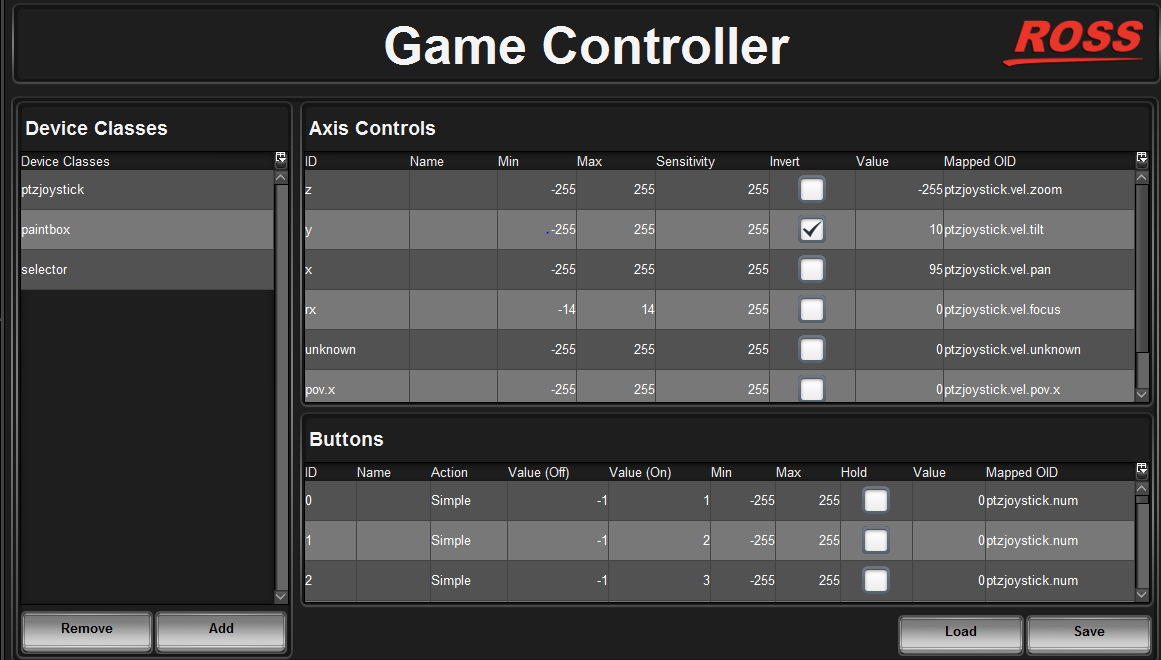
    We have recently bought a Thrustmaster USB Joystick to control the Pivotcam via dashboard. After following the steps mentioned in the readme file inside PIVOTCam With Joystick Control folder to configure the Joystick, we found that there is value when we move the joystick in the attached photo. However, we can't control the pivotcam using joystick. Anyone has any idea about this? Do we still need to do more configuration? Thanks.

    Otto


  • 2.  RE: CANNOT CONTROL PIVOTCAM WITH USB JOYSTICK (DASHBOARD VERSION: DASHBOARD BETA 8.3.0)

    Posted 05-16-2017 12:51
    It would seem that the readme associated with the beta does not have all of the steps required.

    Please follow the steps as outlined in this document and let me know if you are successful:

    https://rossvideoltd.sharepoint.com/sites/proddev/dblcs/_layouts/15/guestaccess.aspx?docid=05dc00e61feb443f280bdb6b3abe7622b&authkey=Af_PDKzeFffZGapxMegrYnw

    Sorry about that!

    James
    #PIVOTCam


  • 3.  RE: CANNOT CONTROL PIVOTCAM WITH USB JOYSTICK (DASHBOARD VERSION: DASHBOARD BETA 8.3.0)

    Posted 11-19-2019 19:20

    Hi that link doesn't seem to work.

    I am also trying to map a USB joystick to dashboard PIVOTCAM control. I can control the Pan/Tilt once I select the camera in dashboard, but I can't seem to map the buttons to select the camera.


    #PIVOTCam