Connectivity

 View Only
  • 1.  Ultrix Router embedded audio breakaway

    Posted 08-23-2021 21:19
    Is there a tutorial on how to configure the router for audio breakaway of SDI Embedded audio?
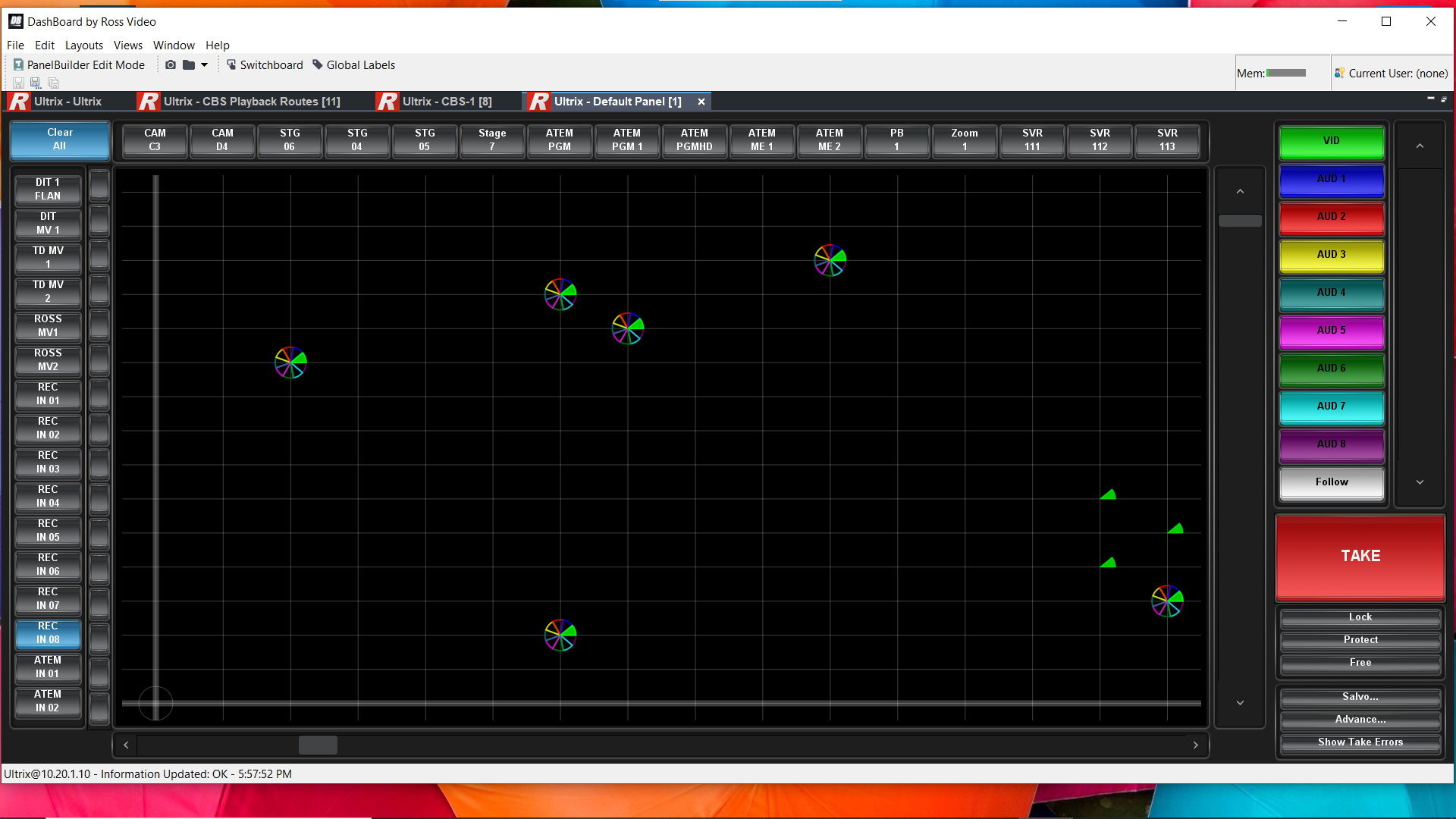
    I am missing something., I have layers configured and named, and see the various colours around the pinwheel on the matrix but they are not filled in with color only an outline.
    I also notice I cannot fill in audio channel sources on the sources page, only pips meters are in the menu pulldown.
    Does the Ultrix need a license for simple audio breakaway?

    ------------------------------
    Conrad Slater
    Slater Sound and Video Engineering
    ------------------------------


  • 2.  RE: Ultrix Router embedded audio breakaway

    Posted 08-31-2021 12:19

    Hi Conrad. 

    Do you have UltriMix turned on for each slot? If not, you will not be able to assign audio channels to sources or destinations and will not be able to do audio breakaway. 


    ------------------------------
    Joe Davenport
    Solutions Architect
    Ross Video
    ------------------------------


  • 3.  RE: Ultrix Router embedded audio breakaway

    Posted 09-07-2021 00:58
    hanks for the prompt Joe
    No the UltriMix was not turned for the slots.
    I have them on now, but still am not seeing audio channel selection in the source or destination audio channel selection tabs, just pip meters and sdi

    ------------------------------
    Conrad Slater
    Slater Sound and Video Engineering
    ------------------------------


  • 4.  RE: Ultrix Router embedded audio breakaway

    Posted 09-07-2021 08:52

    Hi Conrad,

    You will likely need to reboot the router if you have not done so already. You may end up needing to rebuild your database at the end of the day, it will probably be a lot quicker than trying to manually add all those entries in the audio levels. Using the Database Builder tool should be able to knock this out for you in short order. You can copy your old names out of the existing database before hand and put them in an excel sheet to copy and paste back into the new database. 

    Have you reached out to support on this? 


    ------------------------------
    Joe Davenport
    Solutions Architect
    Ross Video
    ------------------------------


  • 5.  RE: Ultrix Router embedded audio breakaway

    Posted 09-07-2021 19:58
    Thanks Joe.
    I tried rebooting but that did not work.
    I have been in contact with tech support and it looks like the best option is to rebuild the database.
    Thanks for the tip on saving the names to an Excel sheet.  I forgot to ask them about that when I spoke with them.

    Cheers

    Conrad B. Slater CAS
    Multi-cam Director/Tech. Director/EIC
    Slater Sound & Video Engineering
    650-346-0602 USA mobile