Totally understand what you are after. To date, I haven't seen a way to return the next row value of the XML stats - I've only ever returned the actual value associated with set row titles.
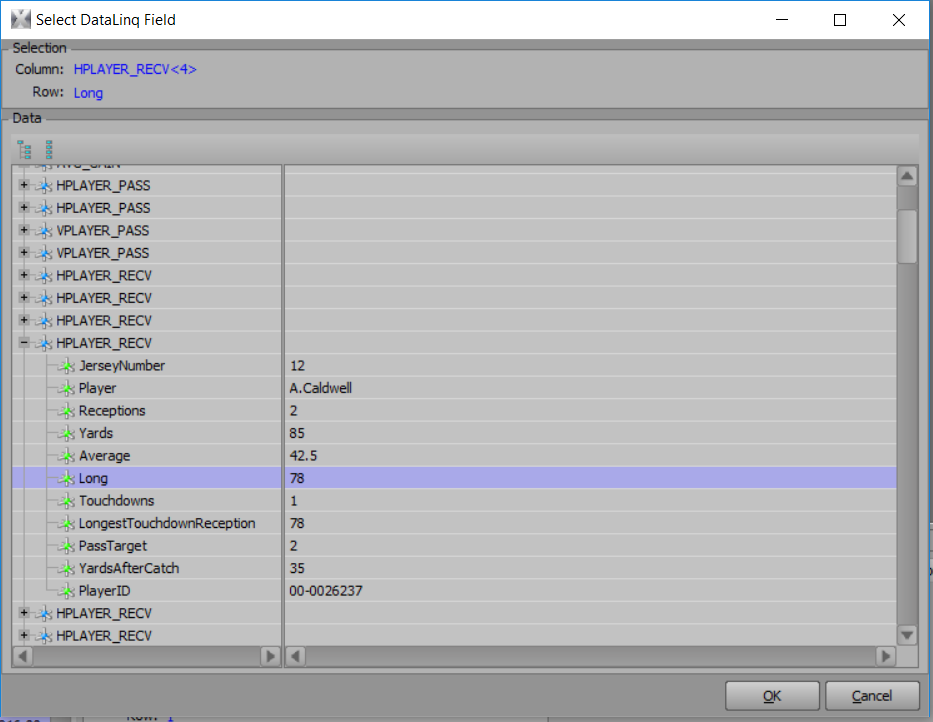
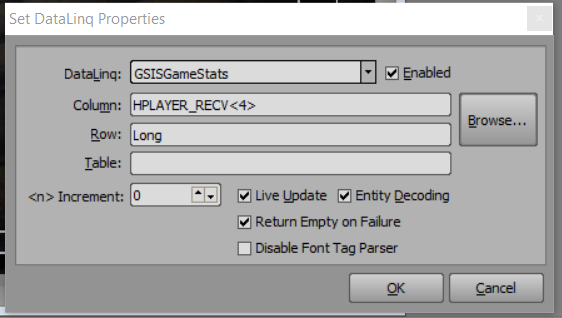
In some XML trees, you can use an INDEX to return the next record, if they are all formatted identically (For Example: if I wanted to return the LONG value for the 4th receiving player in this tree (attached), I would use an index of <4> for the player.) But you still need to know the name of the row you are looking for, and it still returns just the value, not the row header.
So, when the row name can be flexible (i.e. don't know what it will be for sure), I usually I approach it from the other side: I have a Dashboard parameter or a Datalinq Key that is ready to accept user input (for example "long"). Then use that as the "search" term to query the XML data for a match and return the value. But you still need to know what stat you are after, by watching the data feed, external stat display online, etc.
I've seen interfaces where buttons or lists are used to help the XPression user input title/header data quickly into Datalinq Keys so they can populate stats on the fly. I've also seen scenes that link to data that will "potentially" be there (for example, a QB graphic will link up to Completions, Attempts, and Yards, and once the data is populated in the XML after a play, the data will fill in as expected).
#XPression