Graphics

 View Only
  • 1.  change color with visual logic

    Posted 04-08-2017 01:17

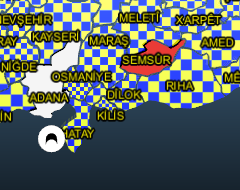
    I created a map for elections.I want cities colorize according result.I want 3 color,
    if no data It will be white
    if A bigger than B it will be yellow otherwise make red.
    But I tried to create materilas,and 3 layer with different in this material.LAYERS :bottom white than yellow and top red.
    this work for one city,but when I tried this visual logics to another city it confused and not working.
    How can I fix this or any easier way to do it?


  • 2.  RE: change color with visual logic

    Posted 04-09-2017 18:40

    Hi, Denis.
    Maybe you will do like this?


    #XPression


  • 3.  RE: change color with visual logic

    Posted 04-09-2017 19:37
    I will try
    Thanks lot.
    #XPression


  • 4.  RE: change color with visual logic

    Posted 04-12-2017 20:25

    Hey,

    This might work for you, if both text boxes are empty it will be white otherwise it will display red or yellow depedning on which number is higher.


    #XPression


  • 5.  RE: change color with visual logic

    Posted 04-13-2017 18:43
    String compare will compare the strings as words and sort them alphabetically.. This will cause it to think that "2"; would be higher than "10".
    You should use the "Greater Than"; block instead of "String Compare".
    #XPression


  • 6.  RE: change color with visual logic

    Posted 04-13-2017 18:58

    After bford's note above, I made a small change, the string compare block is replaced with greater than, I also switched around which item red and yellow are connected too.


    #XPression


  • 7.  RE: change color with visual logic

    Posted 04-13-2017 21:18
    thanks..
    #XPression