Graphics

 View Only
  • 1.  ClockTimerWidget select using text field

    Posted 10-26-2017 16:25
    In the course of a basketball game we use a timer as part of fan experience. These timers range from 24 seconds up to 90. Each is driven by a separate widget. Using scripting is there a way to select the widget name using radio buttons in a hidden text field on the timer scene? Thanks


  • 2.  RE: ClockTimerWidget select using text field

    Posted 10-27-2017 21:03

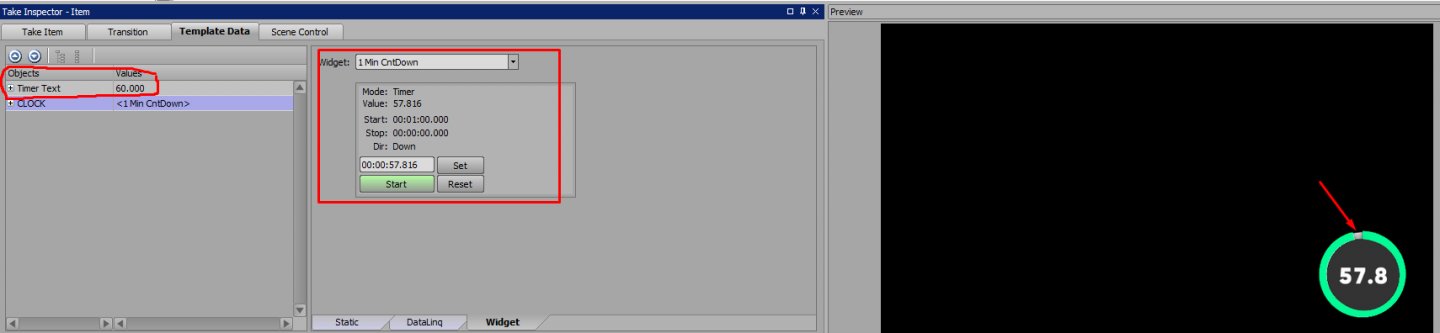
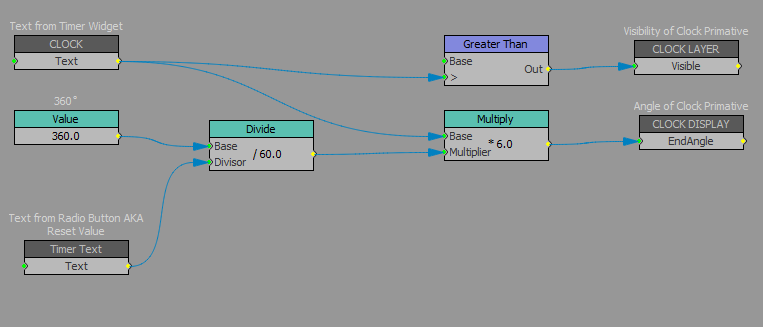
    I'd probably need a little more info about your scene, but the Widgets kind of already work like radio buttons (more accurately a combobox). But what I did was create a combobox for the end angle of my timer cylinder. So that No matter the widget, you can easily change the angle.

    So you just have to match the widget timer length to the timer length of the reset value.

    I don't know if this is exactly what youre looking for, but I'm happy to help.

    #XPression


  • 3.  RE: ClockTimerWidget select using text field

    Posted 10-28-2017 16:57
    Great minds. That's exactly what I did. I just wanted operator to click a single radio button that would take care of everything
    #XPression


  • 4.  RE: ClockTimerWidget select using text field

    Posted 10-30-2017 17:56
    Could you make yourself a hidden text box and use "user input controls" set to "radio buttons" to change the widgets instead?
    #XPression


  • 5.  RE: ClockTimerWidget select using text field

    Posted 11-01-2017 13:26
    @malthepal did you ever solve? I have some free time today and might work on a solve for this.
    #XPression


  • 6.  RE: ClockTimerWidget select using text field

    Posted 11-03-2017 17:02
    Mia, go for it. We have had an extended home stretch and I haven't had a free minute to develop this one. As it is, the operator selects the widget, then uses a radio button to select the duration for the sweep animation.

    #XPression