Graphics

 View Only
  • 1.  Understanding Rendering options

    Posted 01-11-2018 04:18

    Hey guys,

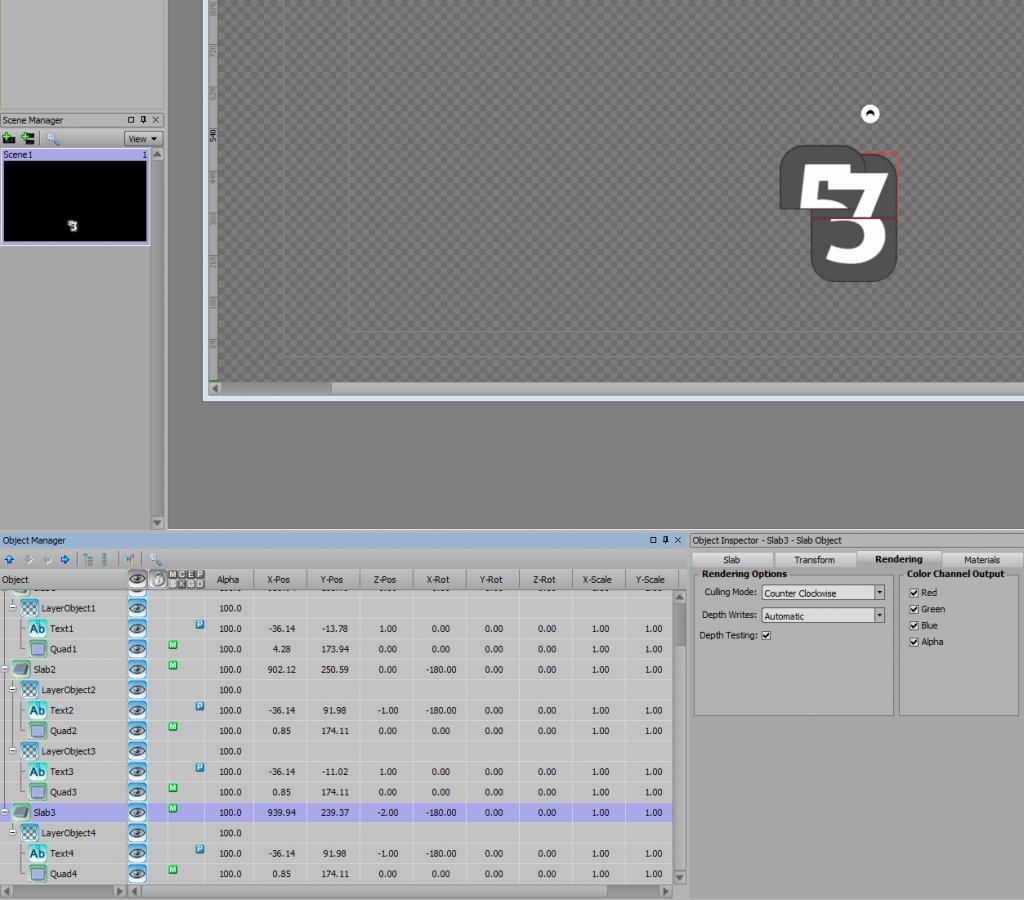
    I'm trying to make a flip clock display style thing, so I've made 3D slabs, attached layer objects with masked 2D text items to them representing the top and bottom portions of clock.
    All is well, until I try to hide a 'flap' behind another one (to be used in the flipping animation).

    While the slabs, which are 3D objects, correctly hide each other, the text (that should be positioned atop their holding slab and behind the new slab), pierces through to be seen always.

    It was pure luck that I figured out how to not make text shine through the back side of the slab, but I can't seem to figure out how to fix interactions between 2 different slabs.

    Any thoughts?


  • 2.  RE: Understanding Rendering options

    Posted 01-20-2018 03:33
    It might be really tedious, but you could generate the halves of your numbers in photoshop, make each of those individual materials and apply them to the front and back faces of your slabs.....then offset the x-rotation of your slabs by setting the y-pivot to -90. As the second slab flips down on top of the first, you might have to push the first back a little on the z-axis...and fade it to zero alpha.
    #XPression


  • 3.  RE: Understanding Rendering options

    Posted 01-20-2018 20:37
    I'm not sure this will solve your problem. By default Text objects Rendering is "Always on Top". In the rendering tab of your text object, try changing it to "Normal". This should hide text when anything is in front of it. Cheers.
    #XPression


  • 4.  RE: Understanding Rendering options

    Posted 01-24-2018 10:43
    As Szizzors says above, "Text on Top" is most likely your issue here.

    It's worth noting that the default can be changed under the first tab of preferences so that all further added text will be "Normal"
    #XPression


  • 5.  RE: Understanding Rendering options

    Posted 02-01-2018 01:11
    With all text changed to normal rendering and not Text on top, the issue still persists!
    #XPression


  • 6.  RE: Understanding Rendering options

    Posted 02-02-2018 18:03

    I see from the screenshots you're using layer objects. When using layer objects the order in which the objects are in the scene tree comes into play as well, top to bottom so anything lower in the tree will appear over things above it. As well as that you also have the layer objects render order controls which changes priorities.


    #XPression