Graphics

 View Only
  • 1.  Layer Render Order

    Posted 02-21-2018 05:28

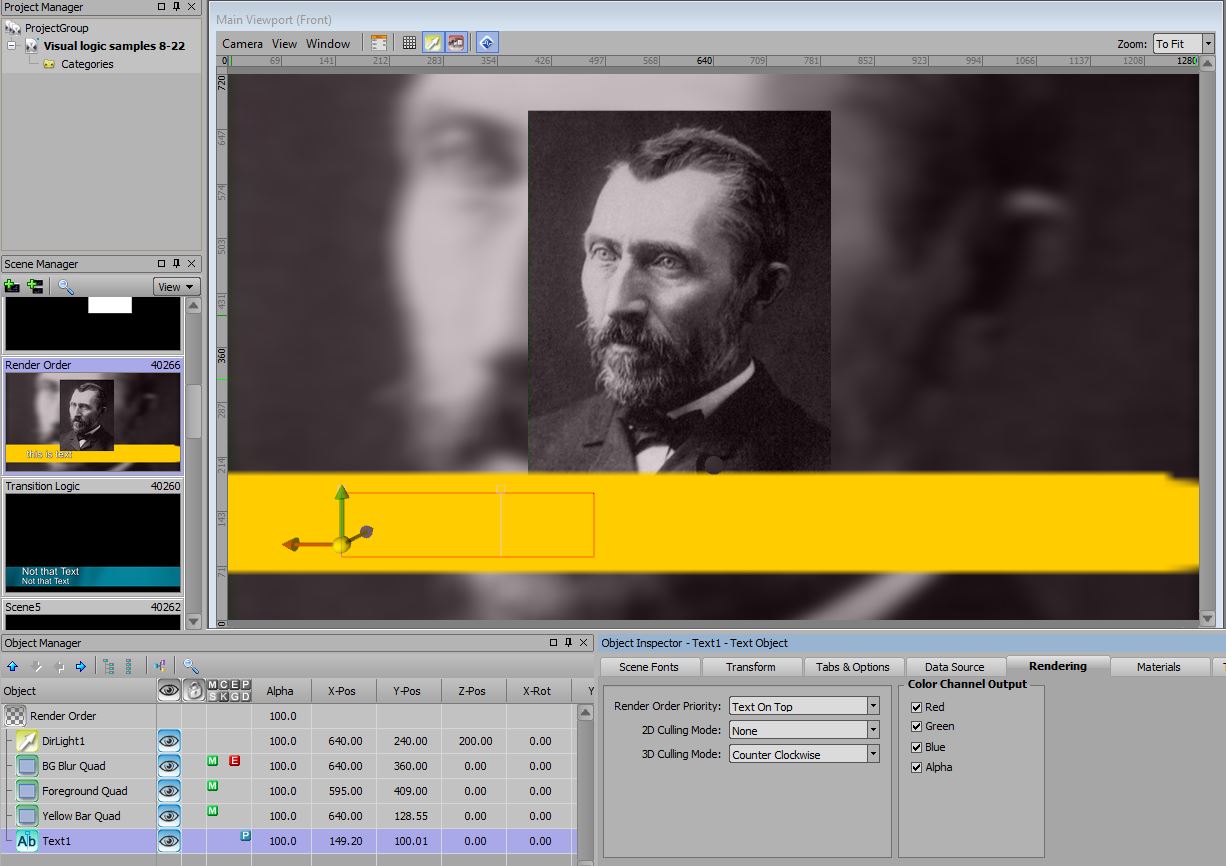
    This seems like something relatively simple to setup, but I'm sure that I'm getting stuck on XPression's layer order/rendering order when trying to set this up:

    3 quad =
    > BG quad with Gaussian Blur Effect applied and photo material applied
    > Foreground quad with photo material applied
    > Quad with yellow bar applied and set up similar to a lower third bar
    > Text object for lower third

    When the Blur Effect is applied to the BG layer, it then takes rendering priority. I was able to adjust the lower third bar quad and the foreground quad to "render on top" from their respective Render tabs, but the text layer's option to render text on top doesn't bring the text to the foreground, in front of the yellow bar layer. I want to be able to preserve the blur applied to the background layer without hiding any of the foreground elements. Any thoughts? 


  • 2.  RE: Layer Render Order

    Posted 02-21-2018 14:18
    You want to use a layer object. Place this in your scene and then make the other quads and text a child of it. From there you can mess with the layer order like normal.
    #XPression


  • 3.  RE: Layer Render Order

    Posted 02-21-2018 16:45
    A footnote: In the object manager click on the main scene (top most object in the list) and then onto the Rendering tab. Then look at Depth Sorting. This will make Xpression behave a little like After Effects but in the reverse order. The objects lower on the list are on top. Hope this helps
    #XPression


  • 4.  RE: Layer Render Order

    Posted 02-22-2018 06:36
    Great responses guys! Thanks again for your help. I knew it was an easy fix - I just needed to be pointed in that direction. Take care - Bill
    #XPression