With Visual Logic , you can bind "animatable" properties to the diffuse color of the light.
For example the position of a hidden object where X,Y,Z are between 0 and 255 and represent R,G,B color :
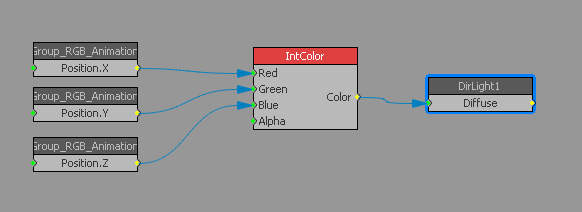
But color blocks only allow RGB values as input and not HSL as you needed. (maybe this could be a new feature to have a additional information in Color blocks to tell what kind of input is used : RGB or HSL )
Since Xpression version 8.0 , light objects are available for scripting : diffuse component of XpDirLightObject object can be changed with SetColorDiffuse(R,G,B) function.
see script for OnRender event :
Dim light as XpDirLightObject

Dim obj as XpBaseObject

Dim m as XpMaterial


if  Self.GetObjectByName("Group_HLS_Animation", obj) and Self.GetObjectByName("DirLight1", light) and Engine.GetMaterialByName("Mat_HLS_Animation",m) then

m.ColorDiffuse.SetHSL(obj.RotX,obj.PosX,obj.posY)

light.SetColorDiffuse(m.ColorDiffuse.RF,m.ColorDiffuse.GF,m.ColorDiffuse.BF)

end if
HLS values are generated from "animatable" properties of a group object named "Group_HLS_Animation" :
RotX from 0 to 360 for Hue
PosX from 0 to 100 for Saturation
PosY from 0 to 100 for Luminance
Conversion from HSL to RGB is be done throught a existing color object of a material named "Mat_HLS_Animation"
see sample project attached : [ATTACH]n16827[/ATTACH]
#XPression