Graphics

 View Only
  • 1.  VL not triggering Scene Director

    Posted 02-25-2019 20:12

    Recently, I had a scene with a clock that when it reached o:oo it needed to dissolve away and dissolve on different text, of which were in two separate groups.

    I made a VL that I thought would do this for me automatically. But for some reason it did not work.

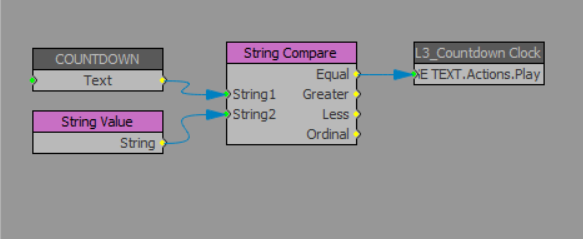
    Basically, I used a String Compare block that when clock is 0:00, compare to String Value (0:00), play CHANGE TEXT Scene Director. When clock reaches 0:00 the String Compare block Equal outputs 1 but the CHANGE TEXT Scene Director does not play. Not sure why? Any thoughts?


  • 2.  RE: VL not triggering Scene Director

    Posted 02-25-2019 20:31
    So I kept working on this, occured to me that String Compare outputs a Boolean as opposed to an Integer. So I routed it to a Input selector and then routed that output to the Scene Director.Play. On the Layout side it works perfectly now. From the Sequencer, when I take to air the text dissolves immediately.
    #XPression


  • 3.  RE: VL not triggering Scene Director

    Posted 02-25-2019 20:37
    I'll look into it and see if I can find the reason.
    #XPression


  • 4.  RE: VL not triggering Scene Director

    Posted 02-25-2019 20:42
    Try this sample, it seems ok for me.. https://transfer.rossvideo.com/f/20cc3a626df99342
    I just made a scene dir that moves the text when it hits 0:00. You can restart the timer widget and next time it hits 0:00 it runs again..
    #XPression


  • 5.  RE: VL not triggering Scene Director

    Posted 02-25-2019 20:47

    Sorry forgot to mention this was on XPression 8.0. Not sure of build. And forgot to attach 2nd photo.


    #XPression


  • 6.  RE: VL not triggering Scene Director

    Posted 02-25-2019 22:56
    Thanks bford. After seeing your example, it occurred to me to resend my scene to the Sequencer. Then it worked exactly as I wanted. Thank you.


    #XPression