Graphics

 View Only
  • 1.  Making a 3-panel L3rd a 2-panel with Visual Logic

    Posted 05-10-2017 01:41

    Ok, so some of the things I have working with this, but this last bit seems illogical (pun intended). Basically, I have a 3-panel Lower 3rd element that I would like to make a 1 or 2 panel depending upon where the operator enters text. I've gotten it to work really well as a 1 or 3 panel, but the 2-panel is not working out. I have attached a snap of the logic setup for that operation: 
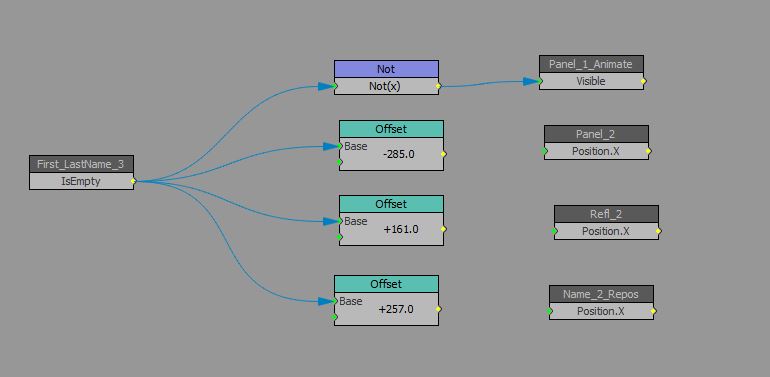


    The 3 nodes currently disconnected are the ones which are not working for me. So Panel 2 and Refl 2 have no keys, but their parent does, and Name_2_Repos is a group object with no keys, but its child (the text 2 - not seen here) does. If I connect all these nodes up straight across from those offset nodes you see there, I DO get the behavior I want when deleting the text out of First_Lastname_3, BUT when I enter text back into that field, the offsets remain... though it seems they shouldn't. Where have I gone wrong?

    Thanks!

    - Willie


  • 2.  RE: Making a 3-panel L3rd a 2-panel with Visual Logic

    Posted 05-10-2017 01:48
    You need to use an input selector on each. The index for the input selector is the First_LastName_3.IsEmpty. The input for 0 should be value 0. The input for 1 is the offset. Then connect the output to an offset node as the second input to that. Do the same for all offsets you want to use.

    This should do what you want.
    #XPression


  • 3.  RE: Making a 3-panel L3rd a 2-panel with Visual Logic

    Posted 05-10-2017 02:11
    Thanks! I will have to try it first thing in the AM, they are shutting me down now. I had some crazy rig with an equal node, value nodes and add nodes, that got me there for one of the 3 elements but not the other 2. I look forward to trying your approach.
    Cheers!
    #XPression


  • 4.  RE: Making a 3-panel L3rd a 2-panel with Visual Logic

    Posted 05-10-2017 17:57
    Ok, so your suggestion worked flawlessly, and I get why it worked... Now, I have one last thing I need to do. When the lower 3rd is in a single panel configuration, I need the text for panel 1 to become L justified instead of Ctr, so that the operator can take advantage of the entire length of the single, long text field.

    Ctr justified in the 2 or 3 panel iterations is necessary to maintain the appearance of the text in those setups. Is there a VL way to change justification on is empty values, or is the approach to have a second text field that is L justified, have the visibility toggle between the 2 when in single panel setup and have it so the operator input for Panel text 1 influences this newly visible L justified version?
    #XPression


  • 5.  RE: Making a 3-panel L3rd a 2-panel with Visual Logic

    Posted 05-10-2017 21:01

    So, I got it sorted and doing everything I need it to. I opted to create new text objects for the 2 and 1 panel options, fed by the original text layer, with visibility toggles and such. For the intrepidly curious among you, here's the logic tree.


    #XPression


  • 6.  RE: Making a 3-panel L3rd a 2-panel with Visual Logic

    Posted 05-11-2017 01:44
    I'm glad it worked. Your solution of using two texts fields fed by another is what I usually do.
    #XPression


  • 7.  RE: Making a 3-panel L3rd a 2-panel with Visual Logic

    Posted 05-11-2017 22:05
    Thanks man... yeah there ended up being a few more things to sort out, but I got it there. It was a bit like a game of whack-a-mole, wherein I would solve one issue, but it would create a new issue. Finally, XPression ran out of moles.
    #XPression