Graphics

 View Only
  • 1.  Visual Logic to set amount of text objects visible

    Posted 06-12-2017 16:39
    Hi,

    I'm working on a full screen graphic that I want to be able to set a certain amount of bullet points to show, depending on a value entered into a non-visible text object. I have 6 possible bullet points, but at times I may want to show just 3 of them by entering the number 3 in my non-visible text object instead of a 6. Any good ideas on how to achieve this with visual logic?

    Thanks


  • 2.  RE: Visual Logic to set amount of text objects visible

    Posted 06-13-2017 00:45

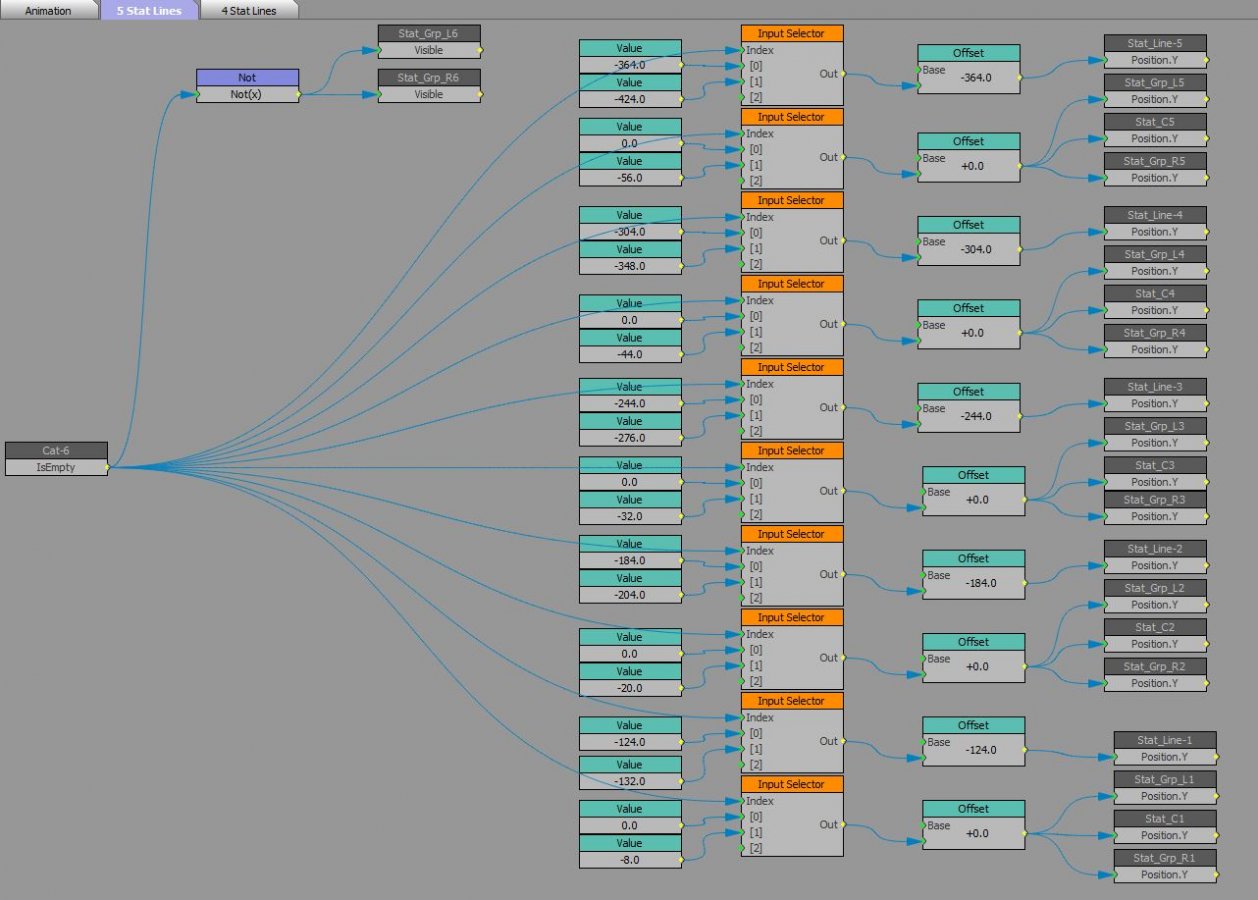
    There may be a more elegant approach, but you could have each line of text for the bullet points as a separate object and then set up VL to turn off the visibility of other elements when a given text object is empty (has no text in it).

    The VL would be, for example Bullet Text 6 [is empty] -> NOT -> Bullet Point 6 [visible] You could further refine this so that when a line of text is empty, the other lines of text you do see move in Y so as to better fill the negative space of the screen. I did that recently with a lower 1/2 graphic for sport stats. Here's a look at the logic tree for that:

    #XPression