wow! i dont know how i missed that. sorry to bother you with a needless question that is clearly covered in the video. thanks.
------------------------------
Roger Heyward
------------------------------
Original Message:
Sent: 07-02-2021 18:47
From: Jeff Mayer
Subject: Transition Logic Scripting
Roger,
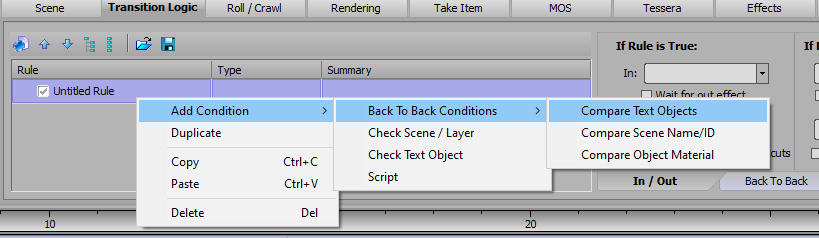
Instead of selecting a "Check Text Object" condition, there should be a Back To Back Conditions submenu that includes "Compare Text Objects." That will let you evaluate if a specific text object is the same or different between the incoming and outgoing scenes.
------------------------------
Jeff Mayer
Ross Video
------------------------------
Original Message:
Sent: 07-01-2021 09:17
From: Roger Heyward
Subject: Transition Logic Scripting
hi brian. i have been going through these Xpression U videos, and I got stuck here, bc i think my version of Xpression (Designer v.6.5) does not have some of the options here. My problem arises at around the 11min mark. The tutorial explains that you can set up rules for a text object to see if it is the same or different than itself(aka, has it changed or not.) In the video there is an option for this, but I don't have that option. My version has options to see if a text object "has data", "is empty", "equals", or "contains" some value. from my coding background i'd think i could just use the equals option and type in some like this $"{Text1.Text}" (see attached image.) I assume there is a way to do this. Let me know. Thanks.
------------------------------
Roger Heyward
Original Message:
Sent: 07-07-2017 01:28
From: Brian Ford
Subject: Transition Logic Scripting
Did you already watch this? https://www.rossvideo.com/graphics-system/xpression/xpression-u/video-tutorial-109/
#XPression