Hi mgoetz,
The easiest solution would be to use scripting for this:
dim obj as xpBaseObject
dim mat as xpMaterial
dim shader as xpBaseShader

dim maxHeight as double = 500
dim maxWidth as double = 500


Self.getObjectByName("Quad1", obj)
obj.getMaterial(0, mat)
mat.getShaderByName("Texture", shader)

dim matHeight as double = shader.Height
dim matWidth as double = shader.Width


Self.getObjectByName("LO_Warning", obj)

if (matheight > maxHeight Or matWidth > maxWidth) then
obj.visible = true
else
obj.visible = false
end if
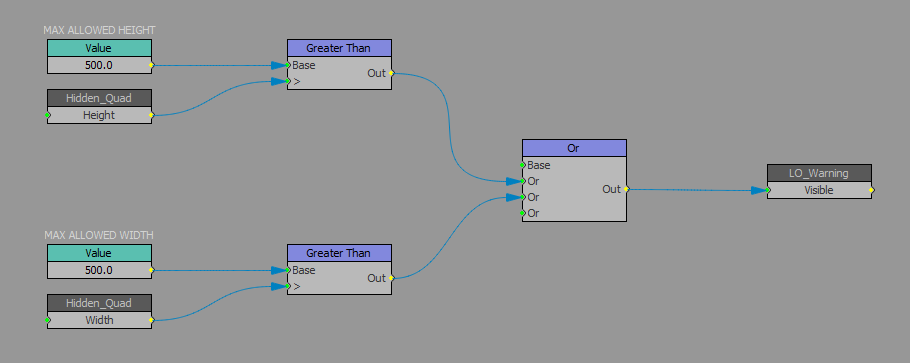
However you could also use VLogic, but theproblem is that we don't have direct access to the dimensions of the material in VLogic. So a possible workaround would be to put a secondary Quad in your scene with the same material applied to it, but you would have to set the Auto-Size property of the quad so that it resizes the Quad every time the Material is resized. i.e. every time the material changes. That secondary quad should be hidden so it's not visible but since it will adjust to the dimensions of the material, you can use the height and width of that quad to determine whether or not it's dimensions are above a specific value.
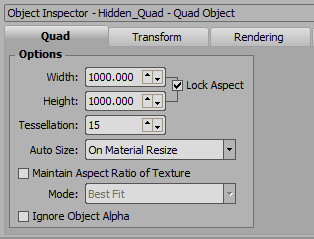
See the VLogic underneath:
Good luck!
#XPression