I understand what you're trying to do. I've also done this myself, but thanks for bringing it up again! Made me realise a few mistakes I had done the first time around.
What you want to do, is take all the three elements, the CITY, DIVIDER and ARENA and put them in a group. This makes the 0-point on the X-axis the center of the graphic.
Now that we have the center point you use the X-position of the CITY, to set the X-position of the DIVIDER. Then you use the X-position of the DIVIDER to set the X-position of the ARENA.
As you might see from the Visual Logic, I take the X-position of the CITY, add the BoundingBox.WidthScaled, and a small value (20) to set the X-position of the DIVIDER. Reason I use the WidthScaled is because if you end up using the Auto-Squeeze on either text, this value will be the correct one, while it might be too long if you squeeze the text.
Now, that you have all texts positioned correctly one after the other, and they are all based on the X-position of CITY. You take the total width of all the elements (dont forget to add the space divider twice), and divide by -2, and you get the negative value on the X-axis to set CITY. Voila... Done!
See picture:
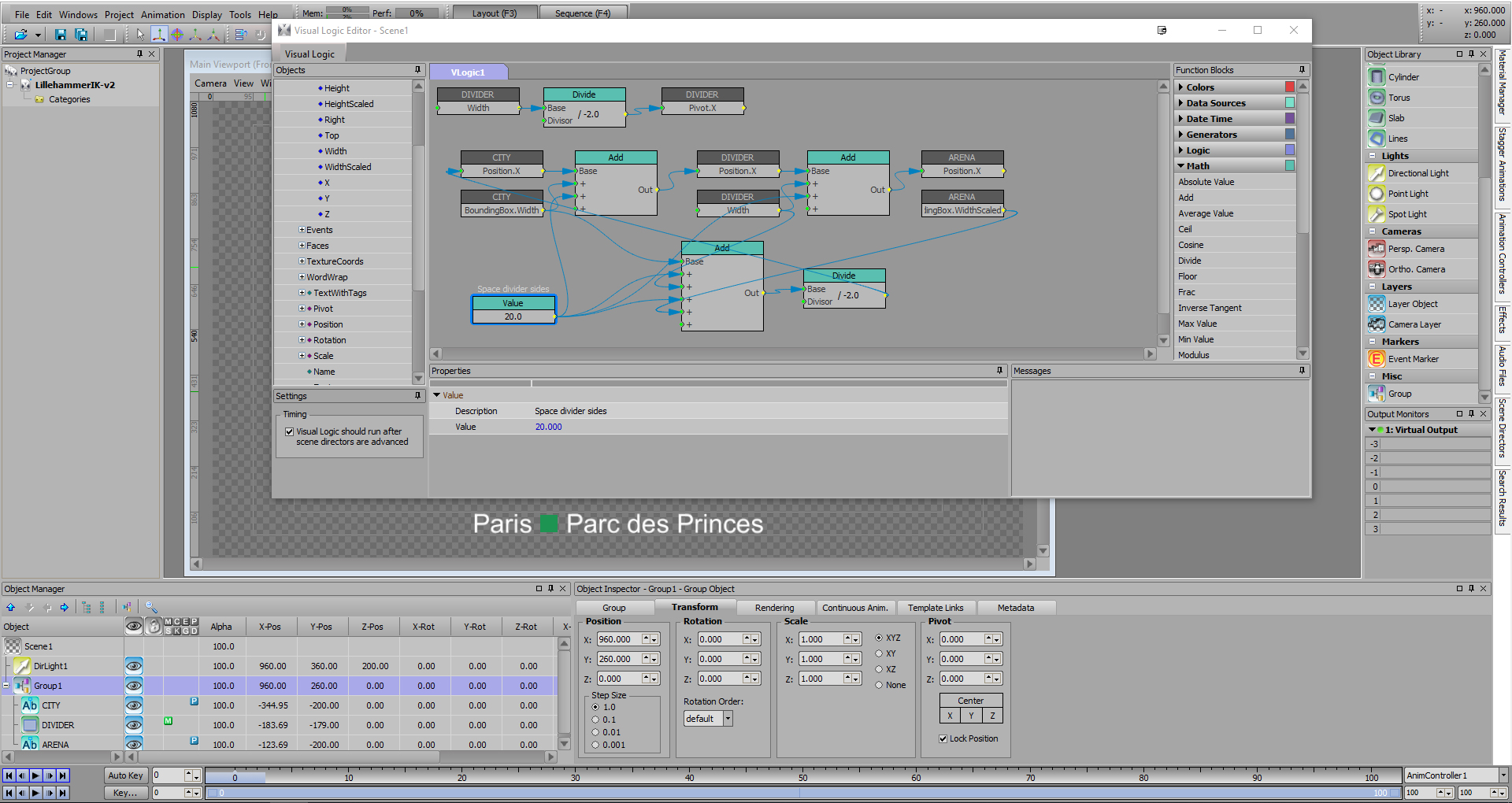
(The three blocks at the top is only there to force the pivot point to be on the left side of the divider graphic, even if you put in a wider graphic there).
#XPression