Hey Mark,
This is something I do all the time. I have included a screen shot of a VL Tree I built yesterday in fact for this very purpose (although this particular template maxes at 4 lines, but the concept is the same regardless).
What I have is a text object which drives the number of lines visible. I have the options for the range of lines published as radio buttons.
The value of this text then determines through 'Equal to' nodes which lines are visible, and through input selectors what the Y position is for the rows of text.
The example I have provided has highlight states too, as well as 3 columns of information, so your setup would be a bit simpler, but the exact same implementation would work.
What I do to set this up is bring in my text object (Rows?) and create my visibility toggles and input selectors with values attached to them, but to do not connect the Y position yet. Then I will go down through the numbers to toggle off rows one at a time, position the first and lat line where I want them on Y, and use the vertical distribution tool to evenly space the rows between, and enter the Y values in the corresponding value nodes connected to the input selectors. Once you have gone through the range, connect that Y position up, and viola!
Hope this helps,
- Willie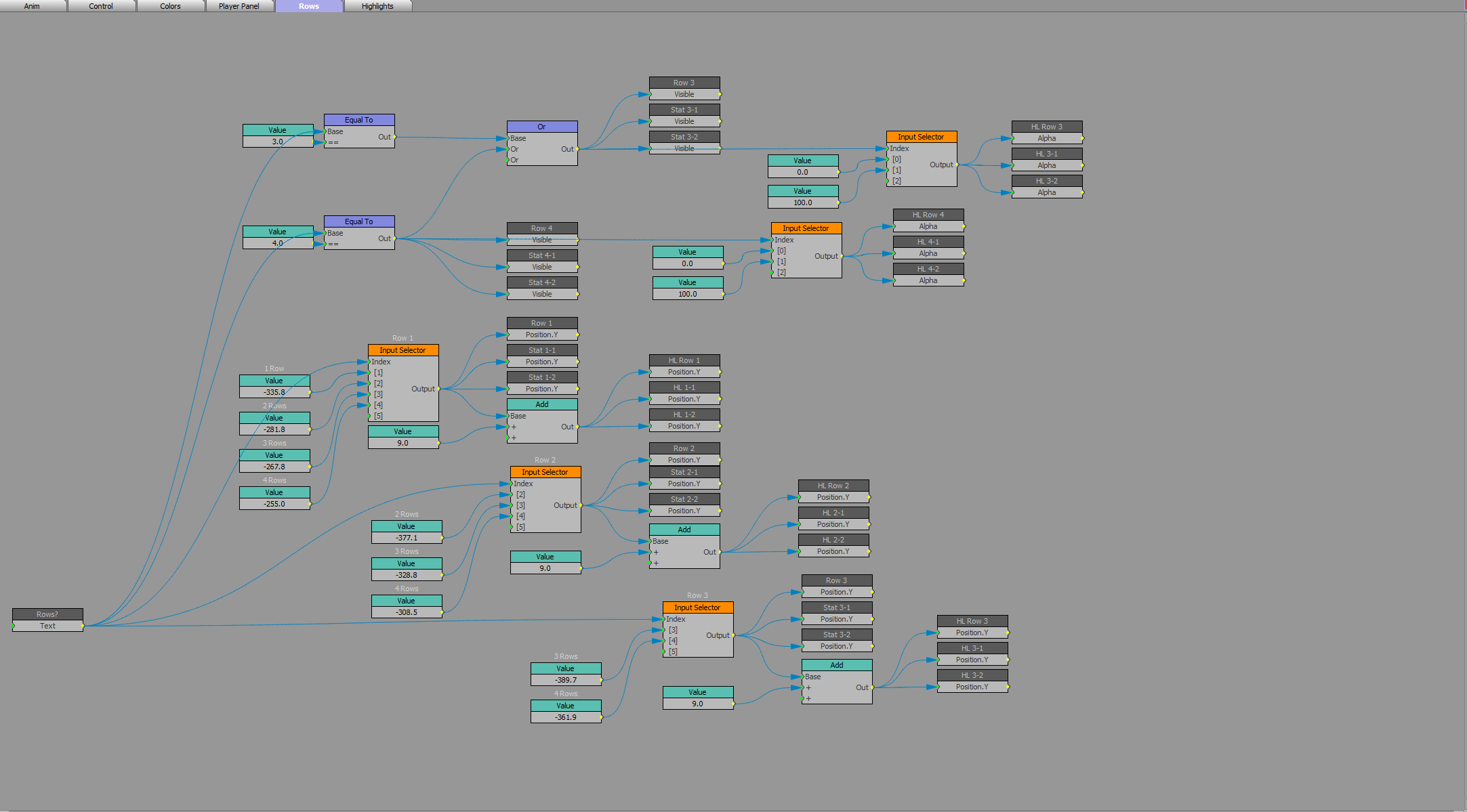
#XPression