Graphics

 View Only
  • 1.  Changing Word Wrap value based on string length using script

    Posted 05-14-2020 22:39

    Imagine you have a text box with a bg tied to it. As the text box grows by lines, the BG auto sizes. BUT, if the input text string is too long eventually the box and text will grow beyond the bottom of the screen because word wrap is on and set to an absolute value. I have been playing with WordWrapWidth in scripting but I can't get it. Basically I want to count characters and if that number is above a certain value (let's say 60 characters) a script will change the word wrap value of that text field so that it is wider.

    Thanks as always. Now go wash your hands


  • 2.  RE: Changing Word Wrap value based on string length using script

    Posted 05-15-2020 12:20

    I'm sure it can be done in scripting somehow, but I know it can certainly be done in visual logic. You can use the Length property node fed into a greater/less than node and run that into an input selector. Then you can just use your two different word wrap settings as needed. If you are in version 9, I would utilize the hard cap on character count within the text object inspector.

    That said though, I've found using length can be tricky sometimes based on the font you are using. Character width can vary between letters as well as tracking, kerning, and even leading settings. So to that end, instead of using the length property we use the bounding box of the text object instead to make that determination.


    #XPression


  • 3.  RE: Changing Word Wrap value based on string length using script

    Posted 05-19-2020 15:29

    I agree Martin. Using bounding box is probably the better way. However, if you change the word wrap value does it affect the bounding box? That would throw it into a loop that continuously changes the dimensions. 


    #XPression


  • 4.  RE: Changing Word Wrap value based on string length using script

    Posted 05-26-2020 01:26

    Malcolm,

    This sounds similar to something I worked on recently. I have a statement graphic consisting of a paragraph and a signature. I wanted producers to be able to change the size of the font easily from within our newsroom production software. I used a global list of the font IDs to create font tags, but then hit the wordwrap problem---in the larger font styles, text extended out of frame to the right.

    I also wanted producers to have the option of adding a headshot to the statement, further complicating the issue.

    I decided to use the x-position and an imagined right margin of 1190.
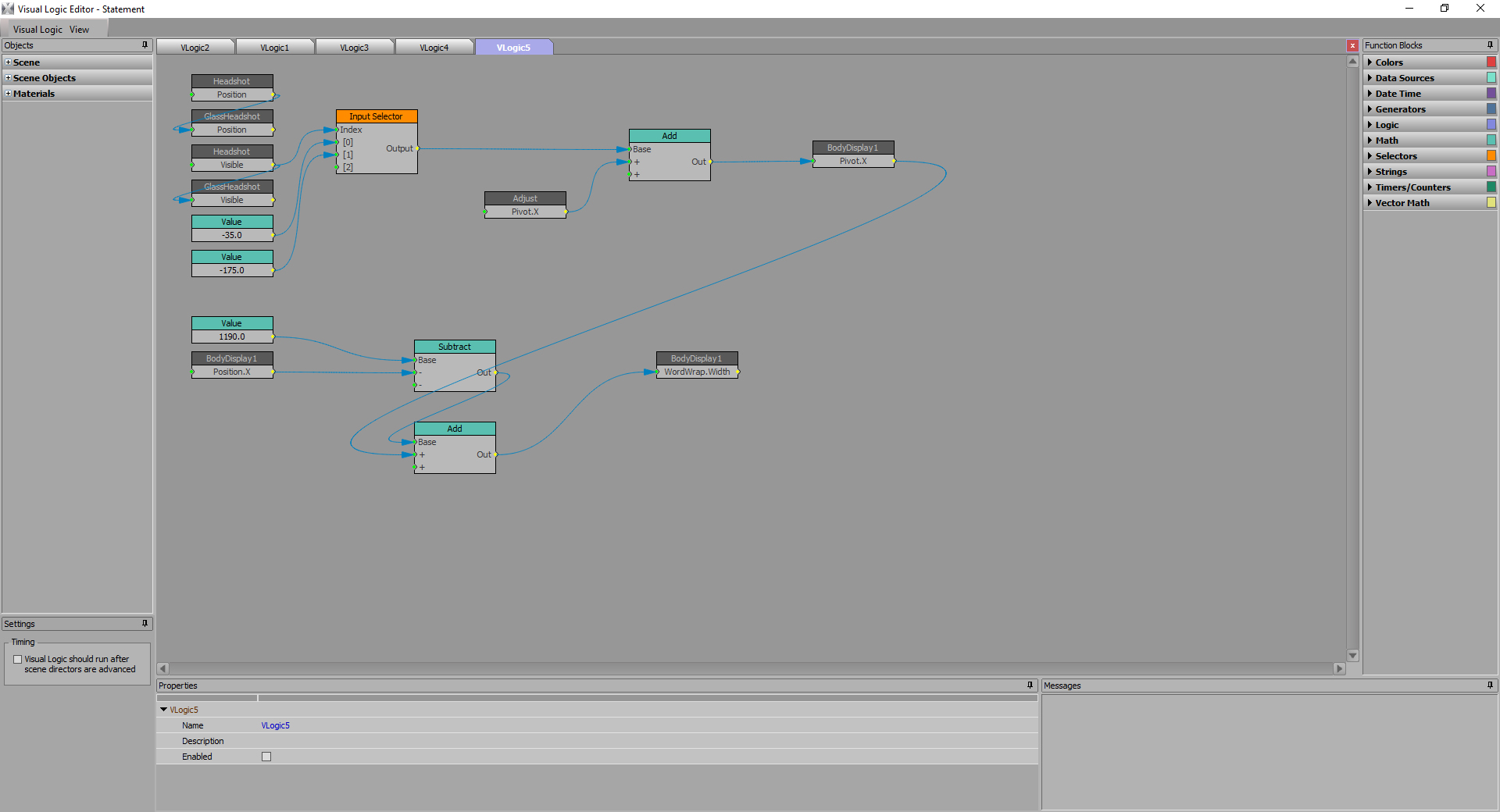
    At the very largest font size, it got a little less reliable, but a statement in a 102 line font isn't more than a word or two...Nun-uh...Uh-hunh.

    James.


    #XPression


  • 5.  RE: Changing Word Wrap value based on string length using script

    Posted 05-26-2020 13:18

    If you try to use the bounding box to control the word wrap you definitely end up in a loop. 

    Not the prettiest idea but you could have a hidden text box that's published that would grow indefinitely and have that linked to a visible text box that you control the word-wrap sizes on and that way avoid the loop. 

    Only publish the hidden one and the operator won't know any different. 


    #XPression