Hi Mark,
As Gabriel said, it's important to know if the tweet and the banner are two different scenes or if they are in the same scene.
From what you are saying I'm thinking that they are two different scenes and that the Transition Logic has not been set up correctly.
But if the tweet and the banner are in the same scene:
All the animations in regards to the banner should happen inside of the BANNER GROUP and all the animations in regards to the tweet should happen inside of the TWEET GROUP. And when a Tweet is shown, the BANNER GROUP needs to animate to the different Y-Position.
So all of your VL or animations regarding the banner will use the reference of the Banner group and will not be affected by any changes in the Y-Position of the Banner group itself or the Tweetgroup.
I made a quick sample, just to show you the principle. You should use an architecture similar to the example below.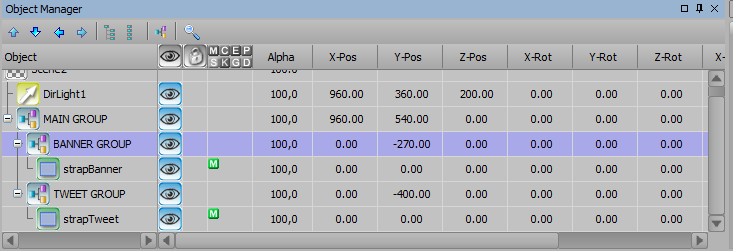
However if you are using two separate scenes, than you will need to use Transition Logic.
On the Banner Scene you will need to create additional Scene Directors to accomodate for the different cases.
• you would have a Scene Director IN & OUT for the Banner without the tweet.
• you would have a Scene Director IN & OUT for the Banner with the tweet.
• you would have a Scene Director with the animation for when the tweet comes in
• you would have a Scene Director with the animation for when the tweet goes out
• you would also have to create a dummy Scene Director with nothing in it to set as the default Scene Director.
In the Transition Logic for the Banner, you would need to check if the tweet scene is online to know which Scene Director you need to play
I hope it helps.
Best regards,
Kenneth
#XPression