Graphics

 View Only
Expand all | Collapse all

Splitting and setting text in Event Script.

  • 1.  Splitting and setting text in Event Script.

    Posted 11-10-2019 19:24

    Hi, I am attempting to set the location of two objects (one quad and one text) based on a pair of values in a spreadsheet using datalinq. I have two text objects that are linked to this value. Values are given as x,y pairs so for example: 1600,950.

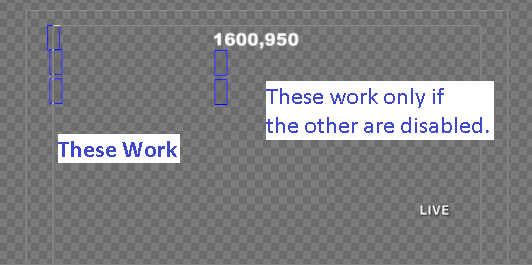
    Everything worked perfectly until I tried to duplicate the code to position the text object as well. When I disable everything related to moving the quad it works. Otherwise, it doesn't even manage to set the the text boxes to the split values. I've spent over 4 hours trying to debug this, so hopefully someone can tell me what I'm doing wrong. Please let me know if I can do anything more to clarify.

    I've attached my code and a screen shot that might help.

    Dim logoXY as xpTextObject
    Self.GetObjectByName ("logoXY", logoXY)
    Dim logoX as xpTextObject
    Self.GetObjectByName ("logoX", logoX)
    Dim logoY as xpTextObject
    Self.GetObjectByName ("logoY", logoY)
    Dim coords as array
    coords = split(logoXY.Text,",")
    Dim LOGO as xpQuadObject
    Self.GetObjectByName ("LOGO", LOGO)

    Dim dateXY as xpTextObject
    Self.GetObjectByName ("dateXY", dateXY)
    Dim dateX as xpTextObject
    Self.GetObjectByName ("dateX", dateX)
    Dim dateY as xpTextObject
    Self.GetObjectByName ("dateY", dateY)
    Dim coords2 as array
    coords2 = split(dateXY.Text,",")
    Dim dateline as xpTextObject
    Self.GetObjectByName ("dateline", dateline)

    logoX.Text = coords(0)
    logoY.Text = coords(1)
    LOGO.PosX = coords(0)
    LOGO.PosY = coords(1)

    dateX.Text = coords2(0)
    dateY.Text = coords2(1)
    dateline.PosX = coords2(0)
    dateline.PosY = coords2(1)


  • 2.  RE: Splitting and setting text in Event Script.

    Posted 11-11-2019 02:19

    You script worked fine for me..  I used it in OnOnline.

    My best guess is that one of you objects is not named exactly as your script is trying to get it by.

    If you can upload your entire scene to dropbox or google drive and post a link we could take a look and help further.


    #XPression


  • 3.  RE: Splitting and setting text in Event Script.

    Posted 11-11-2019 13:58

    I took a look at it again, but it's still not working on my end.

    Let me know if this doesn't work, or if you need anything else. Thanks again for all of the help!

    https://drive.google.com/file/d/10s5rkMSfFOaVSBNyhs-zR1pZ982JpQbZ/view?usp=sharing


    #XPression


  • 4.  RE: Splitting and setting text in Event Script.

    Posted 11-11-2019 19:40

    I have this script in OnOnline and OnPreviewRender, and I have spent another few hours troubleshooting it. I haven't made any progress. Then I noticed this:


    #XPression


  • 5.  RE: Splitting and setting text in Event Script.

    Posted 11-11-2019 19:52

    I downloaded your project, and made two changes..  I removed datalinq because I don't have your datalinq configs.

    I also unpublished the logoX, logoY, dateX, and dateY fields from the sequencer.  Since you are setting those through script there didn't seem to be any reason why they are published.

    Can you try this?  https://transfer.rossvideo.com/f/0407275aa4a2d147


    #XPression


  • 6.  RE: Splitting and setting text in Event Script.

    Posted 11-11-2019 19:57

    Well, the issue seems to be with the datalinq. Your post gave me an idea. I did a quick test of just typing a number into the dateXY object and it worked just fine.

    I need this to populate from the datalinq though. Any thoughts?

    Edit: I am downloading your project now.

    Edit2: Confirmed that both versions, yours and mine function if the value is just typed in and not coming from a datalinq.


    #XPression


  • 7.  RE: Splitting and setting text in Event Script.

    Posted 11-11-2019 20:01

    Hi Nathan,

    I just tried it with a simple text datalinq and also still works fine for me.  

    You'll need to send your datalinq configs, and sources over for me to test further.


    #XPression


  • 8.  RE: Splitting and setting text in Event Script.

    Posted 11-11-2019 20:16

    Here you go.

    .xlsx - https://drive.google.com/open?id=1EmyHsDKLpwYdXTKGCEXkPEHck_QbZkE1

    Config:

    Provider=Microsoft.ACE.OLEDB.12.0;
    Data Source=D:\help.xlsx;
    Extended Properties="Excel 12.0;HDR=Yes;IMEX=1";


    #XPression


  • 9.  RE: Splitting and setting text in Event Script.

    Posted 11-12-2019 01:16

    The link didn't give me permission to download that file.


    #XPression


  • 10.  RE: Splitting and setting text in Event Script.

    Posted 11-12-2019 14:08

    Sorry about that. Try this: https://drive.google.com/file/d/1EmyHsDKLpwYdXTKGCEXkPEHck_QbZkE1/view?usp=sharing


    In case that doesn't work, here's an approximation of what's in there now:

    1 LIVE D:\Xpression\Master\Video\BUG-Call-In_2015.avi 1585,182 BUG Toll Free Generic
    2 LIVE 1600,950 Top Right Date
    3 LIVE 100,100 D:\Xpression\Master\Video\BUG-Call-In_2015.avi 100,100 LOGO and Date Test


    #XPression


  • 11.  RE: Splitting and setting text in Event Script.

    Posted 11-12-2019 14:18

    That explains it, the second row of your data source does not have any value at all for the logo pos, which means the array down not have an idnex of (1), so the script fails and exits as soon as you try to access element (1) of the coords array.

    You need to check the bounds before trying to access it.  

    If you change your script to this it should work.


    Dim logoXY as xpTextObject
    Self.GetObjectByName ("logoXY", logoXY)
    Dim logoX as xpTextObject
    Self.GetObjectByName ("logoX", logoX)
    Dim logoY as xpTextObject
    Self.GetObjectByName ("logoY", logoY)
    Dim coords as array
    coords = split(logoXY.Text,",")
    Dim LOGO as xpQuadObject
    Self.GetObjectByName ("LOGO", LOGO)

    Dim dateXY as xpTextObject
    Self.GetObjectByName ("dateXY", dateXY)
    Dim dateX as xpTextObject
    Self.GetObjectByName ("dateX", dateX)
    Dim dateY as xpTextObject
    Self.GetObjectByName ("dateY", dateY)
    Dim coords2 as array
    coords2 = split(dateXY.Text,",")
    Dim dateline as xpTextObject
    Self.GetObjectByName ("dateline", dateline)

    if UBound(coords) >= 1 then
    logoX.Text = coords(0)
    logoY.Text = coords(1)
    LOGO.PosX = coords(0)
    LOGO.PosY = coords(1)
    end if


    if UBound(coords2) >= 1 then
    dateX.Text = coords2(0)
    dateY.Text = coords2(1)
    dateline.PosX = coords2(0)
    dateline.PosY = coords2(1)
    end if

    #XPression


  • 12.  RE: Splitting and setting text in Event Script.

    Posted 11-12-2019 14:54

    That makes sense. I knew I was missing something! Just tested it quick, and I think this works perfectly. Thanks so much!


    #XPression