Graphics

 View Only
  • 1.  Pause \ Play clips from Clip Store using Visual Logic

    Posted 06-11-2019 19:17

    Can you control the playout of clips dropped into a scene from Clip Store through Visual Logic?  We’re working on a scene that will allow producers to add font to a pre-rendered background animation.  The animations will need to be loaded into Clip Store in order to prevent adding new materials to the project each time, as well as to help manage these clips among our station group.  Animations are dropped into a background element in the scene.  I’m trying to use Visual Logic to pause & play the face material in background based on the keyframe position on a scene director.  See attached image. 
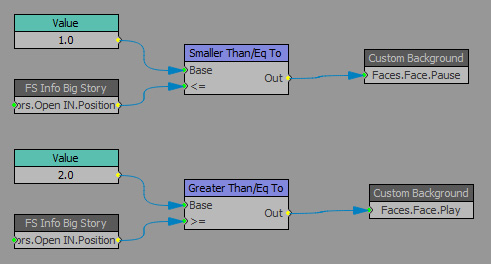
    If the material is built into the project, this works.  Currently clips loaded from the clip store automatically play.  I’ve tried using scripts in the scene director as well, but it does not pause the clip store clips.  Is it even possible to do this?  Thank you.


  • 2.  RE: Pause \ Play clips from Clip Store using Visual Logic

    Posted 06-11-2019 19:36

    Can you not just publish the material that is the video file?  As long as it has the same properties.  Then in sequence side just navigate to the video file and attach it to that quad/slab.  Because then it is just one material of video, and then you are just reattaching files to that material.  Then if it is just a background that loops, just make sure the material is set to loop.


    #XPression


  • 3.  RE: Pause \ Play clips from Clip Store using Visual Logic

    Posted 06-12-2019 13:06

    This particular scene is used for "big story" topics, and is part of a larger project that contains scenes (banners, full screen, monitors, etc) used for daily news production.  So the idea of using Clip Store came about so that we would not have to constantly update the main project each time a topical animation is ordered.  Our artists could drop the animation into an Incoder watch folder that would send it to a clip project.  From there the producer could drop it into this particular scene.  Our stations work in an automated news environment, so there are no operators accessing Sequencer.  Only Directors recalling scenes through Remote Sequencer via automation.  I've tried copying the face material to another quad that had its material on a scene director with a pause at frame 1, but the clip still ignored the pause.  Is there a way to set a material of one quad based on the face of another? 


    #XPression