Thanks. I have it working now.... although, it isn't quite working correctly. I have my hidden Datalinq Key visible and I can see that it does change when I change the parameter in Dashboard.... however, the name that I have linked to the Datalinq Key seems to only update every other time.
So if I change the parameter in Dashboard and take the scene, it is still the old name (though I can see the parameter number has changed). If I take it offline and then on again, only then will the name have updated too.
If I try to change it live, I can see that the hidden Datalinq Key number changes as I change it in Dashboard, but the name only changes every second time... and to the previous name that it didn't load when the change was made.
------------------------------
Jake Lew
Access Communications Co-Operative Limited
------------------------------
Original Message:
Sent: 08-16-2022 15:40
From: Simon Redmile
Subject: Datalinq Key Value driven by a text object
Right-click in the field and choose a text object.
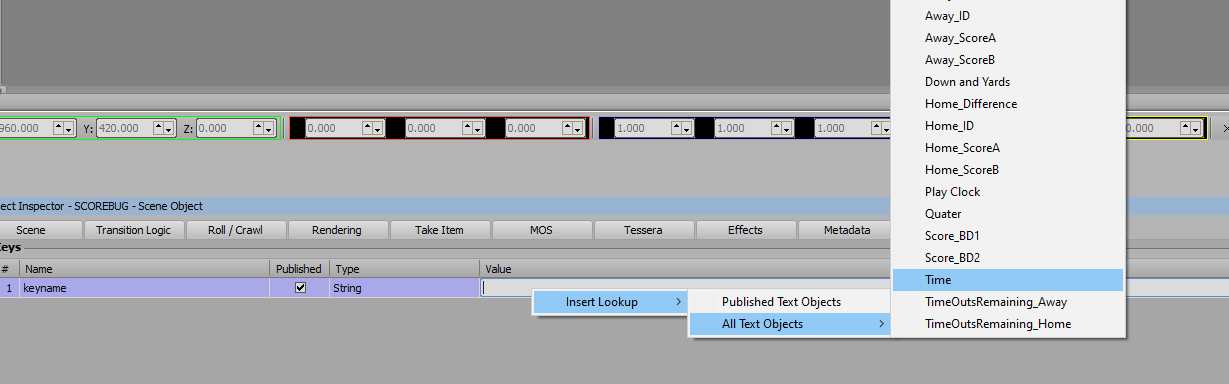
Or you can just write @textobjectname@
Just put the text object name between "@"
------------------------------
Simon Redmile
Senior Graphic Programmer & Designer
Ross Video
Bristol United Kingdom
------------------------------
Original Message:
Sent: 08-16-2022 15:37
From: Jake Lew
Subject: Datalinq Key Value driven by a text object
Hi,
To bump this.... I've got Xpression 10, I don't see this feature. Nor can I seem to figure out how to do it with scripting, which I am hoping to avoid anyways if this feature was actually added. Where can it be found?
------------------------------
Jake Lew
Access Communications Co-Operative Limited
Original Message:
Sent: 01-11-2019 22:32
From: Garner Millward
Subject: Datalinq Key Value driven by a text object
The next next release of XPression, probably version 9, and probably sometime between April-August, will allow this to be done without scripting.
#XPression