Hi Bryan,
It is certainly possible to read a textfile through scripting inside a scene, but my major concern here would be if this would not cause too much stress on XPression during rendering. For a simple textfile it's not an issue, but for a textfile with a 1000 lines, I'm not too sure if it's something I would advise.
I don't know how you were thinking of doing this inside your scene. I could only come up with two things, either creating a textfield for every name, or append the text to a single textfield with some spacing or some delimiter in between?
I have never tried it but I'm not sure how XPression is going to react having 1000 textobjects in a single scene. Not to mention the work you will have to space those out in the scene. So I'm going to say this option is not possible.
A single textfield which is very long might work, but you will have to be careful about some things.
First of all, you can't loop a single TakeItem in a group. Because XPression can't reuse the same TakeItem if it's still online. If you try it, you will see the first TakeItem will crawl off the screen but them will "Jump" back into the image. So you would need at least two TakeItems in your group. But they can be duplicates, so that's no problem.
Next there is the issue of trying to update the content when the SceneGroup or SequencerGroup is on air.
Since you don't have Datalinq, we can only use scripting. The problem there is that all scripts are executed only once. Before it goes on air or when it's being prepared. Now when a scene is inside a Sequencer Group which has been set as a Crawl, you will notice the scene never goes on air. Actually the SceneGroup performs the script just once when the group goes on air, but when it loops, it never fires the script again. Meaning you cannot update the content in between a loop.
The same applies when you are using a SceneGroup.
There is only one exception to this and that is to put the Script in the OnRender-tab of the scene. But that means that the script will be triggered every frame. So trying to read 1000 lines and placing them in a textobject is DEFINITELY going to have an impact on the performance.
Luckily, in the very beginning they included something in XPression which can solve this issue for us; the EventMarker.
Now I haven't used this in over 10 years but finally I found a use for it again ;-)
So I'm not sure how familiar you are with Event Markers but it's basically a trigger which can be animated and it becomes active as soon as it becomes visible. Allowing you to animate with it.
An Event Marker was used to pause a crawl on a copyright for example. But you can also assign scripts to it.
So add an Event Marker to your scene and in the properties of the Event Marker click on "Edit Event Scripts".
A new window will open and there you can add the script below to the OnShow-tab:
dim selectedFile As String = "C:\Test\FileName.txt"
dim txtObj as xpTextObject
dim content as string

content = ""

If System.IO.File.Exists(selectedFile) = True Then
dim lines = System.IO.File.ReadAllLines(selectedFile)

For Each line As String In lines

content = content & " • " & line.Trim()

Next

Scene.GetObjectByName("Text1", txtObj)
txtObj.Text = content
End If
So you will need to change the path of the textfile and also the name of the TextObject you want to use.
In this example I have used a "•" with spaces left and right to space the different lines of the textfile. Feel free to change this any way you like. You can also use FontTags too if you need to.
Don't forget to compile the script and you're done.
Add the scene to a Sequencer Group and set it up for a crawl.
Just notice that I have put some space in between the Event Marker and the start of the textobject.
I did this because I'm assuming that the script might take a bit to complete and I *think* that by placing the eventmarker 500 pixels in front of the textfield, it has enough time to complete the script. But I'm not sure at all, so you might need to play around with this.
Oh and just to you know, I assumed there will be one name per line in the textfile. If it would be a csv with some delimiter the script would be slightly different.
Good luck and let us know if it worked.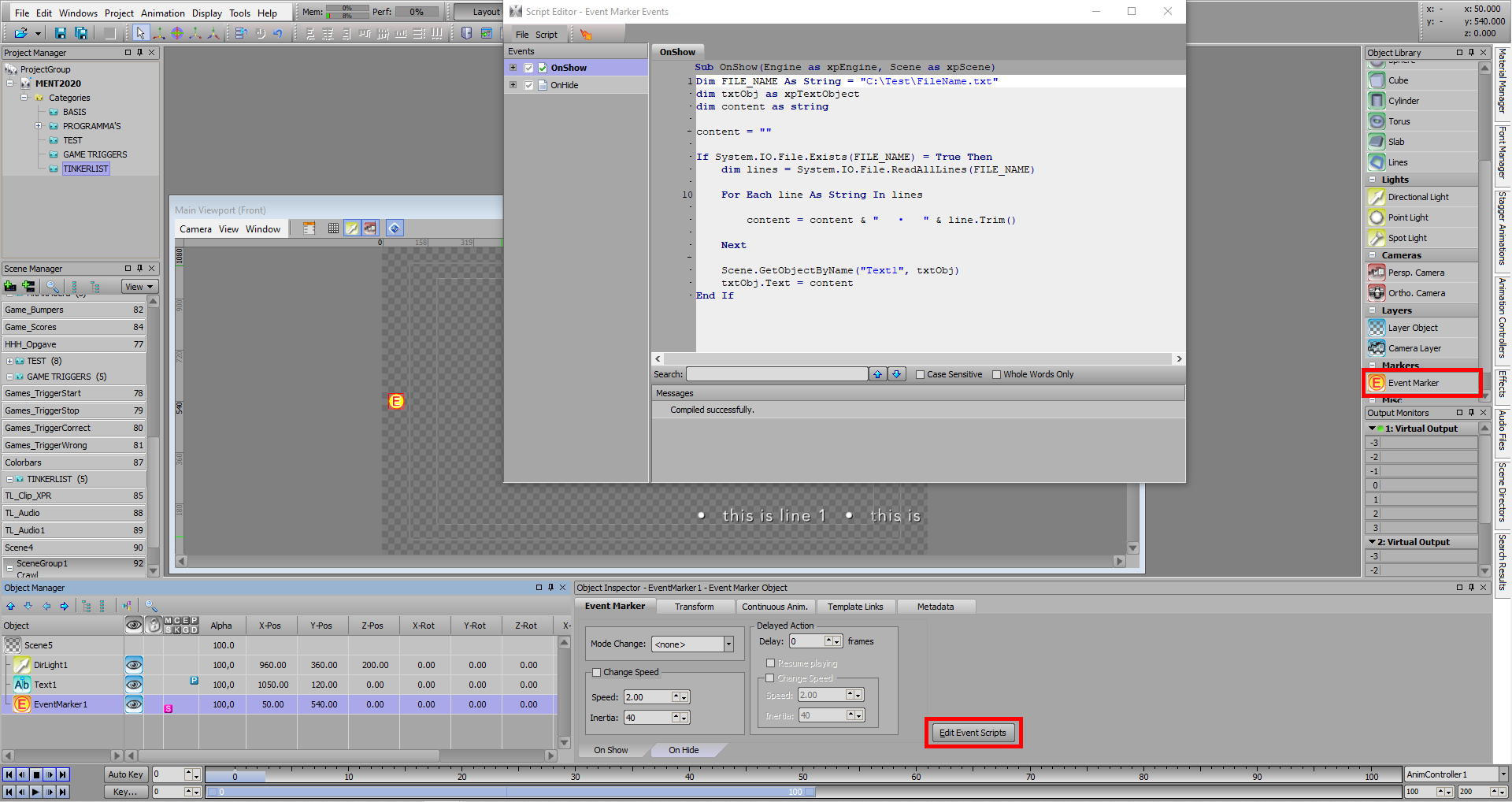
#XPression