Graphics

 View Only
  • 1.  Setting Datalinq key via script doesn't work (v9)

    Posted 01-16-2020 21:01

    Hi, I am having a problem setting a scene Datalinq key from a text object in OnSetText. I have looked at many other posts with people trying to do the same, some say this works, some say it doesn't. I believe I am scripting it correctly, and inside the script, the key does appear to be set. However, when the text field changes again, the key reverts to its original value (in my case blank),

    Here's my setup:

    1. I have a simple scene with a single DataLinq key named SportCode. It is not published, but I've tried that and it makes no difference.

    2. I have a text field with a combo box list of sports leagues (NFL, NBA, MLB, NHL).

    3. In OnSetText of that field, I have the following script:

    dim keys as xpDatalinqKeys
    dim key as xpDatalinqKey

    if (Scene.GetDatalinqKeys(keys)) then
    if (keys.GetKeyByName("SportCode", key)) then
    Engine.DebugMessage("(Before) sport code is " + key.AsString, 0)

    Engine.DebugMessage("Attempting to set to " + text + "..." , 0)

    key.AsString = text

    Scene.RefreshDatalinqs

    Engine.DebugMessage("(After) sport code is " + key.asString, 0)
    end if
    end if

    Here is the output in the console when I change the value of the combo box (ie. select a new league):

    16-01-2020 12:44:39 Notify: (Before) sport code is
    16-01-2020 12:44:39 Notify: Attempting to set to NHL...
    16-01-2020 12:44:39 Notify: (After) sport code is NHL
    16-01-2020 12:44:46 Notify: (Before) sport code is
    16-01-2020 12:44:46 Notify: Attempting to set to MLB...
    16-01-2020 12:44:46 Notify: (After) sport code is MLB
    16-01-2020 12:44:48 Notify: (Before) sport code is
    16-01-2020 12:44:48 Notify: Attempting to set to NBA...
    16-01-2020 12:44:48 Notify: (After) sport code is NBA
    16-01-2020 12:44:48 Notify: (Before) sport code is
    16-01-2020 12:44:48 Notify: Attempting to set to NFL...
    16-01-2020 12:44:48 Notify: (After) sport code is NFL

    So as you can see, the key is found in the scene's Datalinq keys, the key is valid, and the key appears to be getting set properly inside the script. But the next time the script runs, it's back to being blank (or whatever the key was manually initialized with). It's not sticking, therefore I can't use the key elsewhere.

    I've tried Scene.RefreshDatalinqs() as a method call, with and without the parentheses (people on this forum have reported it doesn't work using the parentheses), but it doesn't matter.

    I've also tried doing the same thing in OnPrepare and OnPreviewRender, with the same (broken) results.

    For now, this is all running locally, there is no MOS gateway or sequencer involved.

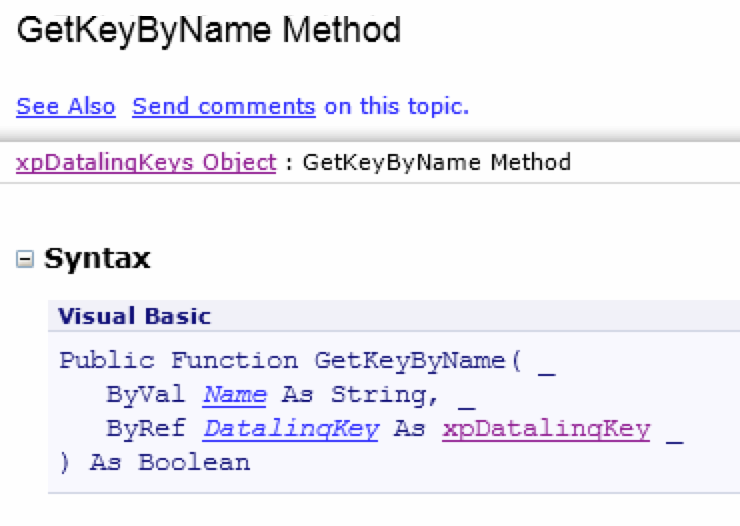
    Is this some v9 bug or am I doing something wrong? It almost looks like the Datalinq keys returned from the function are a copy (ie. "ByVal"), even though the SDK docs say "ByRef", implying that operations (like assigning a value to a key) should be performed on the original objects. Any ideas on this?


  • 2.  RE: Setting Datalinq key via script doesn't work (v9)

    Posted 01-17-2020 20:18

    Hi Ben,

    If you can share your scene with me (dropbox, or google link), I can point you to where the issue is.

    We have many customers that do this, so it is unlikely to be a bug (but its always possible).

    From just your script snippet, I am not able to fully debug the problem and need to see the whole scene.


    Thanks


    #XPression


  • 3.  RE: Setting Datalinq key via script doesn't work (v9)

    Posted 01-17-2020 20:24

    I re-read your message and I am not sure what you mean by "cannot use the key elsewhere".  The datalinq key is local to the scene, so you would not be able to use it in other scenes.  Is that what you mean?

    Each time you put a scene on-air from the sequencer, it begins with a copy of the scene from layout (with your blank datalinq key) and then applies all the template data so your script would run and change it from Blank to whatever was selected in the textobject, so it should go from Blank to Something.  That is correct behavior.


    #XPression


  • 4.  RE: Setting Datalinq key via script doesn't work (v9)

    Posted 01-21-2020 20:55

    Hi Brian, when I say "use elsewhere" I mean use elsewhere within the same scene, not in a different scene, sorry for not making that clear. What I'm trying to do is use a DataLinq key to switch some things in preview mode. So if putting the scene online is a requirement for the key to be set, that sounds like it won't work for my purposes.

    In short, here's what I'm trying to accomplish.

    1. Have a sports league selector with league abbreviations (NFL, etc.) in a combobox where the user can select a league.

    2. Have a combobox text object with a list of players or teams that is pulled from a DataLinq source (I have this working for a single league, currently from a CSV file).

    3. Use the selected sport code from #1 to somehow (via script, Visual Logic, or other method) switch (re-populate and refresh) the player/team list in #2, to show a list of players/teams from the newly-selected league.

    One of the problems I'm running into apart from the DataLinq key is accessing via script the DataLinq properties of a text object that is set to Static Text / Combobox, but then has DataLinq as the type under that. So far I can only seem to access the "top-level" DataLinq, but this does not work for populating a user-searchable combobox. Is there some hidden scripting method to gain access to that?

    But, if I can't set and read a DataLinq key in the previewing phase, none of this may work anyway.

    The other option is to duplicate the whole project for every league and go into every DataLinq in every scene and hard-code it to that league, but this is a maintenance nightmare. There's potentially at least 7 leagues we want to cover.


    #XPression


  • 5.  RE: Setting Datalinq key via script doesn't work (v9)

    Posted 01-23-2020 17:40

    If you want to send a link to the scene/data I'd be happy to take a look for you.  It sounds like there should be no problem doing what you describe.


    #XPression