Graphics

 View Only
  • 1.  Text object sizing

    Posted 12-20-2019 15:56

    First off, squeeky-new to Xpression so apologies for the noob question!

    I have a Text object in the center of my scene. How can I set it so that when I add a new line of text to the object, the text object still stays centered in the scene? Right now, when I add a new line of text to the object, the first line stays right where it is, and the second line is created just below the first line.

    Thanks!


  • 2.  RE: Text object sizing

    Posted 12-20-2019 16:07

    Hey TC. Do you have your text object tab stop set to center justification?


    #XPression


  • 3.  RE: Text object sizing

    Posted 12-20-2019 16:10

    That I do, but I'm looking for a Y-Axis/vertical centering solution ;-)

    Imagine you had a scene which would be text-heavy, and you'd want that dynamically centered in the middle of the screen. 

    Thanks.


    #XPression


  • 4.  RE: Text object sizing

    Posted 12-20-2019 17:47

    You need to do a little scripting, or some Visual Logic. Basic idea is:

     - set your text centered on the x and center justified (as you did)

     - set Y Pivot to be at max

     - position text object at 960, 540, for a 1080 comp.

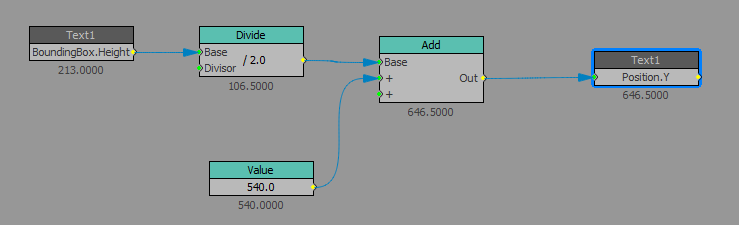
     - use Visual Logic to move the text box up half of the height of the bounding box

    The "Value" block number is 540, for half the height of a 1080 tall composition. The values shown in my image are with 3 lines of text, and they auto-center on the Y axis, as soon as you type a line break.

    Check out the VL blocks in the image.

    #XPression