Hey Lula,
The method you have described is using the Lists in XPression.
So the theory is that when you enter a text into a textfield (which can be hidden) it will look up the text in a list and get a corresponding value which you can assign then to another object, such as a quad.
It's something I use all the time to display country flags, or teamlogos or weathericons, among others.
The way this works requires some setup at first but you'll see it's actually quite simple.
STEP 1: create a dummy textfield and a quad. Create a material with a texture and assign it to the quad like you would normally do.
STEP 2: In order to be able to change the material based on a text, we need to publish the material of the Quad. So select the Quad, go to the Template Links-tab and select Publish Object. The first item (Material) should be selected automatically so you don't have to do anything.

STEP 3: Select the dummy text object and go to the Data Source-tab. In there you need to tick "Enable User Input Controls".
This will make the right hand become visible. On that right hand side, you can select whether you want to use a Statuc List or a Global List. Now the difference is that a Static List will only be available in the specific scene that you are working in. A Global List will be available throughout your entire project. So I would suggest to select a Global List and then click on "Edit Global List". This will open up a new window where you can create or maintain the different lists.

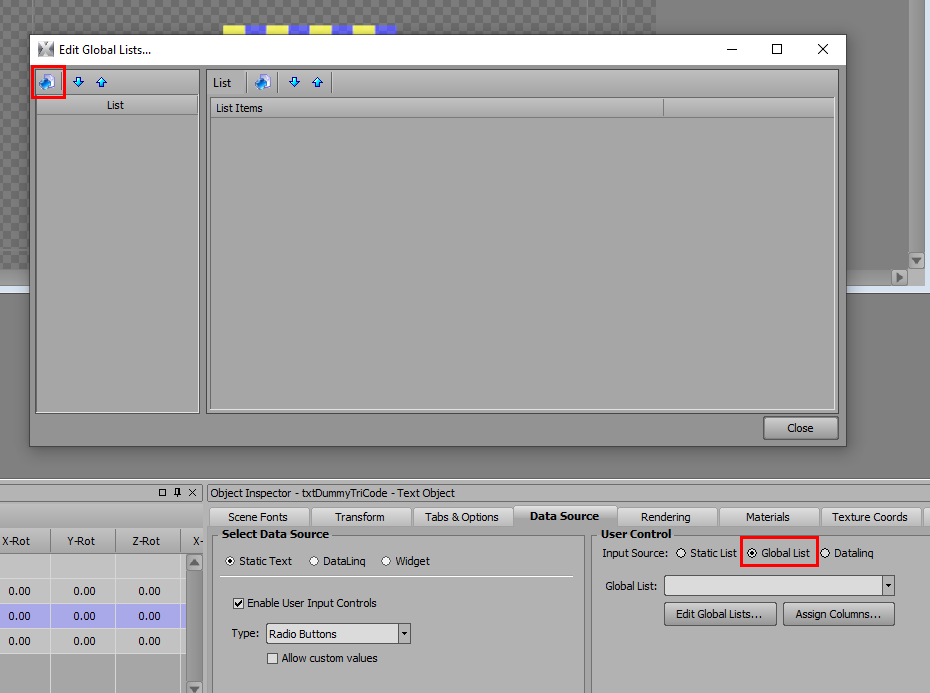
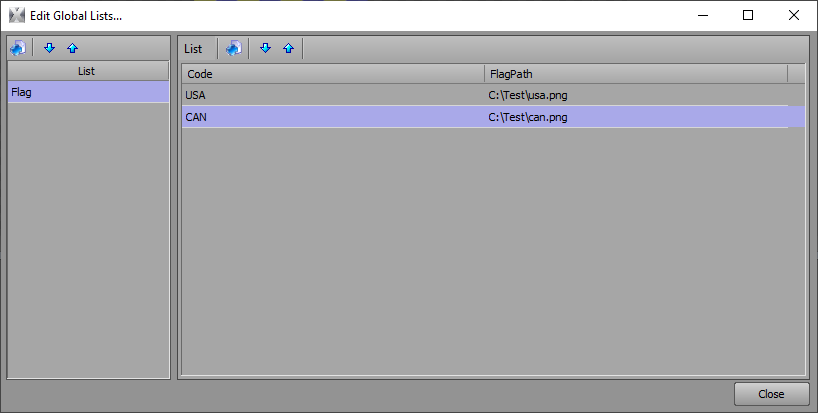
STEP 4: In the popup window you will need to create a new list and you can rename it to whatever name you want. It will automatically create a new list which has one column in it called "Description". You can rename that column by right-clicking on the name of the column and select "Rename".
Now this list needs two columns, one for the Tricode and one for the path where the images are stored. So you need to create a new column. Right-click the columnheader again and select "Add Column".
So now you should have two columns. The first column is the content which will be linked to the textobject. The second column will have to be linked to another object but that's for later.
So once you have entered the values that you need, you can click on "Close".
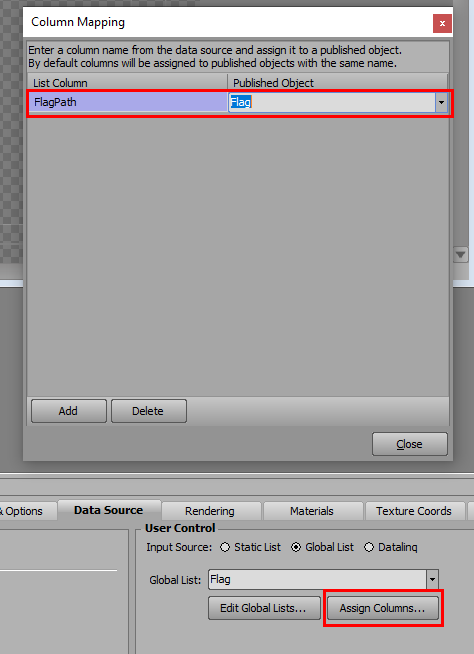
STEP 5: Once you have created a list, you need to select it from the list. So from the dropdownbox, you select the list you have created. Next you need to create the link to the Quad which will hold the image of the flag. For this you need to click on Assign Columns.
In this window you need to assign the column with the path to the flags to the Quad which needs to hold the flag. So on the left side you type in the name of the column from the list, and on the right side you select the Quad which you have published in step 1. Once that's done, you can just click on "Close" and you're done.
If you now put this scene in your sequencer, and you click on the textfield in the "Template Data" you will see all of the tricodes that you have entered. If you select one you will see the corresponding image will be loaded onto the Quad.
Now if you link the dummy text object to a datalinq that sends external data, this process becomes automated. So you don't manually select the country, but the textobject will be filled in by the Datalinq and it will load the corresponding image from the list.
Note that you can also export this list to be used in other projects so you don't have to recreate it again and again. You can export it to a textfile and import that into another Global List in another project. So that saves you a lot of time and you only need to do the linking again.
So I hope that was clear enough.
If not, you can always have a look at the video from Xpression U that explains the same thing. ()
Good luck!
Kenneth
#XPression