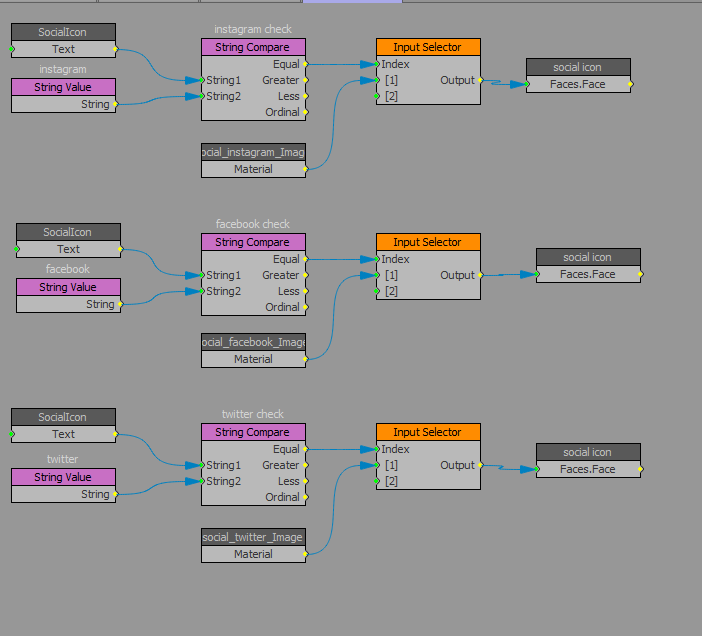
Can't figure out where I'm going wrong. I have a dummy text object tied to a radioboxes Global List so producers can select social media icons (Twitter/Facebook/Instagram). It sorta worked: Twitter would show up, but the other two wouldn't even though I have the same batch of function blocks three times. I have the dummy text and a string value plugged into a String Compare block. If that returns an equal, then use the appropriate material. The really bizarre thing is it seemingly chooses at random which one works. Currently it's Instagram. Tracing it in VL, hovering over the nodes in the String Compare, String 1in the Instragram cluster has a value of "i" and String 2 (set by a String Value block) has a value of "i" and Equals returns a "1" so it's true and the Instagram texture is applied. But if I move to the next group (Facebook) and change my dummy text to "f", String 1 has a value of "f", String 2 (again set by a String Value block) has a value of "f" and Equals returns "0" so it's false and no texture is applied, even though it JUST worked with "i". If I change my dummy text back to "i" the top cluster works again. I can't understand why one group compares correctly but the others, copied and pasted, won't. Been very careful there's no extra spaces or returns in any of the text.
Side thought: I also tried setting this up using a String Value block of "i" and using a String Compare block to determine if the dummy text was equal (i), less than (f), or greater than (t) but that also didn't resolve properly. My hope was to use that to drive an Input Selector to determine the proper material.
Am I just not understanding String Compare? Is my logic structure in VL faulty?