Graphics

 View Only
  • 1.  Questions of Xpression virtual output

    Posted 03-05-2021 09:30

    Hi team,

    Please permit me to ask you some questions about Xpression virtual output.

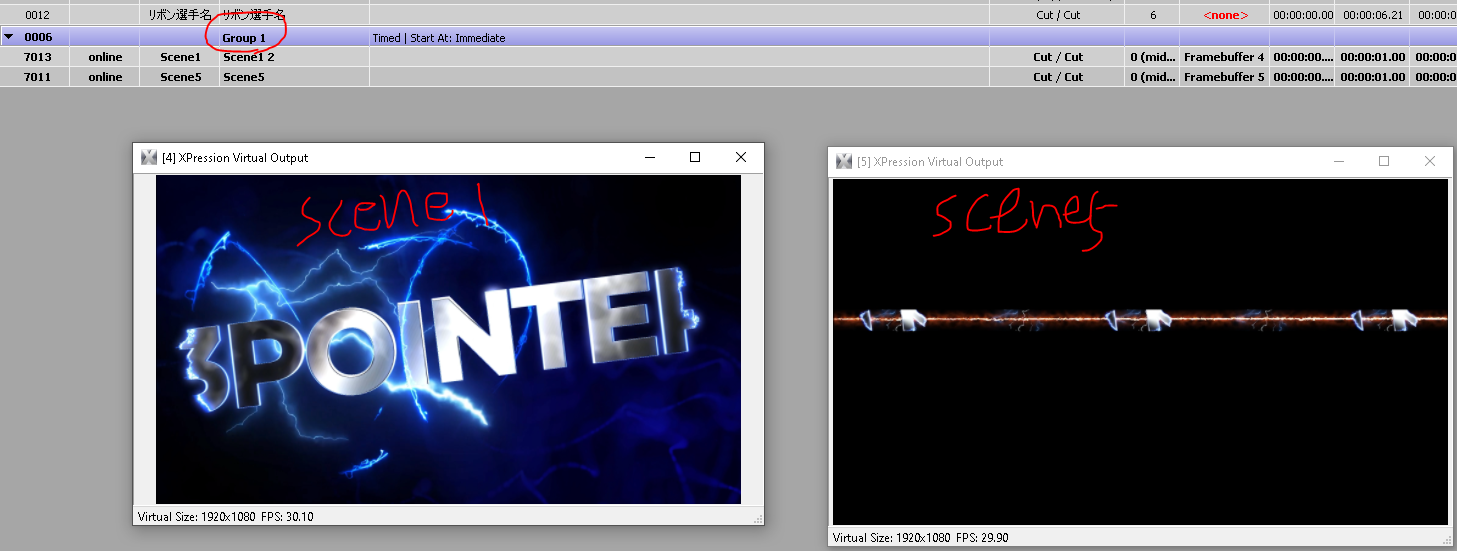
    I have made 2 scenes with Xpression, both of them has video clip in them.

    I put those scenes in different virtual output and group them up to try to play them on air together.

    But when I played the group item there was always a 2-second delay between 2 clip.

    Is it s a definite result when activating 2 virtual output?

    When using virtual output, is there any way to make 2 take item play with no delay?
    Best regards,

    Brian Yang


  • 2.  RE: Questions of Xpression virtual output

    Posted 03-08-2021 00:09

    Hi Brian,

    Something to check on scene 1: what is the length of the animation controller? You may find that is why there's a two second gap.

    What you can do is change the timing on the group. Set it to group timings rather than item timings (I don't have XPression in front of me, so that's just from memory).

    James.


    #XPression


  • 3.  RE: Questions of Xpression virtual output

    Posted 03-09-2021 16:46

    So in my opinion, in order to play 2 scenes online at the same time, the best way to do that is 1) make a custom dashboard button and trigger from dashboard, or 2) if you just the "." key on your num pad of your keyboard, you can "cue" items in Xpression.  So, you can cue the 2 scenes and then you would hit the "/" key on the numpad and "swap" the two items to air.  They will both go online at the same time. - Dashboard is easier in the long run, but for short fixes, a cue and swap will get 2 things outputting.


    #XPression


  • 4.  RE: Questions of Xpression virtual output

    Posted 03-12-2021 20:28

    Your group needs to be set to the "Take All" mode if you want it to take all the items in the group simultaneously when triggering the group.  Your group is currently set to "Timed" based on your screenshot; instead of Take All


    #XPression