Hi Troy,
There is a way to do this using Visual Logic but it might seem a bit weird. However I use this system quite often in a variety of applications.
Like you mentioned in your original question, the input selector only uses numerical values. So to solve your issue, we need to "convert" the string value into a numerical value.
Below you can find an example where I do exactly that.
So basically I compare the value which is being fed into XPression with a few predefined values.
I use the string position because it allows me to add a predefined value inside of the block. You could also use a string compare block but then you would need to feed the value using a string value-block and the value would also have to be identical.
If the string is found the string position will display the position of the character. If it doesn't find the character, it will return 0.
So next I perform a check whether or not the value is above 0 (so a matching value was found) which will return 1 or 0.
To have a unique ID I add a multiplier that multiplies the 1 with a predefined value.
Since I can only feed one single value into the Input Selector, I need to go from three values to one.
But since we will only have one single value at any given time, only one value will return a value, the others will be 0. So by adding the three values together I will get a single value which will either be 1, 2 or 3. If there is no match, the result will be 0.
This can than be fed to the Input Selector to select the correct color or material.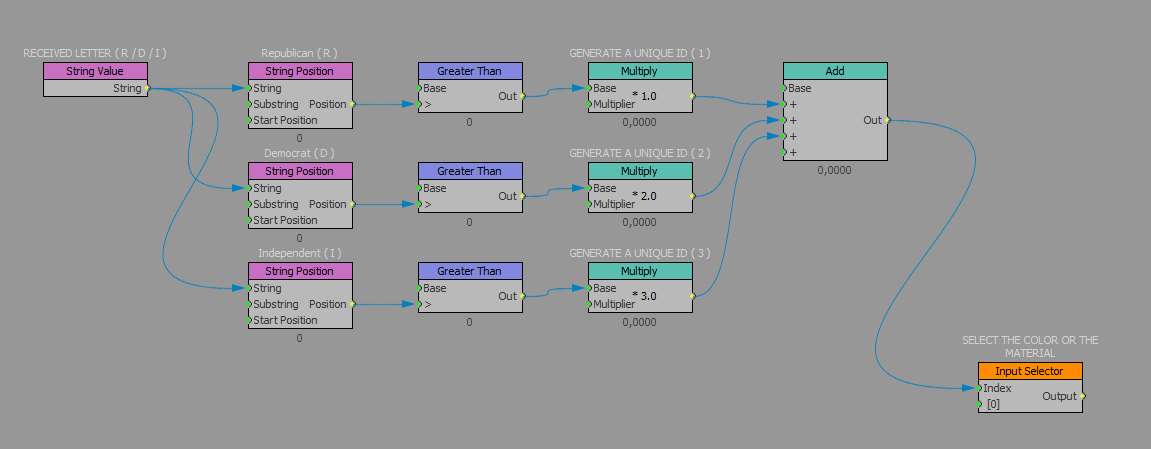
#XPression