On a qaud or other pimative you can datalinq a path here. Just make sure that's its a path to a location the local machine can see and any machines you plan on putting it on can see.
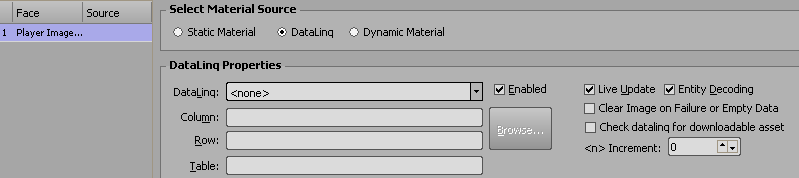
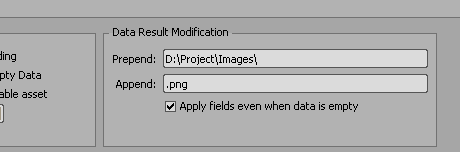
Alternatively make the datalinq colomn just the name of the file and then pre and post append the data with the path and file type making it easier to update if this changes.
If that doesn't work for you
@Garner Millward posted on this post the other day about how to script
volatile texturesHe also mentions Dynamic materials. You could use dynamic materials with a path such as D:\Projects\Images|@Text1@.png
The @Text1@ is a macro that will reference a text object of that name which you could have linked to a field in datalinq.
------------------------------
Simon Redmile
Senior Graphic Programmer & Designer
Ross Video
Bristol United Kingdom
------------------------------
Original Message:
Sent: 08-25-2022 17:04
From: Paulo Dias
Subject: Images and Datalinq - Best practice?
Hi Simon,
I'm working on a project where I'm trying to have headshots populated via datalinq. So far, I've used the option number one described above (Datalinq the actual headshot quad). But as far as I understand, that means I would need to have a material created for every possible headshot?
With the option 2 above, is it possible to have the material link to an image located on the actual machine, meaning a local path? The data provided by the data source (JSON) is only the name of the athlete, not the full path (i.e. 'John_Smith'). Is there a way to grab the datalinq data and manipulate it? That would allow me to drop any image into the images folder and have the material load it, as long as names match.
Thanks!
------------------------------
Paulo Dias
------------------------------
Original Message:
Sent: 11-03-2020 14:49
From: Simon Latus
Subject: Images and Datalinq - Best practice?
Hi Aleksander
I'd say it would go like this:
You datalinq via the quad, if the material already exists, as it looks up the name of the material. eg you have flags of countries, they are not going to change so you could have them all pre-loaded as material images
You datalinq in the material itself and the data specifies a file name or url to the image file. eg a team of players where the players for that game could change and it's not feasible top have every possible player from all possible teams pre-loaded. I'd also go with this route if you were handing a project over and didn't want the operator to have to mess with the project and materials. Makes their life easier, and less prone to accidental deletions!
Least, that's how I understand it!
Simon
#XPression