Graphics

 View Only
  • 1.  Visual Logic - maximum box width

    Posted 03-10-2021 02:23

    I use Visual Logic to scale boxes according to the width of text.  When I have the autosqueeze on a text field, the box continues to expand once the squeeze begins.  Is there a way to set the maximum width of how much a box scales on the X axis, preventing the box to keep scaling?
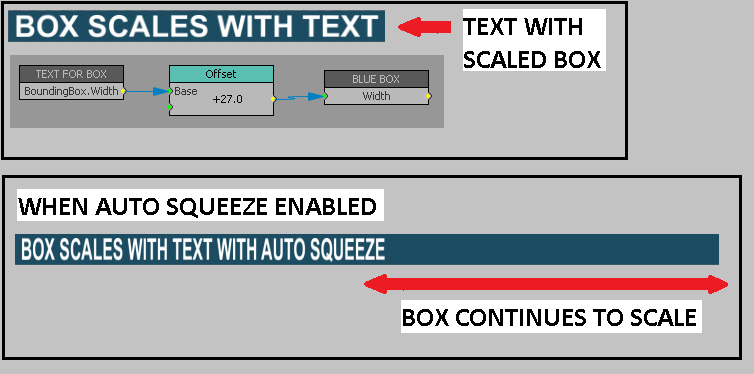
    I have used masks and other ways to get around this before, but I have a situation where I'm using an odd shaped box where a mask would be more difficult to create.  I've also tried different ways using the "Max Value" block with the "Value" and Input Selectors, but never got it to work.  It seems to me there is a way to do this that I can't figure out.

    I would greatly appreciate any help on this.  Thank you.  


  • 2.  RE: Visual Logic - maximum box width

    Posted 03-10-2021 02:40

    Not sure what version you are using...

    But I think if you use the

    TEXT FOR BOX

    BoundingBox.Width.Scaled

    Not sure, but I think that may work for you.


    #XPression


  • 3.  RE: Visual Logic - maximum box width

    Posted 03-10-2021 03:04

    Steve -

    That definitely works!!!  I can't believe I've been racking my brain for years trying to figure this out.  This was a classic case of "over-thinking it".  Thank you so much!!!


    #XPression


  • 4.  RE: Visual Logic - maximum box width

    Posted 03-10-2021 03:17

    You bet Mark; I'm stoked I was right; because I'm usually wrong!  lol.  Cheers.


    #XPression