Well done on finding that I actually forgot you were trying to control the quad directly not the scene director hence my script haha!
Original Message:
Sent: 06-13-2021 14:47
From: Rachel Hinshaw
Subject: AVI material source not swapping when using Dynamic Materials
I also found by using the script below in Scene OnLine, I could get the dynamic material to respond to events on the scene director such as Reverse and Jump to and Take Offline. It might not have been the most direct way, but it's working.
This script is from Simon on another thread.
MyVideoQuad can be replaced with the name of the quad and VideoDir with the name of the scene director as well as putting in the desired Track for Track 1.
dim quad as xpQuadObject
dim mat as xpMaterial
dim newSceneDirClip as xpSceneDirectorClip
dim dir as xpSceneDirector
dim trk as xpSceneDirectorTrack

self.GetObjectByName("MyVideoQuad", quad)
quad.GetMaterial(0, mat)
self.GetSceneDirectorByName("VideoDir", dir)
dir.GetTrackByName("Track1", trk)
trk.CreateMaterialClip(0, mat, newSceneDirClip)

dir.AutoStop = true
dir.PlayRange(0, dir.Duration)
Thanks for the help!
------------------------------
Rachel Hinshaw
Freelancer
------------------------------
Original Message:
Sent: 06-13-2021 11:13
From: Simon Redmile
Subject: AVI material source not swapping when using Dynamic Materials
Hey,
Nope you'll need to use script to play it backwards.
You can use playrange to do that.
dim scene as xpScene
dim fb as xpOutputFramebuffer
dim scenedir as xpSceneDirector
'this will get the first framebuffer
engine.GetOutputFramebuffer(0, fb)
'this will get the scene of layer 0, change the number to the layer you want
fb.GetSceneOnLayer(0, scene)
'this will get your scene director
scene.GetSceneDirectorByName("YOUR DIRECTOR", scenedir)
'this will play it from any frame to any frame, in this case 150 back to 0
scenedir.PlayRange(150, 0)
------------------------------
Simon Redmile
Ross Video
Original Message:
Sent: 06-11-2021 19:02
From: Rachel Hinshaw
Subject: AVI material source not swapping when using Dynamic Materials
@Jeff Thanks, that works in the case of switching between two filepaths. In my case, I'm looking at switching between 32 different video files for different team styles in each scene.
@Red Thank you for the visual logic example. That helps me get a little further. The next question is, can I use the visual logic to make a clip play in reverse, like it can on the scene director? Using visual logic is letting the clip on the face of the quad play forward tied to a position on my scene director, but what if at another position, I need a clip to play in reverse? If it's not possible in visual logic, is there a script that can help?
Otherwise, I'm looking at datalinq'ing the materials to an Excel with filepaths or rendering out the reverse video clips for 32 variations of a dozen different shells.
Thanks again!
------------------------------
Rachel
Freelancer
Original Message:
Sent: 06-09-2021 05:20
From: Simon Redmile
Subject: AVI material source not swapping when using Dynamic Materials
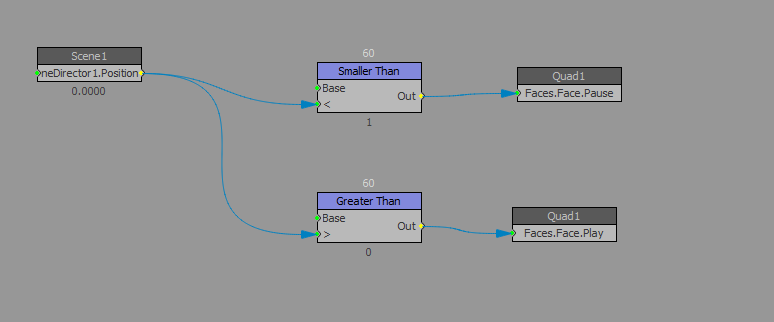
Another way you can have some control over dynamic materials is through visual logic.
For example you can get the face values of a quad object such as pause and play.
You can then get the scene director position property and use greater than, less than etc to control pause and play.
For example if you don't want a video to play until 60 frames into a graphic regardless of the video you could do something like this.
------------------------------
Simon Redmile
Ross Video
Original Message:
Sent: 06-09-2021 01:23
From: Jeff Mayer
Subject: AVI material source not swapping when using Dynamic Materials
Dynamic materials can still be used for video files by taking on the Video Shader properties of the original material (Play Mode, Auto Start, etc.,) but a dynamic material resolving to a file path will not be controlled by the original material's clip on a scene director. XPression will create a temporary material for the file, much like it does if you publish an object's material and select a new file in the sequencer or the MOS plugin.
What you could do, however, is create separate materials for each of your videos in your project, place both of those materials on the scene director alongside your pauses and events, and use the object's dynamic materials to point to those project material instead of a file path (so if your materials are named Gold Promo and Silver Promo, your dynamic material could be set to "@SHOW@ Promo".) No matter which material gets bound to the object, its clip will be on the scene director to control its playout.
------------------------------
Jeff Mayer
Ross Video
Original Message:
Sent: 06-08-2021 13:15
From: Rachel Hinshaw
Subject: AVI material source not swapping when using Dynamic Materials
The dynamic material works for folder or file, but what if the avi is also on the scene director to be controlled with pauses and events? Can those materials be dynamic? Thanks!
#XPression