Graphics

 View Only
  • 1.  How to "scroll" some text within a larger scene

    Posted 07-21-2020 03:09

    So I have this graphic. It has a line of scrolling text that loops continuously:


    The values come from metadata tags in images stored in Streamline (the team names) and just repeats "TEAM A vs TEAM B". I'm sure that part is easy with Visual Logic, but how do I "embed" a crawl scene inside of my main scene (the main graphic with the logos).

    Hopefully, this makes sense.


  • 2.  RE: How to "scroll" some text within a larger scene

    Posted 07-21-2020 05:38

    If you build a crawl group in one scene, you can create a material with a shader called "Render View" and then select the crawl scene as the source of that shader. then in your "master" scene, add a quad and assign the Render View material to it. Rotate to whatever angle you need and you can align it with your team gfx:


    Here is a link to my sample project. There is probably a more elegant way to make the text scroll endlessly, but I just made 2 ticker screens in the crawl group (they are duplicated).

    https://app.box.com/s/jhovhfr1504v0oi7z53qd8715r921oy0


    #XPression


  • 3.  RE: How to "scroll" some text within a larger scene

    Posted 07-21-2020 15:03

    Thanks so much!

    This "somewhat" tackles my problem. The only issue is my text has to be generated by image metadata from within the main scene. Not sure how to get THAT into the crawl scene.


    #XPression


  • 4.  RE: How to "scroll" some text within a larger scene

    Posted 07-22-2020 01:11

    You can make the source of a render view material be a camera within the main scene...just build your text outside the view of your default camera.


    #XPression


  • 5.  RE: How to "scroll" some text within a larger scene

    Posted 07-27-2020 06:42

    Hey Kenny,


    Give this a try if you wouldn't mind! Decided to take a stab at it during quarantine:

    https://youtu.be/arpHcETS5LY


    #XPression


  • 6.  RE: How to "scroll" some text within a larger scene

    Posted 07-27-2020 16:22

    Zachary, I owe you one! I've literally only been using XPression for about 3 weeks and figured this was pretty deep over my experience level at this point, but your tutorial was easy to follow and understand. I had been messing around with continuous animations and thought that might be the approach direction but thanks so much for sorting it out.

    So, for our purposes here both the team names are generated by metadata tags in images saved in Ross Streamline, so I just used some Visual Logic to format the SetText contents to work in your script.
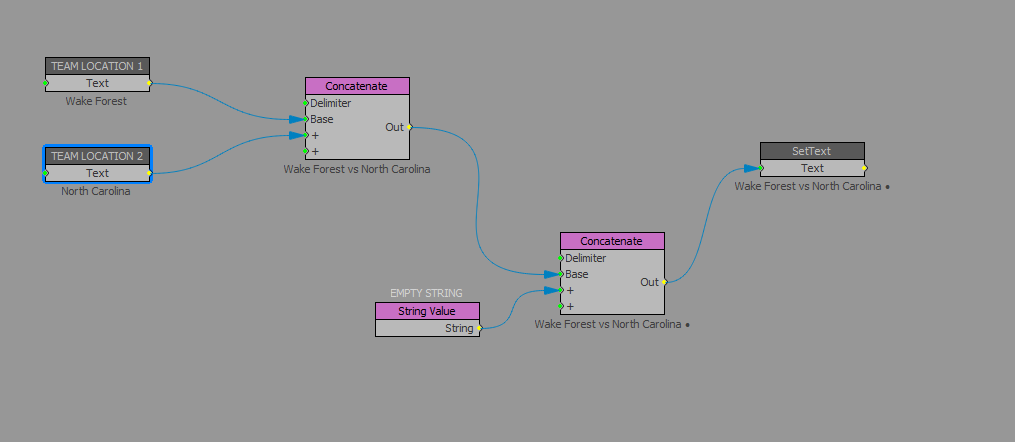
    Don't know if there's a more "elegant" way of accomplishing it, but it seems to work. The first concatenate adds the "vs" between the two team names and then the second one adds the "•" between each set of names.

    I'm still fairly green on Visual Logic too, so like I said maybe someone has a better way of achieving this too?


    #XPression


  • 7.  RE: How to "scroll" some text within a larger scene

    Posted 07-27-2020 17:14

    That's how I would do it, myself! At the end of the day; if it works, it works, right? Glad to hear I could be some assistance


    #XPression


  • 8.  RE: How to "scroll" some text within a larger scene

    Posted 08-06-2020 15:52

    <x-zendesk-user data-user-name="Zachary Fradette">372662259092</x-zendesk-user> let me just say the YouTube video that you uploaded has to be one of the best ever responses on this forum in the form of a response.  To not only show your script, but to visually break it down as well.  I wish there was some award system to give you something for that response.


    #XPression