Graphics

 View Only
  • 1.  Displaying OT on scorebug using Datalinq

    Posted 01-25-2021 14:19

    So I have a Visual Logic script made for displaying 1st, 2nd, 3rd for our Scorebug. (see picture)
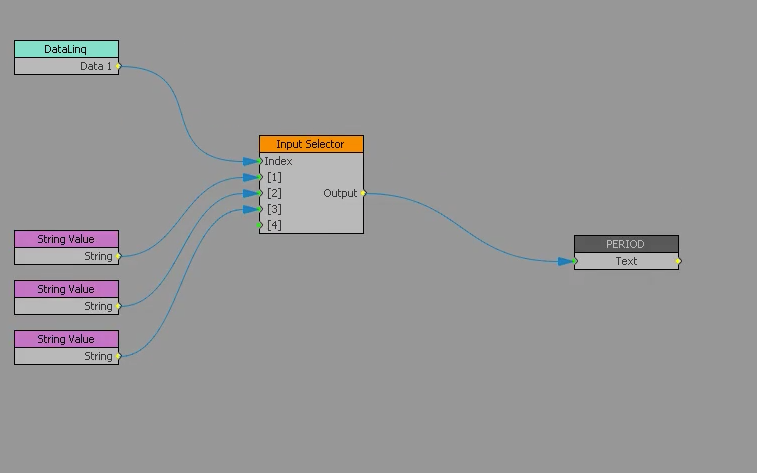
    The String values are 1st, 2nd & 3rd to replace the Datalinq 1, 2 & 3 for the bug.

    The problem I run into is when the Datalinq reads OT, the graphic goes blank.

    I cannot even take the text field and make it Static and change it to OT, it just stays blank.

    Any ideas?


  • 2.  RE: Displaying OT on scorebug using Datalinq

    Posted 01-26-2021 16:51

    Does the Datalinq block pass "OT" or just nothing an empty filed? 


    #XPression


  • 3.  RE: Displaying OT on scorebug using Datalinq

    Posted 01-26-2021 17:11

    I can see the "OT" show up on the Datalinq field, but I think because of how I have it set up on this visual logic, it is not passing to the text field.

    Trying to find a work around because I want to keep the 1st, 2nd & 3rd text with the visual logic I have set up, but want to also have OT show up when they go to overtime.

    Right now it just comes out blank. 


    #XPression


  • 4.  RE: Displaying OT on scorebug using Datalinq

    Posted 01-26-2021 17:22

    That's because the input selector can only accept integers. 

    What I suggest is adding some VL before such as a compare block and if that equals OT then pass "4" and then connect a value you want in that 4th position otherwise pass the number value. 

    Does that make sense, I can make an example if a bit if you like?


    #XPression


  • 5.  RE: Displaying OT on scorebug using Datalinq

    Posted 01-26-2021 17:23

    Simon, if you can show me visually, that would help alot!

    Thank you!


    #XPression


  • 6.  RE: Displaying OT on scorebug using Datalinq

    Posted 01-26-2021 17:47

    So for me this works. I am using a text field in place of datalinq to make things easier for testing. 

    In my example 1 passes 1, 2 passes 2, 3 passes 3 and OT passes OT, anything else is blank.


    #XPression