Marius,
Not sure if you've tried something like this...Select all the Take Item you'd like to export (click the first, then shift-click the last,) then right-click any of those selected Take Items and choose Export Take Items To -> Images. From there, select all the Take IDs in the list (Ctrl + A) and check "Single Frame" on any of those checkboxes. All the items selected will get checked. Choose your Target Folder, and you're set to export out what is the preview frame for each Take Item from there.
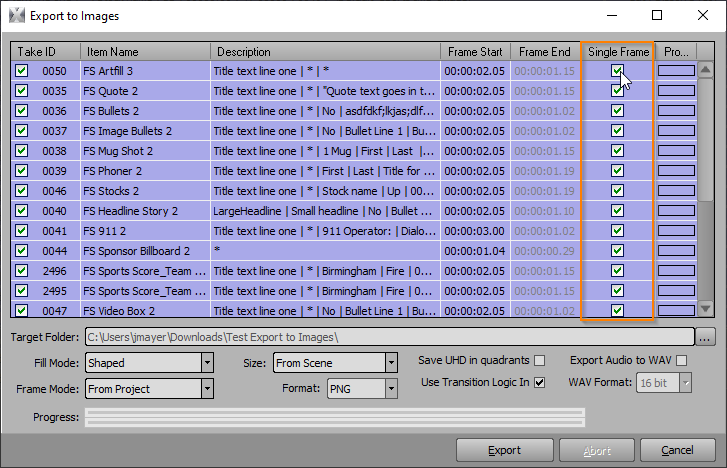
Just be careful not to have multiple Take Items with the same Item Name...the Export uses the Item Name to create the file name. If several Take IDs have the same Item Name, each image will overwrite the proceeding export of the same name.
------------------------------
Jeff Mayer
Ross Video
------------------------------
Original Message:
Sent: 09-08-2021 18:57
From: Marius Baumann
Subject: Save all take items to PNG on button
Hey guys!
Since for the last couple of shows I had to make endless amounts of take item exports (to send to sponsors, social gfx etc...) I was wondering if it would be possible to create a script or dashboard button that exports all scenes in the rundown (all at preview frame point so it doesnt export a blank frame if there would be an intro animation)
to a certain folder so I could just click a button and our social guys would have the updated schedule/bracket/whatever graphics to post on social media.
I saw a tool at an external company once that exported all scene items to pngs but I think it was custom coded and I was wondering If i could include it into xpression to mabe even automize the process
Any creative idea would be appreciated ;)
Regards,
------------------------------
Marius Baumann
------------------------------