ok, this script would go on the scene itself. Basically on the very top "object". I would put it on "on set text"
dim nam, loc, final as xpTextObject
self.getObjectByName("DATA_Name", nam)
self.getObjectByName("DATA_Location", loc)
self.getObjectByName("TXT_name&location", final)
final.text = "- " & nam.text & ", " loc.text
This assumes there are two hidden data text fields (name and location) plus one final text output (name&location)
The final output takes a "-" followed by a space, then the name followed by a comma and space then the location. It then sends these to the final visible text object "name%location". This text object is now subject to auto scaling and any other text operations for formatting. I hope this helps.
------------------------------
Malcolm Thorpe
TV Syndicate/Icon Fitness
------------------------------
Original Message:
Sent: 08-09-2021 01:42
From: Malcolm Thorpe
Subject: Previewing a script and visual logic on the same text line
I would normally have a "first.text" text object and a "second.text" object. these would not be visible. The actual script would be on a "final.text" object that would be visible. It would combine the two text objects and make this combination the text for the visible "final.text". I will load up my Xpression tomorrow morning and get a quick script together for you.
------------------------------
Malcolm Thorpe
TV Syndicate/Icon Fitness
Original Message:
Sent: 08-09-2021 01:35
From: Mark Stasiowski
Subject: Previewing a script and visual logic on the same text line
MalThePal -
Would this go on the first line of the Object Manager (the scene name) or in the text line? Again, forgive my ignorance, but I'm not very informed when it comes to using scripts. Thank you for your response.
------------------------------
Mark Stasiowski
Original Message:
Sent: 08-07-2021 09:29
From: Malcolm Thorpe
Subject: Previewing a script and visual logic on the same text line
I have added spacing using the same technique you used for the parentheses. Spaces are added inside the " "
final.text = "(" & first.text & ") " & second.text
------------------------------
Malcolm Thorpe
TV Syndicate/Icon Fitness
Original Message:
Sent: 08-06-2021 15:31
From: Mark Stasiowski
Subject: Previewing a script and visual logic on the same text line
Red -
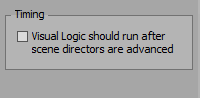
Thank you for your response. I eliminated the multiplier block. I didn't even realize that it was set at 1 (I know this has nothing to do with the issue I'm trying to solve). I also tried unchecking the Timing box as you suggested, but that didn't work. I really don't know much about scripting so I don't use it often. Do you (or anyone else) know the script for spacing? I'm willing to give that a shot to see if I like it any better. My final solution would be to just change everything back to visual logic by replacing the script with the concatenate blocks. Thank you again for responding.
------------------------------
Mark Stasiowski
Original Message:
Sent: 08-06-2021 08:18
From: Simon Redmile
Subject: Previewing a script and visual logic on the same text line
Might also be worth trying checking this box off to see if that helps before you move it all to script.
------------------------------
Simon Redmile
Senior Graphic Programmer & Designer
Ross Video
United Kingdom
Original Message:
Sent: 08-06-2021 04:09
From: Simon Redmile
Subject: Previewing a script and visual logic on the same text line
My guess is that the visual logic is running before the script, so on the output it looks fine bit in preview where it only renders once you're seeing this issue.
You might be best doing the spacing in script as well.
You also don't need that multiply box btw since you are multiplying by 1 that's not actually doing anything.
------------------------------
Simon Redmile
Senior Graphic Programmer & Designer
Ross Video
United Kingdom
Original Message:
Sent: 08-06-2021 02:01
From: Mark Stasiowski
Subject: Previewing a script and visual logic on the same text line
I have a full screen graphic with 2 separate text fields. On the first text field, I'm using a script to automatically add parenthesis - a very simple text = "(" & text & ")". Then I'm using visual logic for the second text field to auto follow the first text field depending on its bounding box width.
In layout mode, I see the visual logic work and the spacing is correct. In the sequence mode preview window, and in Inception preview, the visual logic does not show. It is fine when I play it out and I know it will work. However, when a producer is using this template, they sometimes add spaces to adjust it in preview which makes it incorrect when played out.
I know I can use the Concatenate blocks to add the parenthesis and have everything in visual logic, but I was wondering if there is an easy way to use both a script and visual logic and see how it will play out in the preview window. I attached a png of some of the items to help illustrate my point. Thank you in advance for any help.
------------------------------
Mark Stasiowski
------------------------------