Cool! Glad you got it to work. Many options. For anyone who comes across this in the future:
Tested that above example again, and the only way that you can get a 0 value at the second text input is if the Output of your first Input Selector is plugged into the Index of your Second Input Selector. Your First Input Selector Output should go into the "0" of the second input Selector. That first Input Selector can only output blank or Defenseman based on the argument "0" = nothing and "1" = defenseman. I would double check where you pointed the different outputs.
Another way to accomplish this is using one Input Selector block and using Math blocks to increase the boolean value to the appropriate numbers. You could also skip that "blank" String Value block going into "0" and increment the Input Selector to start at "1"
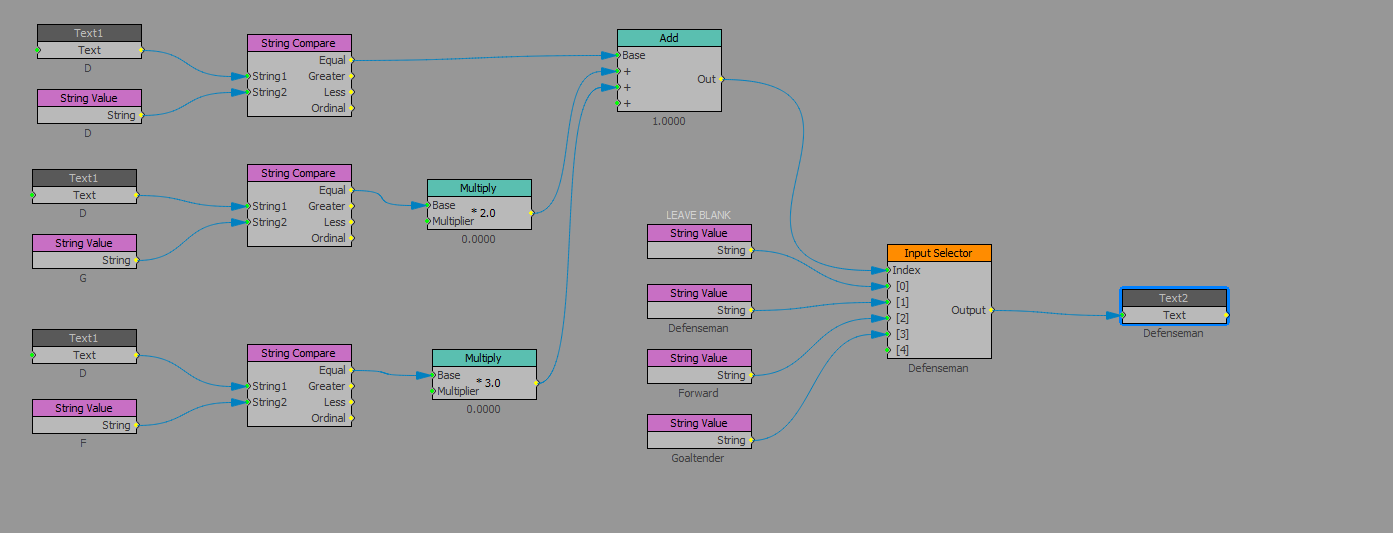
Finally, you could do this with just a single Text Block and Scipting.
Copy the following script into the OnSetText of the text object that is being Datalinq'd and receiving the D, F or G values:
Text = text.replace("old text", "newtext")
if text = "D" then
text = "Defenseman"
elseif text = "F" then
text = "Forward"
elseif text = "G" then
text = "Goaltender"
end if
You'll see the reaction when you drag it over to the Sequencer and either manually type in the values or the Datalinq value changes.
#XPression