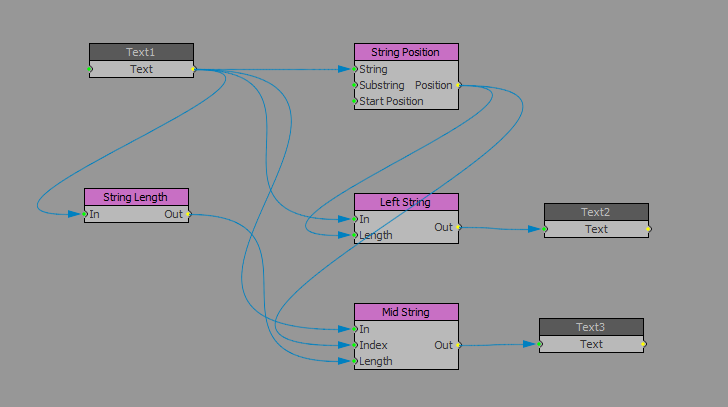
Yup using the string position block, in the substring section here I have put a space so the string position block tells me where that space is. After that I use that position to complete the left string and the mid string.
I have attached the project so you can take a look.
------------------------------
Simon Redmile
Ross Video
------------------------------
Original Message:
Sent: 07-01-2021 19:46
From: Sam McIntosh
Subject: XPRESSION GO SCRIPTING
Is there a way to achieve this using visual logic.
I know you can split a string after a number of characters but can you split after a specific character or space
------------------------------
Sam McIntosh
Original Message:
Sent: 07-01-2021 08:54
From: Simon Redmile
Subject: XPRESSION GO SCRIPTING
Prime does not support scripting. You'll need to upgrade to Studio Go for scripting.
------------------------------
Simon Redmile
Ross Video
Original Message:
Sent: 07-01-2021 07:47
From: Sam McIntosh
Subject: XPRESSION GO SCRIPTING
Hi Simon, it is Prime Go
------------------------------
Sam McIntosh
Original Message:
Sent: 07-01-2021 05:36
From: Simon Redmile
Subject: XPRESSION GO SCRIPTING
Depends on what version of go it is. Is it Prime Go or Studio Go?
------------------------------
Simon Redmile
Ross Video
Original Message:
Sent: 06-30-2021 23:36
From: Sam McIntosh
Subject: XPRESSION GO SCRIPTING
Hi, I am using the below script to separate the first and last name from a data source
Text = Split(Text, " ", 2)(0)
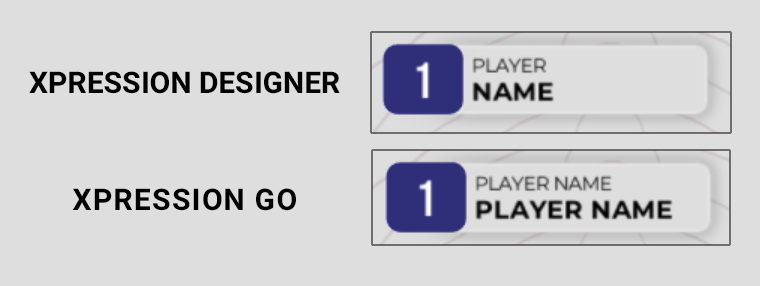
It displays correctly in Xpression Designer, however in Xpression GO it does not (see attached).
Is scripting not a feature in Xpression GO? Or does anyone know of a workaround.
Any help is appreciated, Thanks
#XPression
------------------------------
Sam McIntosh
------------------------------