I looked at the PNG files from that site and they are saved as 8bits per pixel.
Version 10 and below of XPression require 32 bits per pixel (8bit Red, 8bit Green, 8bit blue, 8bit Alpha). To be honest I've never encountered an 8 bit per pixel PNG before, so these seem pretty rare.
However, upcoming versions of XPression do have support for this format.
If you need to use these specific PNG's you would need to resave them as 32bit PNG's.
------------------------------
Brian Ford
Ross Video
------------------------------
Original Message:
Sent: 09-09-2021 11:40
From: Patrick Orser
Subject: Xpression PNG question
this is happening now on a second computer we have... the third is off site so I can't test it today
------------------------------
Patrick Orser
AV specialist
The Bayview Yards
Original Message:
Sent: 09-09-2021 10:51
From: Patrick Orser
Subject: Xpression PNG question
And the first image is what I'm seeing
------------------------------
Patrick Orser
AV specialist
The Bayview Yards
Original Message:
Sent: 09-09-2021 10:50
From: Patrick Orser
Subject: Xpression PNG question
Still white background
------------------------------
Patrick Orser
AV specialist
The Bayview Yards
Original Message:
Sent: 09-09-2021 10:47
From: Brandon Derry
Subject: Xpression PNG question
Thanks!
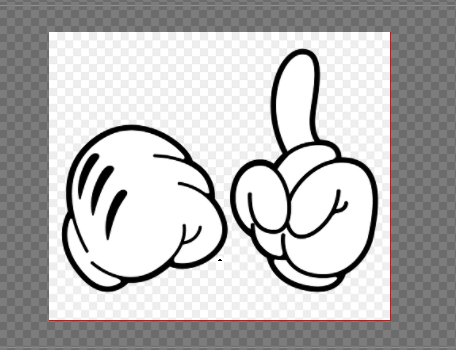
Is this what you are seeing? if so it is because the image on the site itself when right clicking and save to folder contains white; I followed the download buttons for the image. Can you try the attached image?
------------------------------
Brandon Derry
Ross Video
Original Message:
Sent: 09-09-2021 10:44
From: Patrick Orser
Subject: Xpression PNG question
10.0
------------------------------
Patrick Orser
AV specialist
The Bayview Yards
Original Message:
Sent: 09-09-2021 10:42
From: Brandon Derry
Subject: Xpression PNG question
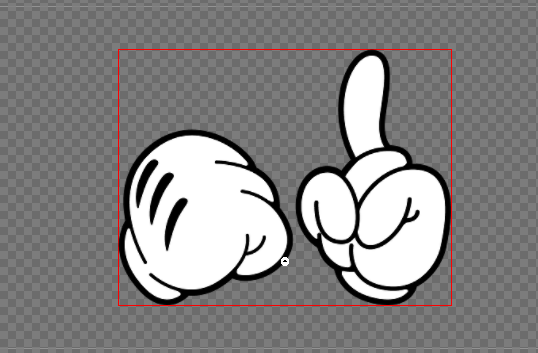
Hey Patrick,
Still works for me, which version of XPression are you running?
------------------------------
Brandon Derry
Ross Video
Original Message:
Sent: 09-09-2021 10:39
From: Patrick Orser
Subject: Xpression PNG question
That was a jpeg... sorry site said png downloads! Here is a png I will use!
------------------------------
Patrick Orser
AV specialist
The Bayview Yards
Original Message:
Sent: 09-09-2021 10:32
From: Patrick Orser
Subject: Xpression PNG question
Still same issue....
------------------------------
Patrick Orser
AV specialist
The Bayview Yards
Original Message:
Sent: 09-09-2021 10:32
From: Patrick Orser
Subject: Xpression PNG question
Ok so I used this one:
------------------------------
Patrick Orser
AV specialist
The Bayview Yards
Original Message:
Sent: 09-09-2021 10:28
From: Patrick Orser
Subject: Xpression PNG question
Site won't let me post the png
------------------------------
Patrick Orser
AV specialist
The Bayview Yards
Original Message:
Sent: 09-09-2021 10:27
From: Patrick Orser
Subject: Xpression PNG question
------------------------------
Patrick Orser
AV specialist
The Bayview Yards
Original Message:
Sent: 09-09-2021 10:27
From: Patrick Orser
Subject: Xpression PNG question
Hello... Ignore Object Alpha was not checked off... I don't know who originally made graphic as I'm just using a sample I found online.
------------------------------
Patrick Orser
AV specialist
The Bayview Yards
Original Message:
Sent: 09-09-2021 05:00
From: Gerard de Vries
Subject: Xpression PNG question
Hi Patrick,
XPression (obviously) should just import the PNG and use the transparency. We never have had problems doing this. Any chance the designer forgot to save/export the PNG with transparency? Or that the "Ignore Object Alpha" option accidentally got ticked in the Texture settings of the created material? If you can share your XPF (with just 1 scene containing the object and 1 material referencing the PNG), as well as the PNG itself, I can take a look to see what's wrong.
Kind regards,
Gerard
------------------------------
Gerard de Vries
Solution Architect Live Graphics & Virtual Graphics
EMG
The Netherlands
Original Message:
Sent: 09-08-2021 16:20
From: Patrick Orser
Subject: Xpression PNG question
Why won't png import as transparent? The background around image is still present (the transparent white that is).
------------------------------
Patrick Orser
AV specialist
The Bayview Yards
------------------------------