Hi Carlos,
For me it's a bit unclear if your timing is using the actual time (like clock-time) or a timer (that starts at 0).
For the latter, when you start a timer at the start of the game and you want to subtract a time from your timer, the solution of Simon would work well.
However, if you are using the clock time, then the solution of Simon would not work at it's present form because if you go back 20 minutes from 12:02, you would need to get 11:42.
So that would mean that you would have to create additional logic to get this to work, which is doable but a lot of work.
Depending on your XPression version, you could use the Date/Time Offset-block that allows you to enter a time and to add or subtract any desired amount of time to the original time.
From the top of my head, I think the Date/Time Offset was added in V8 or V9 but I'm not sure.
You could then use something similar like below:
In this example I have used two values, but these could be a textbox for example.
These values are fed into an Encode Date Time-block to convert these values into an actual Date Time object.
That Date Time-object is then fed into the Date/Time Offset-block in which I have specified a negative 20 in the minutes so it effectively subtracts 20 minutes from the original time provided.
The output from that block can then be used to populate a textbox or something else.
Note that you could also use a Clock-block if you needed to perform this action with the actual clock, but then you would just need to connect the clock directly to the Date/Time Offset and not use the Encode Date Time-block.
Best regards,
Kenneth
------------------------------
Kenneth Buck
LOOK & LISTEN BVBA
------------------------------
Original Message:
Sent: 02-18-2022 04:00
From: Simon Redmile
Subject: Time Calculator
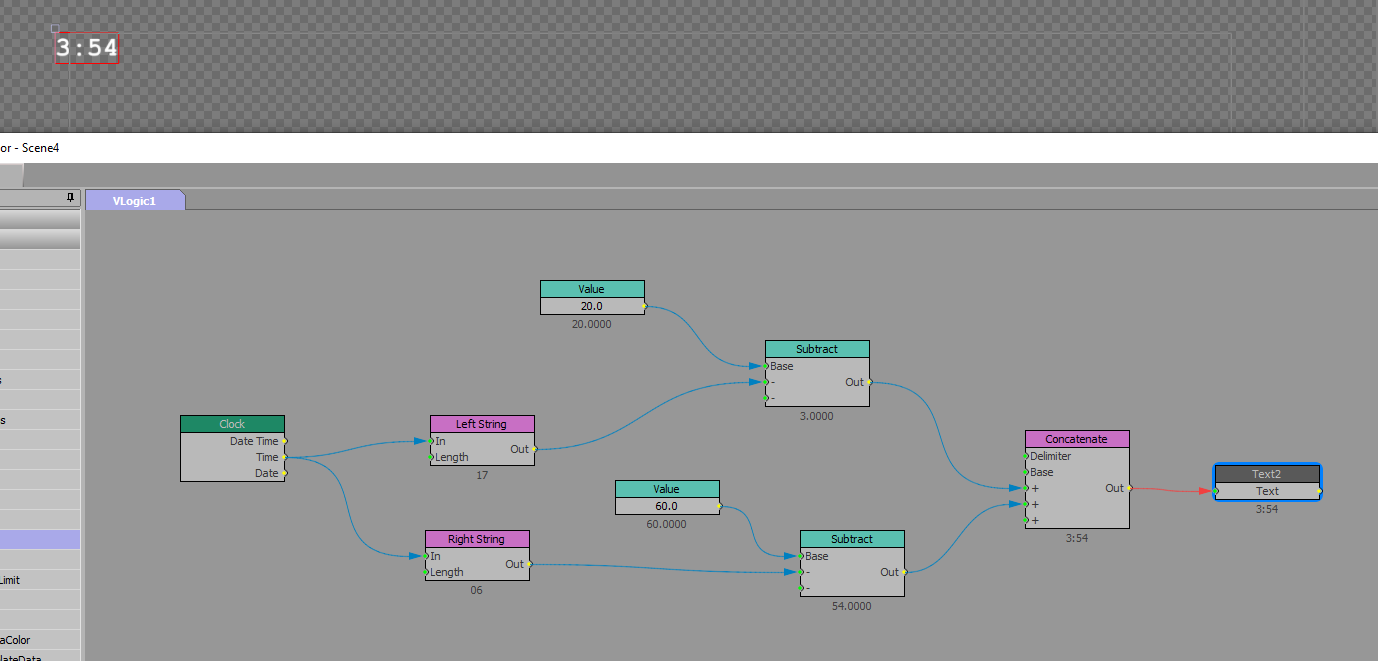
I would split the hour and minutes up and do the maths on the separately.
The clock i am just using here as an example of time, yours would probably come from data. The clock is set to 17:06
I have set the left and right string to 2.
I then put them all back together with a concat block with a colon delimiter.
I attached the visual logic, make a text object called "Text2" and import this and you should see it working.
------------------------------
Simon Redmile
Test Pilot | Senior Graphic Programmer & Designer
Ross Video
London United Kingdom
Original Message:
Sent: 02-17-2022 20:12
From: Carlos gonzalez
Subject: Time Calculator
Hey Simon,
Thank you for getting back to me. I am trying to build a function through visual logic or scripting to subtract 20 minutes by a time I input into the system. Say the time of the goal is 12:03 I would want to subtract 20:00 by 12:03 for the output to be 7:57. Let me know if you have any questions.
Thanks again,
Carlos
------------------------------
Carlos gonzalez
production
Original Message:
Sent: 02-17-2022 07:31
From: Simon Redmile
Subject: Time Calculator
Hey Carlos,
Perhaps you could explain in a little more detail what you're trying to achieve?
------------------------------
Simon Redmile
Test Pilot | Senior Graphic Programmer & Designer
Ross Video
London United Kingdom
Original Message:
Sent: 02-16-2022 20:29
From: Carlos gonzalez
Subject: Time Calculator
Hi Everyone,
My name is Carlos Gonzalez and I recently joined the Xpression community. Would appreciate any advice on the current issue I am facing.I am trying to build out a time calculator in Xpression and wanted to see if anyone has any experience with this. Any advice would be appreciated.
------------------------------
Carlos Gonzalez
Live Sporting Production
------------------------------