Graphics

 View Only
  • 1.  Ross Xpression output doesn't not line sync properly like the rest of my sources in my switcher.

    Posted 03-03-2016 12:42
    We just installed the Ross Xpression Clip player into our Snell Switcher setup and it works great through VDCP. However the one thing i take issue with is the line sync. it sits about 2 lines higher than all my other sources. when an effect is fired from the xpression as a DSK you can still see about a line or two of the background source at the very bottom of the screen. I've hit a wall in the switcher so the only thing that fixes it is if i turn line syncs off for all my sources which i don't want to do. Is there a way to adjust that in the Xpression outputs? we used to have a chyron that had output settings that you could adjust vertically or horizontally based on how it was lining up in the switcher. Has anyone had any experience with this?


  • 2.  RE: Ross Xpression output doesn't not line sync properly like the rest of my sources in my switcher.

    Posted 03-03-2016 18:45

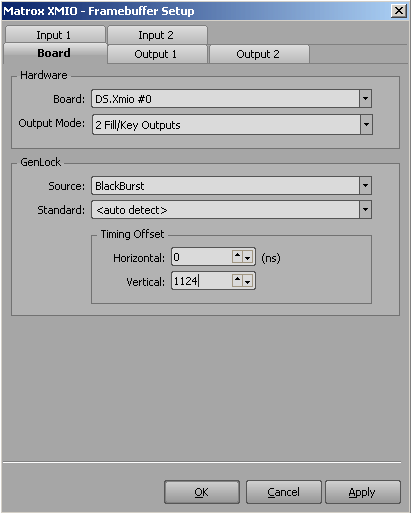
    Yes, you can configure the vertical reference delay in the Hardware Setup menu for the matrox. The proper settings are all depending on whether you are using Trilevel Sync or Blackburst and which video format you are using.

    Assuming Trilevel sync and 1080i, try setting the vertical timing offset to 1124.
    If using blackburst sync and 1080i, try setting the vertical timing to -2.

    #XPression


  • 3.  RE: Ross Xpression output doesn't not line sync properly like the rest of my sources in my switcher.

    Posted 03-09-2016 15:45

    Hi,

    I have almost the same problem but with video at the top. When i have a fullscreen image in Xpression and key it on top of video the first few video lines are transparant.
    I tried adjusting with the offsets but I can only lower the image. I tried almost everything including negative values.

    Sync: Blackburst
    Project settings: 1080i 50
    Matrox output: 576i (downconverted squeeze)

    As you can see in this image the top (where black white is showing) should be covered by the key.


    Any idea?


    #XPression


  • 4.  RE: Ross Xpression output doesn't not line sync properly like the rest of my sources in my switcher.

    Posted 03-09-2016 18:14
    You'll have to get waveform monitor and time the XPression output against Blackburst.
    The values that Brian Ford posted work most of the time but not always, if they don't work a waveform monitor is usually required.
    #XPression


  • 5.  RE: Ross Xpression output doesn't not line sync properly like the rest of my sources in my switcher.

    Posted 03-09-2016 19:00
    Niek, The settings I provided earlier were for 1080i 29.97 modes.. For your setting of PAL 576i, try using:
    Vertical Offset: 0
    Horizontal Offset: 57420


    #XPression


  • 6.  RE: Ross Xpression output doesn't not line sync properly like the rest of my sources in my switcher.

    Posted 03-18-2016 12:54
    Thanks for the answers.
    The 57420 horizontal offset did make it better but there is still a little line of background visible. I tried making the offset higher but no visible results.
    #XPression