Here's an example of a script for changing the volume level of a live input shader (a live video input material). Typically this script would be run in either OnPrepare or OnOnline for the scene, but you could of course run it in other places based on your needs.
Dim m_live1 as xpMaterial
Dim sh_live1 as xpBaseShader
Engine.GetMaterialByName("LiveSource1", m_live1)
m_live1.GetShaderByName("LiveSource", sh_live1)
sh_live1.SetVolumeLevel(0, 0)
For the SetVolumeLevel method (SetVolumeLevel(0, 0) – the first function is what audio channels to change the volume for, and the second function is to set the volume level. The range for volume level is 0 – 1.
0 is 0%
0.5 is 50%
1 is 100%
Ex.
SetVolumeLevel(0, 0) would set all audio channels to 0%.
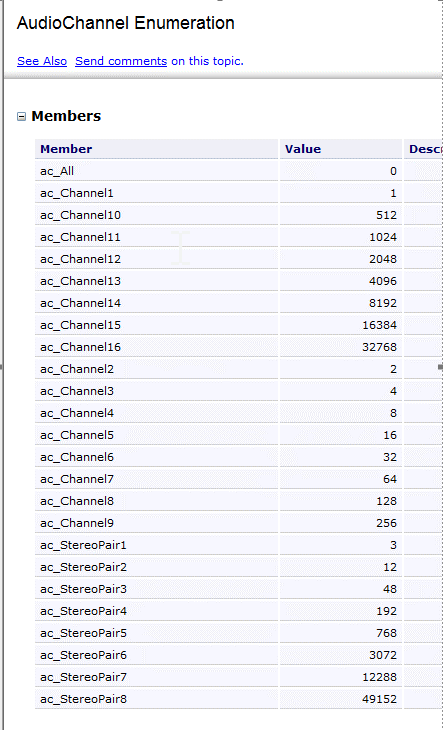
SetVolumeLevel(3, 1) would set stereo pair 2 at 100%.
For the audio channel function, here are the enumerations for different audio channels:
Original Message:
Sent: 02-01-2022 07:51
From: eyevar
Subject: Scripting - Live Source audio level
I'm trying to write a script that will set the audio level to 0 (mute) for a Live Video Source in my Xpression scene. I'm sure this is pretty simple to do, but unfortunately my scripting skills are limited. The external live source object is named "Background EXT INPUT". I have applied the script to the "OnOnline" tab on the scene. Appreciate any help on this.
Dim ExtInput as xpLiveSourceShader
Self.GetObjectByName("Background EXT INPUT",ExtInput)
ExtInput.SetVolumeLevel(audiochannel.ac_all,0.0)
------------------------------
eyevar
------------------------------