Yes it can be scripted.
dim rosstalk as xpGPIBoard
Engine.GetGPIBoard(0, rosstalk)
rosstalk.SendMessage("GPI 1")
'The "0" in the GetGPIBoard is the index of the GPI board in Hardware Setup > GPI Boards
'(Board #1 = Index 0, Board #2 = Index 1, etc..)
------------------------------
Simon Redmile
Ross Video
------------------------------
Original Message:
Sent: 06-15-2021 15:35
From: Casey Woodman
Subject: Script to Trigger Take ID from a different Xpression
Can this also be accomplished with a script? I am hoping to be able to use a dynamic text field that I can put the Take ID for the Other Xpression if I can.
------------------------------
Casey Woodman
Northwestern University Athletics
Original Message:
Sent: 06-15-2021 12:51
From: Simon Redmile
Subject: Script to Trigger Take ID from a different Xpression
Hey
You can place a RossTalk command on the Scene Director and send out commands over Smart GPI.
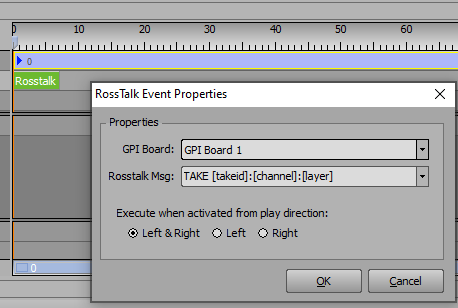
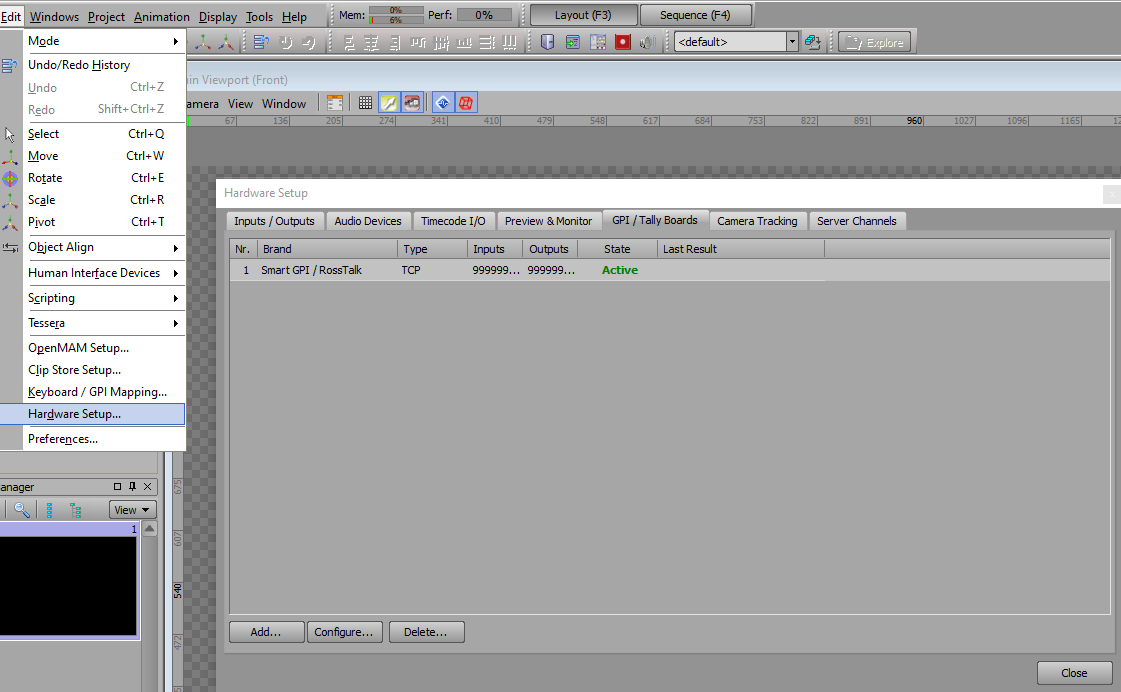
Don't forget you'll need to setup your outward GPI and inward GPI in XPression Hardware Setup.
------------------------------
Simon Redmile
Ross Video
Original Message:
Sent: 06-15-2021 12:39
From: Casey Woodman
Subject: Script to Trigger Take ID from a different Xpression
I am looking for guidance on if there is a way to trigger a Take ID from a different Xpression using scripting. For instance, If I want my Tessera Xpression (Ribbons) to Display a specific scene when I trigger a full screen on another xpression.
Has anyone had success doing this. Im assuming its using the Ross Talk Trigger but I am not sure how to direct it to the other xpression.
Any help is appreciated. Thanks
------------------------------
Casey Woodman
Northwestern University Athletics
------------------------------