Hey John,
my guess is for some reason txtAnimation is null; you could try wrapping the script in a try catch and see if any errors are thrown; I also recommend trying to delete the on disk script cache and restart XPression
engine.DebugMessage("****RIBBON CRAWL INPUT SCRIPT START****",0)
'declare variable
dim Project as xpProject
dim RibbonCrawl As xpScene
dim txtAnimation, txtLine1, txtType, txtAnimationName as xpTextObject
dim objTrans, objLoop as xpBaseObject
dim matLoop, matTrans as xpMaterial
dim shaderLoop, shaderTrans as xpBaseShader
dim sd as xpSceneDirector
Try
engine.DebugMessage("Variables declared",0)
'select output scene
Engine.GetProjectByName("WPLG19",Project)
engine.DebugMessage("Project selected",0)
Project.GetSceneByName("Ribbon Crawl Output", RibbonCrawl, false)
RibbonCrawl.GetObjectByName("Type", txtType)
RibbonCrawl.GetObjectByName("Animation Name", txtAnimationName)
RibbonCrawl.GetObjectByName("Foreground Trans", objTrans)
RibbonCrawl.GetObjectByName("Foreground Loop", objLoop)
RibbonCrawl.GetSceneDirectorByName("TRANSITION", sd)
sd.Position = 0 'set animation frame to 0
sd.Stop
engine.DebugMessage("Output scene elements selected",0)
'select input scene
Self.GetObjectByName("Select Animation", txtAnimation)
Self.GetObjectByName("Line 1", txtLine1)
engine.DebugMessage("Input scene elements selected",0)
engine.DebugMessage("Selected Animation = " & txtAnimation.Text,0)
engine.DebugMessage("Line 1 Text = " & txtLine1.Text,0)
'set output scene animation name text
txtAnimationName.Text = txtAnimation.Text
'set animation type type
If txtLine1.Text = "" Then
'set foreground animation to loop
txtType.Text = "Loop"
objLoop.SetVolatileTextureFile(0, self.project.projectpath & "Video\Ribbon Crawl\" & txtAnimation.Text & " Loop.avi")
engine.DebugMessage("Animation type = LOOP",0)
Else
'set foreground animation to transition
txtType.Text = "Trans"
objTrans.SetVolatileTextureFile(0, self.project.projectpath & "Video\Ribbon Crawl\" & txtAnimation.Text & " Transition.avi")
sd.Play 'play trasition animation
engine.DebugMessage("Animation type = TRANS",0)
End If
'set scene online
RibbonCrawl.SetOnline(2,-1)
engine.DebugMessage("****RIBBON CRAWL INPUT SCRIPT END****",0)
Catch ex As System.Exception
engine.DebugMessage(ex.Message,2)
End Try
------------------------------
Brandon Derry
Ross Video
------------------------------
Original Message:
Sent: 05-17-2022 10:41
From: John Robbins
Subject: Scripts working on one engine but not another
We recently upgraded our XPression system to 10.5 build 5518, and we're running into an issue where a script has stopped working on one engine but runs perfectly fine on another. The script runs OnOnline and recalls another scene to to a different layer on the same framebuffer then sets text and clips based on selected options in the parent template. On the affected engine the script gets to a specific point then stops. Below is a screenshot of the script debug monitor when the script runs successfully:
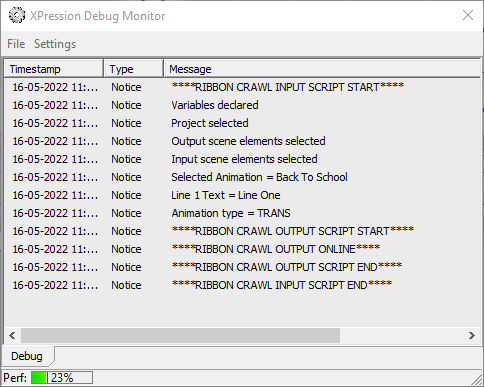
And the one below from the engine that it fails on:
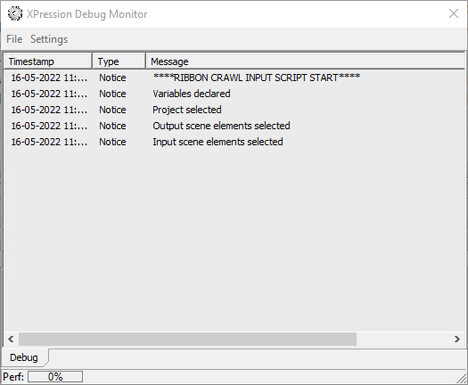
We've tried reinstalling Studio, making sure the script engine was installed, and it has not resolved the issue. Ross tech support has a copy of the project and the script is working for them. Has anyone come across a similar issue? Script in question is below. Thanks in advance!
engine.DebugMessage("****RIBBON CRAWL INPUT SCRIPT START****",0)
'declare variable
dim Project as xpProject
dim RibbonCrawl As xpScene
dim txtAnimation, txtLine1, txtType, txtAnimationName as xpTextObject
dim objTrans, objLoop as xpBaseObject
dim matLoop, matTrans as xpMaterial
dim shaderLoop, shaderTrans as xpBaseShader
dim sd as xpSceneDirector
engine.DebugMessage("Variables declared",0)
'select output scene
Engine.GetProjectByName("WPLG19",Project)
engine.DebugMessage("Project selected",0)
Project.GetSceneByName("Ribbon Crawl Output", RibbonCrawl, false)
RibbonCrawl.GetObjectByName("Type", txtType)
RibbonCrawl.GetObjectByName("Animation Name", txtAnimationName)
RibbonCrawl.GetObjectByName("Foreground Trans", objTrans)
RibbonCrawl.GetObjectByName("Foreground Loop", objLoop)
RibbonCrawl.GetSceneDirectorByName("TRANSITION", sd)
sd.Position = 0 'set animation frame to 0
sd.Stop
engine.DebugMessage("Output scene elements selected",0)
'select input scene
Self.GetObjectByName("Select Animation", txtAnimation)
Self.GetObjectByName("Line 1", txtLine1)
engine.DebugMessage("Input scene elements selected",0)
engine.DebugMessage("Selected Animation = " & txtAnimation.Text,0)
engine.DebugMessage("Line 1 Text = " & txtLine1.Text,0)
'set output scene animation name text
txtAnimationName.Text = txtAnimation.Text
'set animation type type
If txtLine1.Text = "" Then
'set foreground animation to loop
txtType.Text = "Loop"
objLoop.SetVolatileTextureFile(0, self.project.projectpath & "Video\Ribbon Crawl\" & txtAnimation.Text & " Loop.avi")
engine.DebugMessage("Animation type = LOOP",0)
Else
'set foreground animation to transition
txtType.Text = "Trans"
objTrans.SetVolatileTextureFile(0, self.project.projectpath & "Video\Ribbon Crawl\" & txtAnimation.Text & " Transition.avi")
sd.Play 'play trasition animation
engine.DebugMessage("Animation type = TRANS",0)
End If
'set scene online
RibbonCrawl.SetOnline(2,-1)
engine.DebugMessage("****RIBBON CRAWL INPUT SCRIPT END****",0)
------------------------------
John Robbins
Graham Media Group INC
------------------------------