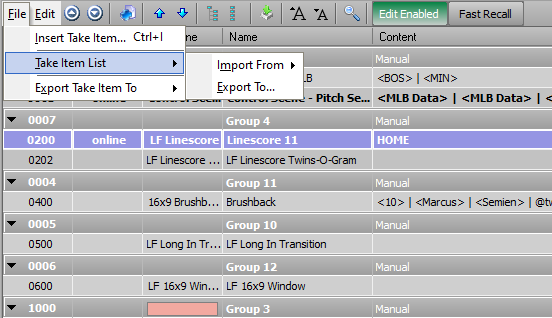
What Red said above. I call it the "small file". So you have the file menu system at the top left, and then when in sequence mode there is another file at the top. You can click that and do export take item to XML. Then you can save that XML and move it all around. As long as it is the same project you load on the other machine, then the XML will rebuild all of the graphics.
Things to note. If you want to grab the groups. Make sure you select the groups. Also make sure that you expand everything in your sequence. So if you sequence is collapsed and you select a group, it is not going to select the take items inside of that group, it is only going to take that group itself.
Then you will see in Red screen shot the import from as part of the small file, so when you get to your other machine, you do that step and load the XML file and you are in business. This is how ESPN executes most all of its college sports shows. They have XMLs that have 4,000-6,000 take items inside of it. Then the location will load their projects and then load the XML.
XML files are tiny and you can email them to yourself to transport around. - You can also save them into a project structure so that when you package a project up into an xpp file, you can save the XML with it.
Lastly, If you understand the XMLs, you can even technically build graphics through like Notepad++ application. Any application that would allow you to edit an XML file. You can make changes to your saved XML, or add graphics. The structure to the XML file is really to understand and edit in an offline setup for when you are not at an Xpression machine.
------------------------------
Garrett Hall
Overtime Elite
------------------------------
Original Message:
Sent: 02-16-2022 13:38
From: Simon Redmile
Subject: Copy a sequence/sequence group to another job?
Is this what you are after?
------------------------------
Simon Redmile
Test Pilot | Senior Graphic Programmer & Designer
Ross Video
London United Kingdom
Original Message:
Sent: 02-16-2022 13:29
From: Helen Ringer
Subject: Copy a sequence/sequence group to another job?
Can you copy a sequence or a group within a sequence to another job?
If you make a set of cut card credits from a single layout, within the sequencer can this then be copied/imported to another job?
Otherwise it means making credits in layout over lots of pages and then importing them into another job.
Would be useful to be able to export/import sequence groups.
H
------------------------------
Helen
------------------------------