Facility Control

 View Only
  • 1.  Countdown Clock in Dashboard

    Posted 09-19-2018 15:35
    I think I already know the answer to this.

    Is there anyway to get the countdown clock of a video running in Xpression into Dashboard? There are a few sequences where we need to know the run time.

    Ryan


  • 2.  RE: Countdown Clock in Dashboard

    Posted 09-19-2018 17:14
    Unfortunately, at this point, I don't think there's any way of doing that. We are working on some things that will make this possible soon.
    #DashBoard


  • 3.  RE: Countdown Clock in Dashboard

    Posted 09-19-2018 19:59
    That's what I thought. Thanks for the response I will look forward to this update!
    #DashBoard


  • 4.  RE: Countdown Clock in Dashboard

    Posted 06-19-2019 18:55

    Has this been addressed in the new software for Graphite or Xpression? I would love to have countdown clocks in my custom dashboard!


    #DashBoard


  • 5.  RE: Countdown Clock in Dashboard

    Posted 06-19-2019 19:22

    How are you playing the clips?   Are they part of scenes in XP Studio, or just stand-alone clips in XP Clips?


    #DashBoard


  • 6.  RE: Countdown Clock in Dashboard

    Posted 06-19-2019 19:37

    I'm playing 'groups' in XP Studio.

    My custom control in my custom dashboard references the take ID (#1100 and #1200) as seen in the attached screenshot and plays the entire group/playlist.

    My hope is that I can add a window in my dashboard that shows the number of minutes and seconds left in the playlist so they can be ready to switch to the next source as the XP studio playlist comes to an end. Right now they have to switch between viewing the XP window for the countdown and the Dashboard window to click the next button.


    #DashBoard


  • 7.  RE: Countdown Clock in Dashboard

    Posted 06-19-2019 20:09

    Yes, there is a way of getting the countdown information for these clips (since you are adding them to the Studio Sequencer).


    In DashBoard, add your XP Device using the green "plus"
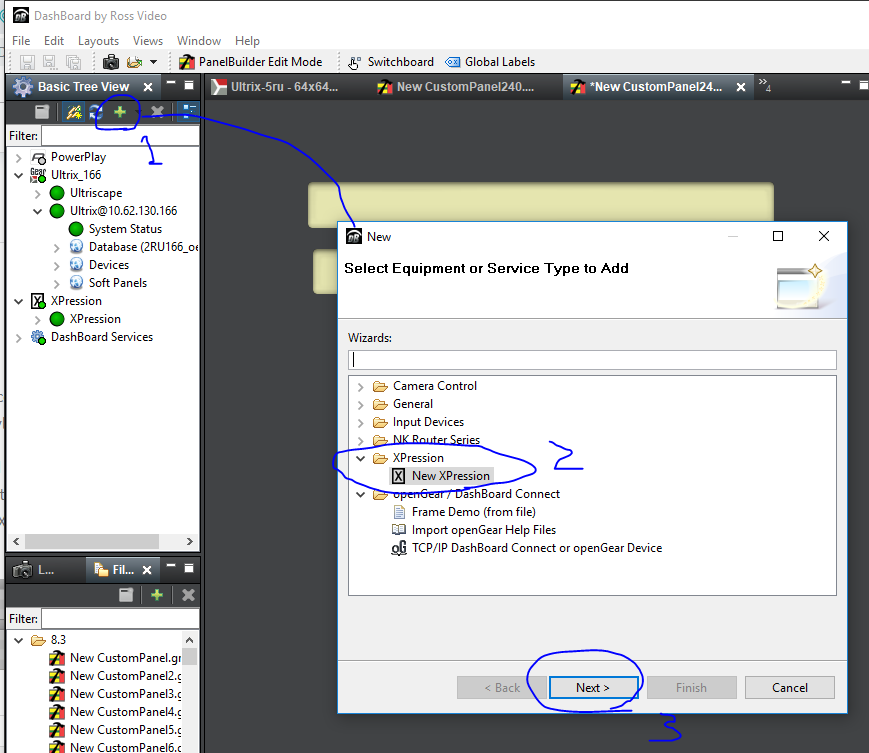
     

    It will show up in your tree, like this:
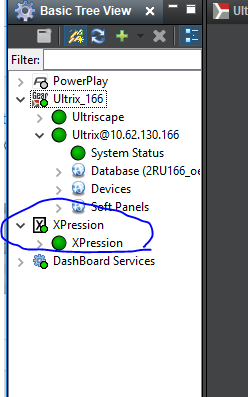
     

    Create a new custom panel with the default settings.   Go into Panel Builder mode, and double click anywhere there is nothing to get into the Edit Component window.   If you clicked on nothing, the top level node should be selected (if not, select it)

    Find where it says "openGear or XPression datalinq".  Check that box, and the configure screen should appear.  Select "select a device" radio button, and select your XPression from the list:
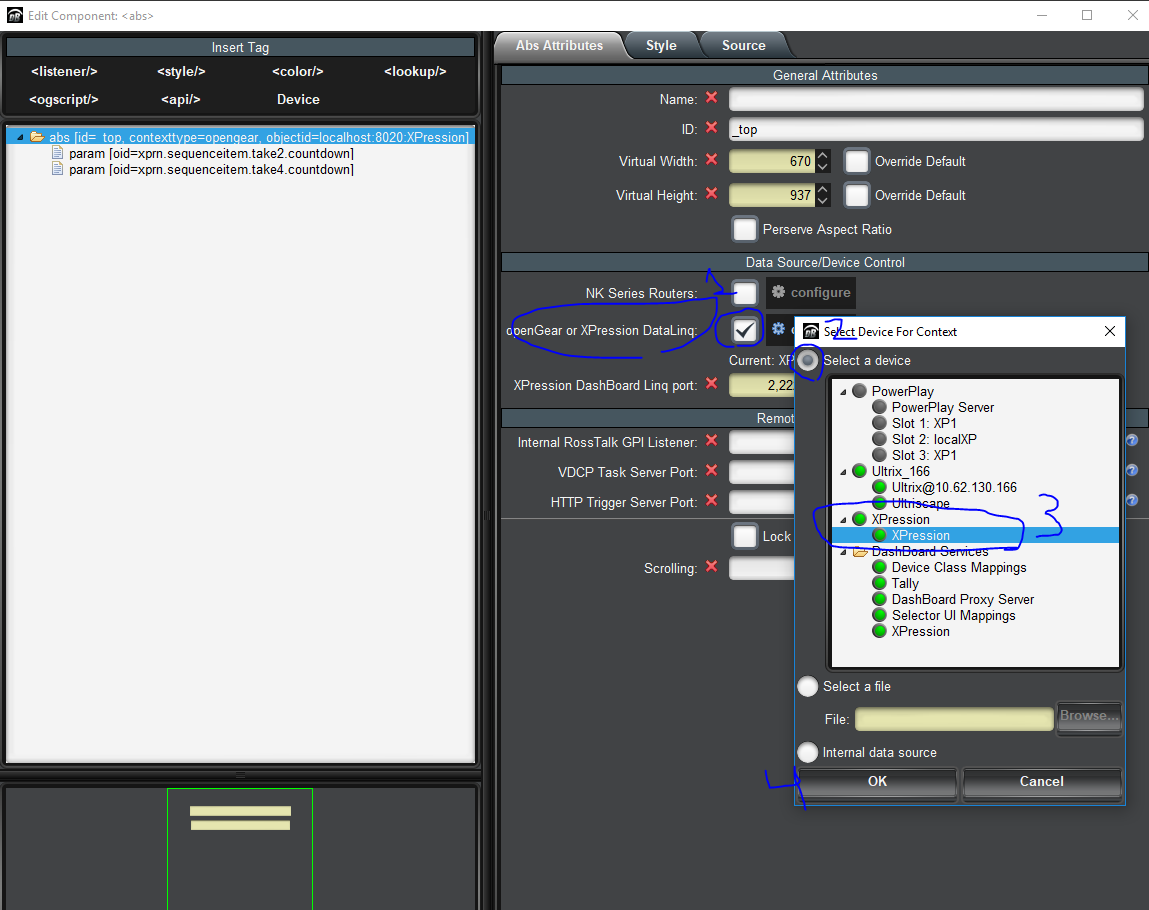
     

    Then in your panel, select the "param" button in panel builder mode.   Drag and drop somewhere to drop a parameter, a popup window will appear showing you all the parameters that we received from your XP:
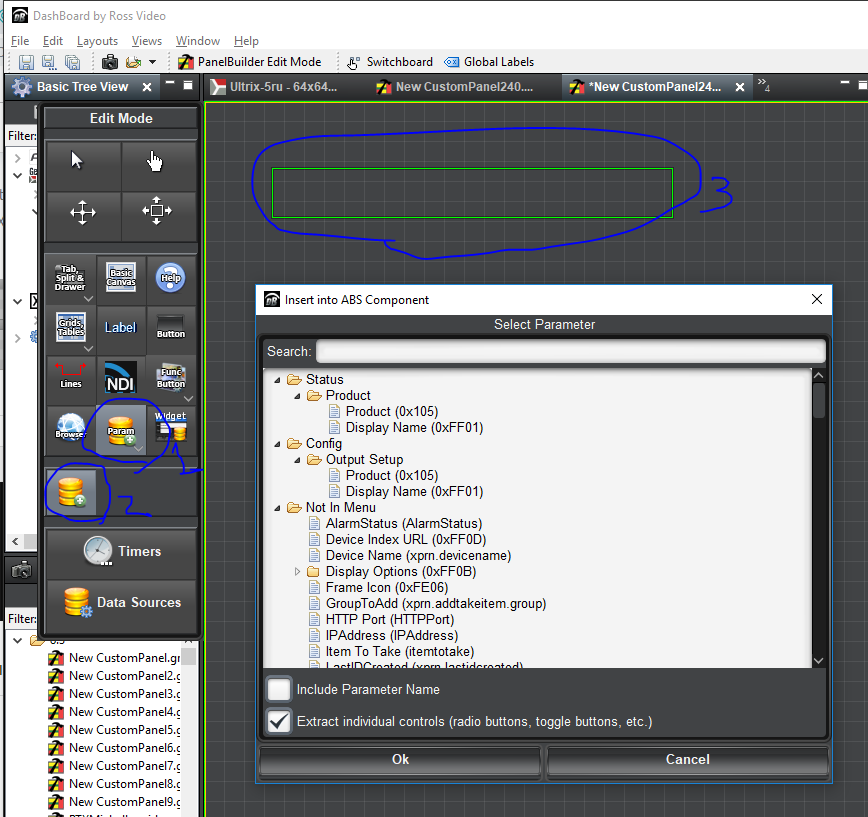
     

    If you search for "countdown" in the search bar, you will see the countdown field for each of the takes in your XP.
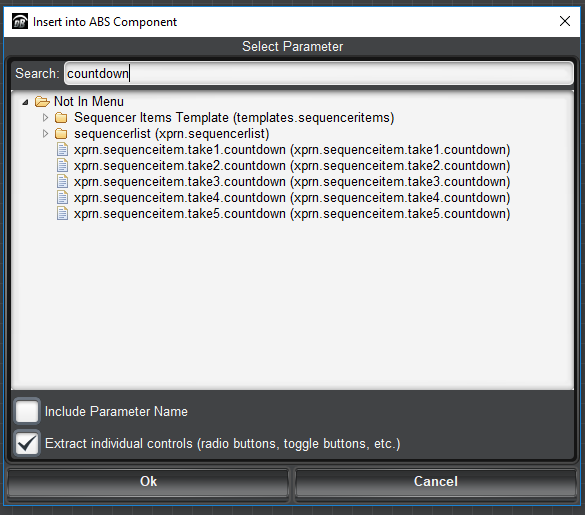


    Pick one and drop it in your panel.    It should be blank by default (if your clip is not playing).   If you play a clip in XP, you will see this value change.   It only updates once per second, or when the state changes.   But it gives you a rough value for the remaining time.    You can also search for "duration", and find the clip durations.

    With those 2 parameters, you should be able to figure out how much time is remaining in one clip.   You can use other parmaters (like the "group" and "state" parameters to find all the clips in your whole group, and figure out how much time is remaining in the whole group).

    If you need more help, let me know.


    #DashBoard


  • 8.  RE: Countdown Clock in Dashboard

    Posted 06-19-2019 20:58

    Thanks this is very helpful. Although, I am using a Graphite, and when I click the green plus to add the Xpression device, there is no Xpression device to add. Is it different with a Graphite? I tried adding a manual device with the IP address and that didn't work either.


    #DashBoard


  • 9.  RE: Countdown Clock in Dashboard

    Posted 06-19-2019 21:48

    Hi Chris.

    Which version of DashBoard are you running on your Graphite? It may just be an older version that pre-dates the XPression Plug-in. The plug-in should be available in version 8.4.0 and newer.


    James


    #DashBoard


  • 10.  RE: Countdown Clock in Dashboard

    Posted 06-19-2019 21:54

    That's it. We're on version 8.3.1. We'll update at some point and I'll give it a try. Thanks!


    #DashBoard