Facility Control

 View Only
  • 1.  Tab order,__two or more lines,__etc

    Posted 07-18-2014 06:02
    Hello!

    I am making a control panel using DashBoard Version 6.2.0 I. Also I am using Ross Video's documents:"DashBoard Control and Monitoring System User Guide Version 6.0"

    and "ogScript Reference Guide DashBoard 6.0.0.v6000x".

    Could you please advise me.

    1

    I want to change the tab order of controls as I like on a control panel of DashBoard. Can I indicate serial numbers to every components as one of attribute of a component?

    By this method or others, How can I indicate it in a grid file?Please tell me form's samples. The tab order is the order in which the TAB key moves the input focus from one control to the next within a control panel of DashBoard.

    2

    I want to display a text which have two or more lines as "Name" on a label or a button. Can I use LF(line feed) or/and CR(carriage return) in "Name" of label?

    Please tell me form's samples.

    3

    If you have some later revisions of DashBoard's and ogScript's Manuals than one which I have, please tell me where they are?

    Thank you.


  • 2.  RE: Tab order,__two or more lines,__etc

    Posted 07-18-2014 14:06
    Hi Kei,

    Point 1:

    I'm not entirely sure what you're trying to achieve so excuse me if this advice isn't any good.

    * make sure you have given all your tabs unique IDs. These are not set by default. Note that double clicking a tab group will bring up the UI for the group's container. You need to use the tree view on the left to select each child in the tab group, then set the ID field in each to something meaningful.

    * you can then bring any one of these to the front by this script:

    ogscript.reveal('[id of tab']);

    Point 2 is pretty easy to solve: use html tags to mark up the attribute of your button like this:


    [TR]
    My[/TR]

    [TR]
    Button[/TR]


    This will render as:

    My

    Button

    Point 3:

    The 6.1 versions of the manuals can be downloaded here [URL=http://www.rossvideo.com/control-systems/dashboard/index.html][/URL]

    Hope this helps!

    John

    #DashBoard


  • 3.  RE: Tab order,__two or more lines,__etc

    Posted 07-18-2014 16:11

    ok - the forum ate the html I typed into my original reply, so I'm going to try again with escaped characters... If this isn't exactly right it's because I'm only human...

    first, I'll try the code escape wrapper.

    [TR]
    My[/TR]
    
    [TR]
    Button[/TR]

    if there's blank between this line and the previous one ending in "wrapper" that didn't work. Here's a human escaped version:

    [TR]
    My[/TR]
    [TR]
    Button[/TR]


    good luck!


    #DashBoard


  • 4.  RE: Tab order,__two or more lines,__etc

    Posted 07-18-2014 16:12
    so the code escape wrapper removed all the markup too, but the human escaped version looks about right.

    #DashBoard


  • 5.  RE: Tab order,__two or more lines,__etc

    Posted 07-22-2014 03:24
    Thank you,Mr. Naylor.

    Point 1

    I am sorry my explanation is not good.

    If I push a space key while running DashBoard with some CustomPanel on Windows OS,a same effect occurs as which I click a highlighted(focused) component on the CustomPanel by a mouse.

    I think that it is a function of the OS. Whenever I push a tab key, the highlighted component changes.

    I have called this highlighted component's changing order "Tab Order" on the previous question.

    Point 2

    Like your saying it is pretty easy to edit on "Button Attributes" of "Edit Component",isn't it?

    Thank you!

    Point 3

    I will refer to them.

    Thank you.

    #DashBoard


  • 6.  RE: Tab order,__two or more lines,__etc

    Posted 05-25-2021 13:04
    Sorry to resurrect this thread, but it never got an answer.
    Is there a way to handle the order of Tabbing through objects in Custom Panels (aside from physical placement)?
    What I found online about the subject is something like this: Creating_Logical_Tab_Order_with_the_Tabindex_Attribute

    No luck when I attempted to put it into practice, but that's kind of par for the course with custom panels and ogscript in my experience.

    Also I guess a comment on the Aura theme, I used to be able to see what object was in focus when tabbing, but now I can only really tell if it's a text field. Even pressing space or enter doesn't really stand out, unless it's on an object like a toggle or checkbox that shows a distinct change.

    It doesn't come up too often, but sometimes the layout of objects and their practical use for the operator aren't exactly the same, and being able to create a logical order with Tabs can be surprisingly useful.

    As a prime example, here is how I handle a canvas where we enter details following a race:
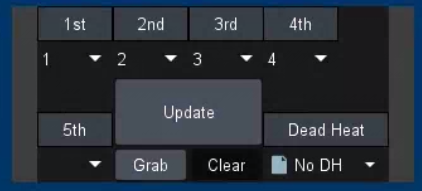
    We always write in the top 4 runners of the race, but sometimes we might need to put in a 5th. Instead of having to type in "1st, tab, 2nd, tab, 3rd, tab, 4th, tab, tab, enter to Update", I've moved the 5th away from the group and have the Update extra tall to manipulate the tab order. Makes it look a little weird, but it works, and like I said, not really the ideal layout.

    Similarly, this is a configuration area for a slate:
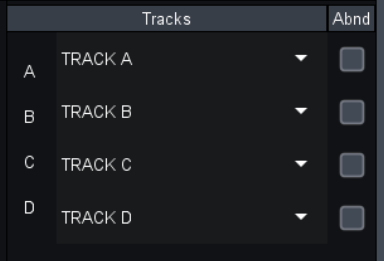
    We always write/select tracks for the dropdowns, but the Abandoned checkbox is more of a special case situation. In this layout, it makes logical sense, but you have to tab twice after each track to get to the next track and continue typing. If we can force a tab order, we can skip the checkboxes automatically.

    Instead, I have something like that manipulates the tab order:
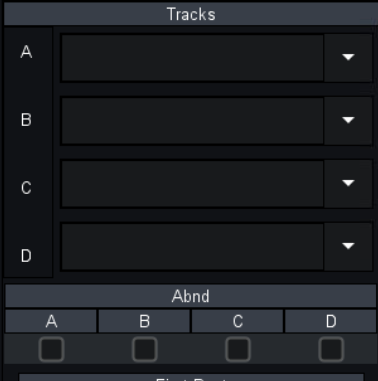
    It works. But I don't think it looks as good or is as efficient as before.

    It doesn't seem like much, but when you have to put information like the race results in upwards of 40-50 times a night, those extra tabs add up.

    Anyway, just some thoughts and examples. It would be cool to get an answer to this very specific use case! Thanks.

    ------------------------------
    Mike DeMarco
    Video Production Engineer
    RCN
    Las Vegas United States
    ------------------------------


  • 7.  RE: Tab order,__two or more lines,__etc

    Posted 05-25-2021 16:19
    Hi Mike
    I don't have an update for you in terms of manually-specifying your tab order - we still tab through them in the order they appear in the CustomPanel hierarchy and don't have an explicit way of removing them from the tab-traversal.
    With respect to the specific layouts you've mentioned, you may do better at achieving your goal by using different containers. For your second layout, if you create a 3-column table and fill each column with a single-column <simplegrid/> tag, I think you might like the results (attaching an example panel).
    For your first layout, I assume you are using a <table/> with your update button a row higher with its rowspan set to 2. If you keep that but set the fill to horizontal and the anchor to bottom, you should be able to make the size/alignment of the update button match the buttons in columns 1 and 3.
    <abs contexttype="opengear" keepalive="true">
    <meta>
    <params>
    <param access="1" maxlength="0" name="Text" oid="Text" precision="0" type="STRING_ARRAY" widget="text">
    <value>
    </value>
    <value>
    </value>
    <value>
    </value>
    <value>
    </value>
    </param>
    <param access="1" constrainttype="INT_CHOICE" name="Toggle" oid="Toggle" precision="0" type="INT32_ARRAY" value="0;0;0;0" widget="checkbox">
    <constraint key="0">Off</constraint>
    <constraint key="1">On</constraint>
    </param>
    </params>
    </meta>
    <table height="364" left="91" top="99" width="633">
    <tr>
    <simplegrid cols="1" colspan="1" fill="both" insets="2,2,2,2" rowspan="1" vspace="2" weightx="0.0" weighty="1.0">
    <label name="A" style="txt-align:center"/>
    <label name="B" style="txt-align:center"/>
    <label name="C" style="txt-align:center"/>
    <label name="D" style="txt-align:center"/>
    </simplegrid>
    <simplegrid cols="1" colspan="1" fill="both" insets="2,2,2,2" rowspan="1" vspace="2" weightx="1.0" weighty="1.0">
    <param expand="true" oid="Text" showlabel="false"/>
    </simplegrid>
    <simplegrid cols="1" colspan="1" fill="both" insets="2,2,2,2" rowspan="1" vspace="2" weightx="0.0" weighty="1.0">
    <param expand="true" oid="Toggle" showlabel="false"/>
    </simplegrid>
    </tr>
    </table>
    </abs>


    ------------------------------
    James Peltzer
    Ross Video
    ------------------------------


  • 8.  RE: Tab order,__two or more lines,__etc

    Posted 05-25-2021 20:26
    Ah yes. That's kind of the solution I came to myself as well, but haven't put it into practice yet. It actually really helps looking at the panel you shared! I've just now really started making more use of tables (previously just used canvases for most things), and the code you showed looks like a great way to still keep things nice and clean.

    Funny enough, the examples I shared are the other way around. 
    The first is just a simple canvas with all the elements laid out in it manually which is how I manipulated the tab order. I had to check once you mentioned the order they appear in the hierarchy, but I can assure you that's not it manifests in that canvas:
    As far as I've gathered, it somehow looks just to the physical placements of the objects and works left to right, top to bottom, starting with the last object you click on.

    And the second example is actually a 4-column table (there's more below that I didn't add to the snap), but I do really like the idea of reducing how many rows there are and using more container elements inside the table instead. This table we're referring to is actually similar in that it's part of a group of tables inside of a bigger table, but based on your example I think learning to make use of simplegrids might help clean up my layout quite a bit.


    Thanks James!

    ------------------------------
    Mike DeMarco
    Video Production Engineer
    RCN
    Las Vegas United States
    ------------------------------