Facility Control

 View Only
  • 1.  XPression Proof of Play Panel

    Posted 06-22-2018 19:34
    Hi,

    I was wondering if there is a way to configure a panel in Dashboard that has the ability to track how long certain scenes play inside of XPression as well as how many times they have played. In essence, it would be a sponsorship tracker that can also prove how long each sponsorship has appeared on air. The data would also just stay contained inside of Dashboard, it wouldn't need to output to an Excel sheet, but if anyone knows a way to do this, it would be greatly appreciated.


  • 2.  RE: XPression Proof of Play Panel

    Posted 06-29-2018 14:17
    Are you using the DashBoard panel to trigger the XPression scenes or are they being triggered elsewhere?

    How you're triggering the scenes will impact how you can keep track of this information. You may also consider posting to the XPression forum as I believe some of the information you're looking for is already tracked on that side.

    James
    #DashBoard


  • 3.  RE: XPression Proof of Play Panel

    Posted 06-30-2018 18:11
    They're being fired via Dashboard.
    #DashBoard


  • 4.  RE: XPression Proof of Play Panel

    Posted 06-30-2018 22:43
    Xpression has as run logging enabled by default. Any reason you want to do this within DashBoard?
    #DashBoard


  • 5.  RE: XPression Proof of Play Panel

    Posted 07-03-2018 13:34
    I'd want to do this inside of Dashboard because we already utilize a sponsorship tracker that tells us how many times a sponsor plays and it would be to have the alongside it. We also utilize the Tessera system and we'd like to use it to fire our fascias as well as our main board, but there isn't an established way inside XPression to export out runtimes of certain graphics, unlike what Daktronics has. We want to have the ability to control our fascias with the Tessera, but until we can prove playout times to our corporate sponsorship team, we have to stick with Dak.
    #DashBoard


  • 6.  RE: XPression Proof of Play Panel

    Posted 07-03-2018 18:57

    If you have the XPression Plugin for DashBoard (which was released with Version 8.4), and the appropriate XPression License, then you can use that plugin to determine when a take item is taken to air or taken off air.

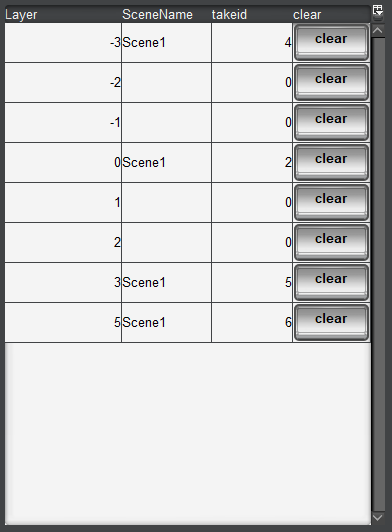
    The easiest way to do that is to use the xprn.outputs.0.outputstate parameter (I used 0, for the first output, but there is one for each output of your XPression).

    That parameter is a structure that has all the active layers of the output. For each layer, it tells you what takeid and scene is currently on that layer.

    It looks something like the attached picture.

    You could put a listener on that parameter, and every time it changes, figure out which take id was either put on air or removed from air. You could keep a running total in that way.

    Of course, just because something was put on a layer does not mean it's visible. There might be something blocking it on a higher layer. But you would have a count of each time something was played, and you can calculate how long it was on air.


    If you only care about a few take items, then you could also use the xprn.sequenceitem.take.state parameters (where is the takeid of the item you care about). You could put a change listener on that parameter for each item you want to track to know when it's online or offline.

    Let me know if you need more info about this.

    #DashBoard


  • 7.  RE: XPression Proof of Play Panel

    Posted 08-08-2018 09:21
    Hello
    it's a very interesting solution.
    Can you write an example how launch the listener on the Dashboard?
    Do I have to change any options in Xpression to run it?


    #DashBoard