Facility Control

 View Only
Expand all | Collapse all

Dashboard Beginner Question

  • 1.  Dashboard Beginner Question

    Posted 10-29-2018 18:59
    I have an existing Custom panel that contains objects copied from multiple MC-1 devices in different frames. I also have a NK-3G16 router I am trying to create a button to change specific router cross points. To start, I just want a simple button that connects a single input to an output on the NK but I am having a very difficult time. After reading a lot of posts I suspect my difficulty in adding the new button is because my original custom panel may not be the correct type. I set up my current panel using "Blank Self-Contained Data Source Panel (XPression)" After reading the Forum posts I suspect I must use "NK Data Source Canvas"? Is that true??

    I did attempt to create a button on a new "NK Data Source Canvas" but I still could not figure it out. If I start with a "NK Data Source Canvas" how do I create a button to change a single cross point. I was told all I need is the input name, output name and layer. I only have 1 layer and I know the names of the input and output.

    I also tried to copy the existing objects from my original custom panel onto a new "NK Data Source Canvas" panel so everything would be on the same panel, but Dashboard just put up a message saying waiting for Slot 1 and never copied any objects.

    So how to I create my button so it and all my existing MC-1 objects live on the same custom panel? Please dumb it down for the newbe.

    Thanks for any help.
    Jim


  • 2.  RE: Dashboard Beginner Question

    Posted 10-30-2018 21:36

    Hi Jim.
    Custom Panels can contain multiple data sources (these would be your MC-1s) and data types (an MC-1 or openGear product vs. an NK Router). To use both, you need to have containers or "contexts" pointed at each of your different devices. If you are seeing "wating for slot..." it means that you haven't pointed the container (the part of the screen where the control lives) at the correct data source.

    The easiest way to have an NK and openGear data source in the same custom panel is generally to nest an NK data source inside of the openGear data source like this:

    <abs contexttype="opengear">
       <meta>
          <params>
             <param access="1" constrainttype="INT_CHOICE" name="Test" oid="Test" precision="0" type="INT32" value="0" widget="22">
                <constraint key="0">One</constraint>
                <constraint key="1">Two</constraint>
                <constraint key="2">Three</constraint>
                <constraint key="3">Four</constraint>
             </param>
          </params>
       </meta>
       <abs bottom="0" contexttype="nk-router" left="0" right="0" style="" top="0">
          <meta>
             <ogscript handles="nkstatchange">var statChangeEvent = event;
    ogscript.debug('CHANGED SOURCE: ' + statChangeEvent.getSrcAddress());
    ogscript.debug('CHANGED DEST: ' + statChangeEvent.getChangedOutput());
    ogscript.debug('LEVEL MASK: ' + statChangeEvent.getChangedLevels());</ogscript>
          </meta>
          <ipslist height="97" left="9" top="7" width="567"/>
          <param expand="true" height="173" left="85" oid="Test" style="style:toggleButton;" top="150" width="554">
             <task tasktype="ogscript">nk.doSwitchWithLabels('DST_NAME', params.getValue('Test', 0), '0');</task>
          </param>
          <lvlstatus dst="all" height="314" left="678" scroll="vertical" showlabel="true" style="font:mono;size:small;bg#efffbe;fg#000000;t:bg#c8d5a0;t:fg#000000;" top="28" width="272"/>
       </abs>
    </abs>

    If you go into edit mode and select the top-level element in tree, you can also add additional devices (like multiple MC-1s) to the custom panel or point the top of the custom panel to a specific MC-1 if all of your parameters are coming from there.

    If you want to do an NK switch, you would need to put a button inside of an NK context and call nk.doSwitchWithLabels('DST_NAMES', 'SRC_NAMES', 'LEVEL_NAMES_OR_NUMBERS');


    #DashBoard


  • 3.  RE: Dashboard Beginner Question

    Posted 10-31-2018 22:19
    Sorry can you dumb it down for me a bit. To create my current panel I just dragged and dropped the items I needed from my MC-! "On-Air Control" panels. That was easy. This seems alot more complicated. I know you say I need to add a NK context but I am not following your instructions. So far I have... I open my original form and enter edit mode. I already added a blank button on my panel that I want to use to control a single router cross point. You indicated I need to add the NK context to my existing panel (or is it to the button)???

    Specifically how do I add an NK context? If its helpful I can send you my existing panel. Otherwise if you could provide a screen shot example of how I add the context. I have only been working with the GUI not the code so I need a bit of a push to understand this. For example do I double click on my panel and add the new context in the inset tag area? Or do I add it to the Source tab on the Right side?

    I double clicked on my panel and I see under "Abs Attributes" there is a Checkbox and a configure button for "NK Series Routers" Do I need to check that to add the NK context? FYI I just tried that checkbox and it turned OFF the "OpenGear or XPressions DataLinq" Checkbox just below it so I quit out.

    If you can help me get just one button going I am sure I can work out the rest but I do not follow how to add the context to get to the router, to connect the button..

    Thanks
    Jim
    #DashBoard


  • 4.  RE: Dashboard Beginner Question

    Posted 11-01-2018 18:37

    Hi Jim.
    Let's try a different approach and use Visual Logic to create your router crosspoint change:

    In your button:

    • Select "Add" in the task list

    • With the Visual Logic editor open, click the green "+" symbol next to "Devices & Parameters"

    • Select "Add device from Basic Tree"
    • Choose your IPS from the tree

    • You should now see commands available for your router and be able to do switching either by name or by number


    #DashBoard


  • 5.  RE: Dashboard Beginner Question

    Posted 11-06-2018 16:13
    Thanks for the visual. It worked perfectly!
    #DashBoard


  • 6.  RE: Dashboard Beginner Question

    Posted 12-05-2018 23:19

    I need to take my original question to the next level. I need to create a custom panel button that will change a router input on the MC1. I would like a button that changes the MC-1's button 2 from router input 1 to router input 2? Is that possible?


    #DashBoard


  • 7.  RE: Dashboard Beginner Question

    Posted 12-06-2018 15:00

    Hi Jim,

    I don't believe there is a visual logic block or api call to change the router input on an MC1. But you can still do it.

    You need to find the parameter that represents the value you want to change. The easiest way is to go into Inspector Mode in the MC1 Config panel. You do that by pressing Ctrl+I. Then you can double click on the value you want to change to see what parameter is backing it.

    If you look at the image MC1_Step1, you will see that the router input is backed by the parameter 0x1811. The first one in the list is index 0, the second is index 1, and so on.

    With that information, in your ogscript, you can change the value with the following command:

    params.setValue("0x1811",0, 99);

    This would set the first one (index 0) to the value 99. If you want to change the second one, you would use:

    params.setValue("0x1811",1, 99);

    If you know the parameter, you can also do it with Visual Logic. See MC_Step2 image for an example.

    Let me know if you have any questions.


    #DashBoard


  • 8.  RE: Dashboard Beginner Question

    Posted 12-06-2018 18:36
    Thank You that was very helpful. I was able to add it just as you specified but I haven't tested it yet. I am waiting for a time I can test it without affecting on-air.

    One more question if you can. Is it possible to create a button array/index? I currently have 8 buttons on my custom panel. But only one can be active at a time and with 8 individual buttons you cant tell which one is active. So I would like to create a set of 8 buttons where the active button is a different color and clicking on any of the other buttons makes the button clicked active and the original button inactive. All 8 of my existing custom buttons currently control my router. So the short question is how do I create a set of buttons that function like the Program bus but have my own backend router commands.
    #DashBoard


  • 9.  RE: Dashboard Beginner Question

    Posted 12-06-2018 19:05

    The way to do this is to add a parameter with a Choice Constraint.

    I clicked on the "parameters" button in the Panel Builder Edit Mode bar, and created the following parameter:


    You could also use a String instead of an Integer instead if you want.

    Make sure you make a Choice Constraint, and in the constraint, put in all the values you want.

    In the Widget Hint, make sure you put "Toggle Buttons" (the plural one, not the Toggle Button, singular).

    Click on Commit Changes.

    Then in your panel, you can use the param button, and drag that parameter where you want it.


    You now have a series of toggle buttons. You can double click on it in Panel Builder mode, and add a task to it at the bottom. The task I added just says:

    ogscript.debug("toggle is now set to " + params.getValue('buttonArray', 0));

    So when you click on a button, it outputs which one is set to the debug console. You could obviously do something different based on the value that is clicked.

    If you don't want it in a row like that, you can use a simple grid. In the grids and tables section, pick a simple grid, and drag/drop it onto your panel. Override the default number of rows and columns to make it 3x3 (or whatever you want). Then use the same "param" button as the above picture, but instead of dragging your parameter onto the panel, just click on the empty simple grid. Pick your parameter, and it will fill up the simple grid with the toggle buttons.

    You can see an example in the attached grid file.


    #DashBoard


  • 10.  RE: Dashboard Beginner Question

    Posted 12-06-2018 20:14
    Ok made a lot of progress, but I am lost at one point. Can you provide me an example on how I would do a different command based on what button was pressed?

    here is a example of a command I have in my 8 individual buttons.

    • /*! block id=1003 !*/ nkglobal.getScriptObject("NK_IPS.1").doSwitchWithL abels("QC Monitor", "IMMediaTV Live", 1); /*!! !!*/ /*!!14eaa0ba72deaf75bebf0761e0285c28!!*/
    I have 8 of these commands all using different router points. What would my task look like in the new button array if I wanted to have each button execute a different command?
    #DashBoard


  • 11.  RE: Dashboard Beginner Question

    Posted 12-06-2018 20:34

    I'm assuming that the "IMMediaTV Live" is what is changing in each of your buttons. If that assumption is wrong, then adjust the code based on what is really changing.

    You have several options:

    Option 1: if statements:

    if (params.getValue('buttonArray', 0) == 1) {
    nkglobal.getScriptObject("NK_IPS.1").doSwitchWithL abels("QC Monitor", "IMMediaTV Live", 1);
    }

    if (params.getValue("buttonArray', 0) == 2) {
    nkglobal.getScriptObject("NK_IPS.1").doSwitchWithL abels("QC Monitor", "Something Else", 1);
    }

    ...

    Option 2: switch

    switch(params.getValue('buttonArray',0)) {
    case 1:
    nkglobal.getScriptObject("NK_IPS.1").doSwitchWithL abels("QC Monitor", "IMMediaTV Live", 1);
    break;
    case 2:
    nkglobal.getScriptObject("NK_IPS.1").doSwitchWithL abels("QC Monitor", "Something Else", 1);
    break;
    case 3:
    nkglobal.getScriptObject("NK_IPS.1").doSwitchWithL abels("QC Monitor", "Something Else Again", 1);
    break;
    default:
    code block
    }

    Option 3: Use your constraint values to dictate what happens:
    Change your task to this:

    nkglobal.getScriptObject("NK_IPS.1").doSwitchWithL abels("QC Monitor", params.getValueAsString("buttonArray",0), 1); 

    The getValueAsString will get you the name of the button. As long as you setup the constraint with the right names, then the SwitchWithLabels will work fine.

    I much prefer option 3, but I'm not sure what the other 7 buttons are doing. If they are all doing the same thing, but with one small change, then I would use option 3. If each of the buttons is doing something radically different, I would go with option 2.

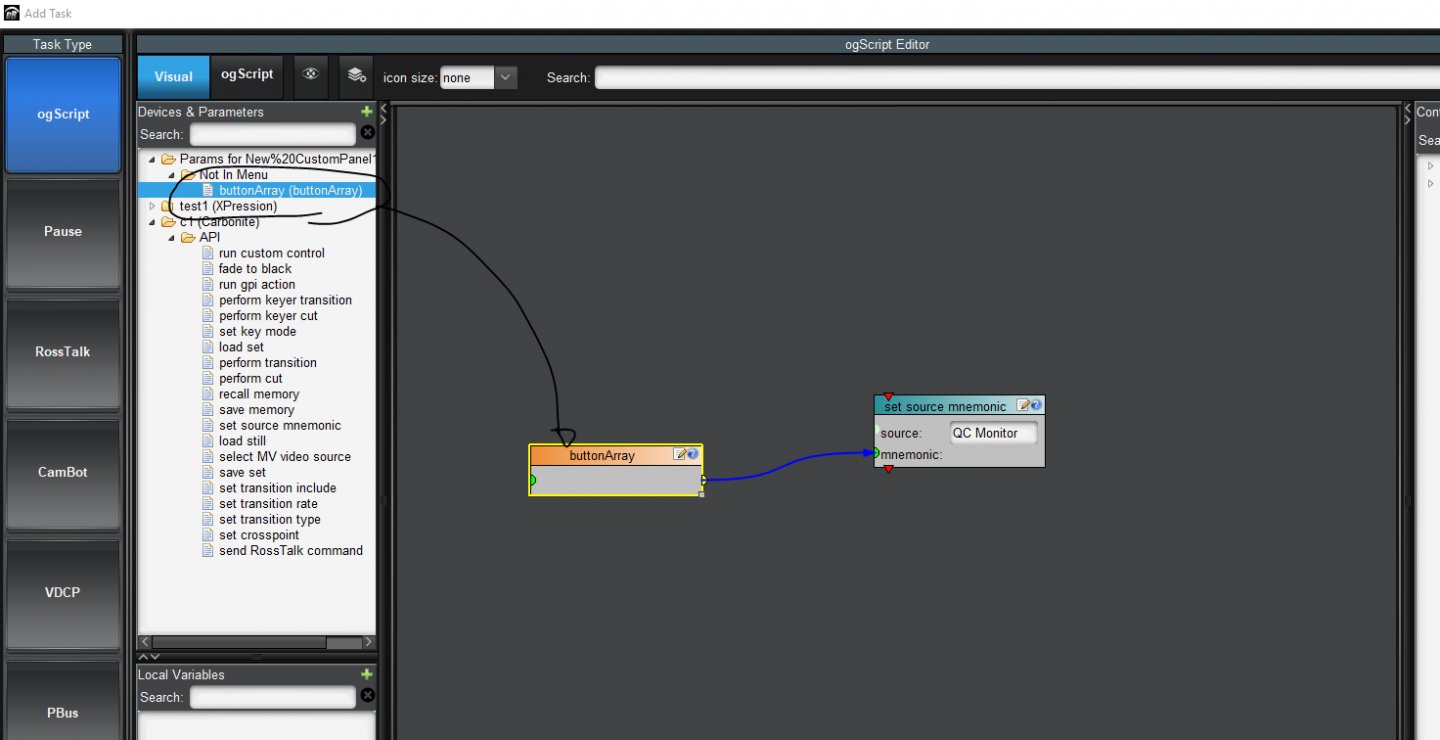
    It also looks like you are using Visual Logic.

    There are VL blocks for if and switch statements too.

    You can also find the block for the "buttonArray" parameter and attach it to the "doSwitchWithLabels" block that you are using. I don't have an NK router in my current network, so I can't show you an example. But that block should have several inputs, you can use the parameter value as one of those inputs. I'm using a Carbonite "set source mnemonic" block as an example of what it would look like:

    #DashBoard


  • 12.  RE: Dashboard Beginner Question

    Posted 12-06-2018 20:36
    That makes perfect sense. I will give it a try. THANKS!!
    #DashBoard


  • 13.  RE: Dashboard Beginner Question

    Posted 12-06-2018 22:38
    Your last advice worked perfectly! Thank You!!!

    I hope this is my last question. I have added a 2 button array to replace 2 individual buttons. Each of the individual buttons had 4 commands each. I am trying to use your option 3 but I cant figure out how to connect the IF True statement to my top 4 actions and IF False to the bottom 4 actions. I want the top 4 options when the button pressed is index number 1 and the bottom 4 actions when the button index is 2. Is my IF statement good and how do I connect the IF True/False to the actions?


    #DashBoard


  • 14.  RE: Dashboard Beginner Question

    Posted 12-06-2018 22:43

    Just poking around... Is this correct?????


    #DashBoard


  • 15.  RE: Dashboard Beginner Question

    Posted 12-07-2018 14:47

    That will work, but only for 2 values (1 and "not 1"). You would have to chain multiple if statements if you have multiple cases.


    But I don't suggest you do that, since it's long and complicated. You are much better with a switch statement:


    #DashBoard


  • 16.  RE: Dashboard Beginner Question

    Posted 12-10-2018 22:14

    Its not functioning. Any thoughts on what I am doing wrong?


    #DashBoard


  • 17.  RE: Dashboard Beginner Question

    Posted 12-12-2018 16:25
    Any ideas what is wrong with my Visual Rule? Nothing is happening.
    #DashBoard