Facility Control

 View Only
  • 1.  User File Select

    Posted 03-02-2020 16:23

    Hi All,

         I am working with daily data files from different locations. Currently, I just rename the new file every day then click a button that says load new data, the data for the new day is now loaded into the pre-defined tables, etc. I think the best way (more user-friendly way) to do this would be to use the same Load New Data button, but have it open a dialog box to select the file and then give that selection result to the underlying script. 

    is it possible in dashboard to do such a thing using a user-selectable dialog box?

    Thanks

    Curtis


  • 2.  RE: User File Select

    Posted 03-02-2020 16:38

    Hi Curtis, 

    You can make a parameter that has a widget type of "file picker":
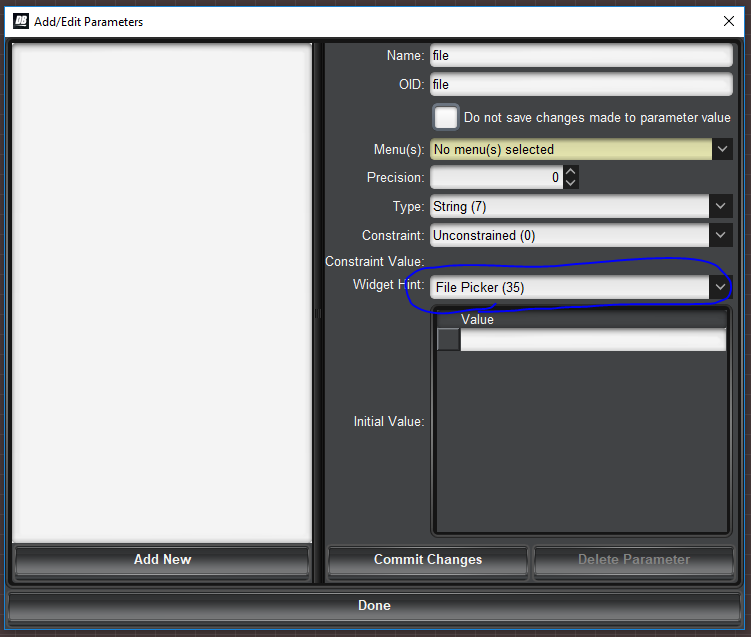
     

    You can then drop that parameter into your panel and put a task on it so it runs when the file changes.


    Here is a very short example panel that just outputs the file name when the user chooses it.


    <abs contexttype="opengear" id="_top" keepalive="false" style="">
    <meta>
    <params>
    <param access="1" maxlength="0" name="file" oid="file" type="STRING" value="" widget="file-picker"/>
    </params>
    </meta>
    <param expand="true" height="37" left="90" oid="file" showlabel="false" top="54" width="536">
    <task tasktype="ogscript">ogscript.debug("the file is now " + params.getValue("file",0));</task>
    </param>
    </abs>


    You could just get the value of the file when the user clicks on "load" as well.


    #DashBoard