Facility Control

 View Only
  • 1.  Router Config

    Posted 02-19-2018 17:18
    Without getting to complicated. Is there a way that I can create a button with a list of commands to switch routher sources and destinations?

    What I wanted to do is create a CC on my Carbonite that will recall a GPI that I have associated with a list commands to switch router destinations\Sources. However I do not seem to see a way to add my NK Router as Device using Visual Logic.


  • 2.  RE: Router Config

    Posted 02-20-2018 19:16

    You can get access to an NK Router in Visual Logic by adding its IPS to your DashBoard tree and using the "Add Device" and selecting "Add Device from Basic Tree".
    Once the IPS has been added to the panel, you'll have access to the NK Router API.


    #DashBoard


  • 3.  RE: Router Config

    Posted 02-22-2018 17:42
    @jamespeltzer I tried adding that way and it would not work. I will try again today.
    #DashBoard


  • 4.  RE: Router Config

    Posted 08-30-2018 16:02
    Coming back to this. I still have not had any luck with being able to add this into my panel.
    #DashBoard


  • 5.  RE: Router Config

    Posted 08-30-2018 17:50

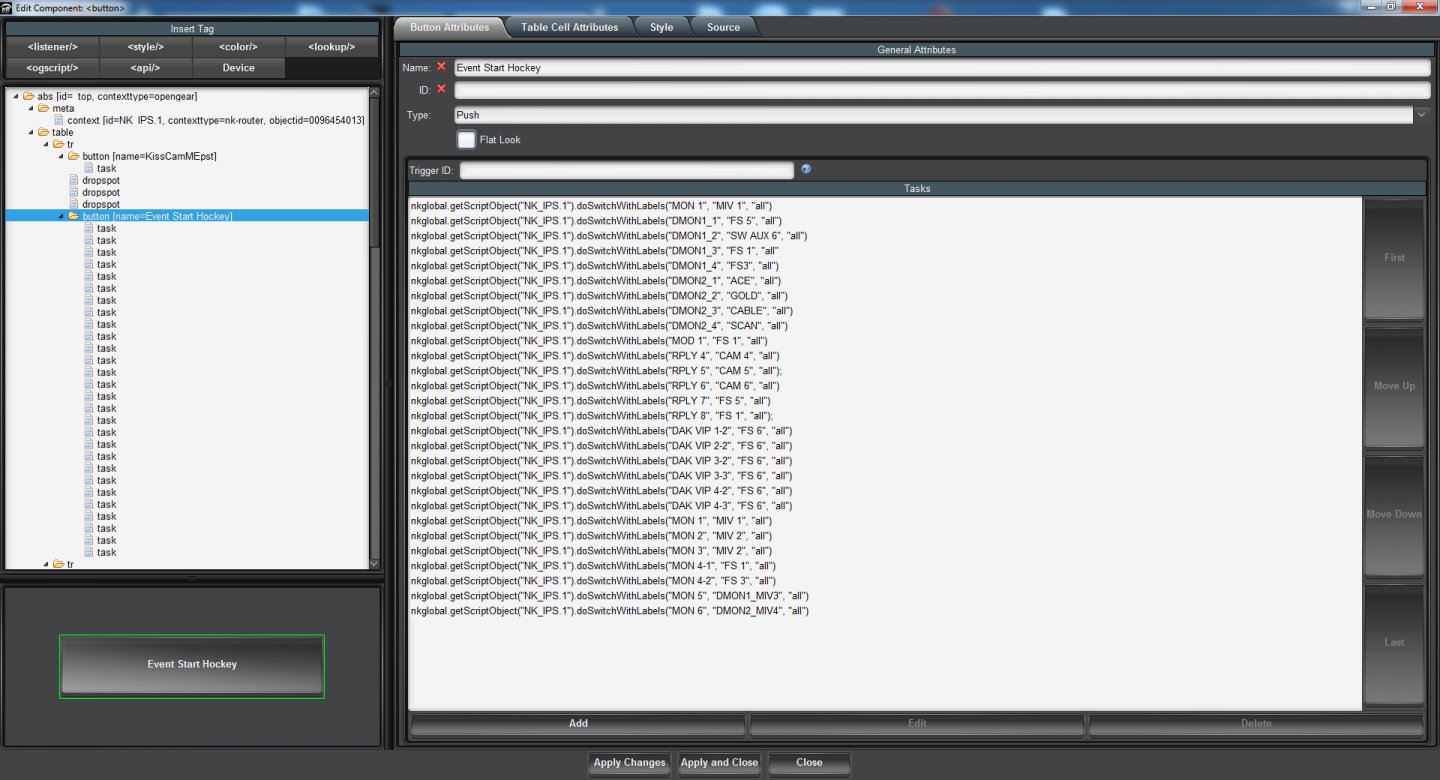
    Ok. So I was able to get it finally. I needed to use a blank canvas. My next problem is I will have multiple cross point changes. I am trying to create an initialize so to speak so when we go from sport to sport and can setup a button to change everything in the switcher, router, etc.

    I am having issues though with assigning multiple cross points. I tried doing multiple blocks in one script and that did not get the results I was hoping for. I then tried to do multiple lines of script as seen in the picture, that is also very inconsistent. If I run it multiple times it will eventually get to everything, but I just want to be able to press the button once, and have it do its thing. Anyone have any thoughts if this is something I can do?

    #DashBoard


  • 6.  RE: Router Config

    Posted 08-30-2018 18:15
    Hi.
    Sorry you're having so much difficulty getting this going. For multiple cross point changes in NK, you need to insert a "Pause" task between each switch - generally 500ms is plenty of time. To make it easier, you should be able to create one pause task and then copy/paste it in the XML between each existing .

    Please let me know if you require further assistance.

    James
    #DashBoard


  • 7.  RE: Router Config

    Posted 09-06-2018 13:51
    Hi Jbins,

    If you are still having any issues, then it might be worth reading through the panel I wrote to save and restore snapshots from a NK router. It might give you some pointers that might help get you up and running.

    https://discussions.rossvideo.com/forum/default-forum-gc1/dashboard-gc43/12492-using-dashboard-to-perform-nk-router-snapshots
    #DashBoard