Hi Shawn,
I have created a number pad for you to do what you want to do. The code for it can be seen at the end of this comment.
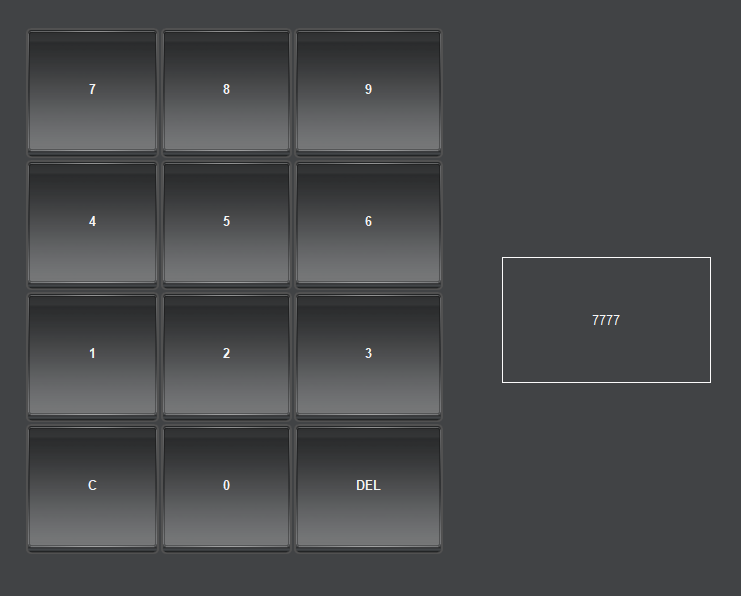
To add a backspace with an arrow instead of the DEL button, you can edit the button Style and choose a Background (URL) to have the image you want.
<abs contexttype="opengear" id="_top" keepalive="false" style="">
   <meta>
      <params>
         <param access="1" constrainttype="INT_NULL" name="display" oid="0x2" precision="0" type="INT16" value="0" widget="label"/>
      </params>
   </meta>
   <table height="528" left="343" top="109" width="419">
      <tr>
         <button buttontype="push" colspan="1" fill="both" id="7" name="7" rowspan="1" weightx="1.0" weighty="1.0">
            <task tasktype="ogscript">value = params.getValue('0x2', 0);
value = value + '7';
params.setValue('0x2', 0, value);</task>
         </button>
         <button buttontype="push" colspan="1" fill="both" id="8" name="8" rowspan="1" weightx="1.0" weighty="1.0">
            <task tasktype="ogscript">value = params.getValue('0x2', 0);
value = value + '8';
params.setValue('0x2', 0, value);</task>
         </button>
         <button buttontype="push" colspan="1" fill="both" id="9" name="9" rowspan="1" weightx="1.0" weighty="1.0">
            <task tasktype="ogscript">value = params.getValue('0x2', 0);
value = value + '9';
params.setValue('0x2', 0, value);</task>
         </button>
      </tr>
      <tr>
         <button buttontype="push" colspan="1" fill="both" id="4" name="4" rowspan="1" weightx="1.0" weighty="1.0">
            <task tasktype="ogscript">value = params.getValue('0x2', 0);
value = value + '4';
params.setValue('0x2', 0, value);</task>
         </button>
         <button buttontype="push" colspan="1" fill="both" id="5" name="5" rowspan="1" weightx="1.0" weighty="1.0">
            <task tasktype="ogscript">value = params.getValue('0x2', 0);
value = value + '5';
params.setValue('0x2', 0, value);</task>
         </button>
         <button buttontype="push" colspan="1" fill="both" id="6" name="6" rowspan="1" weightx="1.0" weighty="1.0">
            <task tasktype="ogscript">value = params.getValue('0x2', 0);
value = value + '6';
params.setValue('0x2', 0, value);</task>
         </button>
      </tr>
      <tr>
         <button buttontype="push" colspan="1" fill="both" id="1" name="1" rowspan="1" weightx="1.0" weighty="1.0">
            <task tasktype="ogscript">value = params.getValue('0x2', 0);
value = value + '1';
params.setValue('0x2', 0, value);</task>
         </button>
         <button buttontype="push" colspan="1" fill="both" id="2" name="2" rowspan="1" weightx="1.0" weighty="1.0">
            <task tasktype="ogscript">value = params.getValue('0x2', 0);
value = value + '2';
params.setValue('0x2', 0, value);</task>
         </button>
         <button buttontype="push" colspan="1" fill="both" id="3" name="3" rowspan="1" weightx="1.0" weighty="1.0">
            <task tasktype="ogscript">value = params.getValue('0x2', 0);
value = value + '3';
params.setValue('0x2', 0, value);</task>
         </button>
      </tr>
      <tr>
         <button buttontype="push" colspan="1" fill="both" id="C" name="C" rowspan="1" weightx="1.0" weighty="1.0">
            <task tasktype="ogscript">params.setValue('0x2', 0, '0');</task>
         </button>
         <button buttontype="push" colspan="1" fill="both" id="0" name="0" rowspan="1" weightx="1.0" weighty="1.0">
            <task tasktype="ogscript">value = params.getValue('0x2', 0);
value = value + '0';
params.setValue('0x2', 0, value);</task>
         </button>
         <button buttontype="push" colspan="1" fill="both" id="DEL" name="DEL" rowspan="1" weightx="1.0" weighty="1.0"/>
      </tr>
   </table>
   <param expand="true" height="126" left="820" oid="0x2" style="txt-align:center;bdr#FBFBFB;" top="339" width="209"/>
</abs>
#DashBoard